
Pinned

⭐
🔥
Dec '25 •
The CLASSIFIEDS Premium Tier - Everything You Need to Know!
If you are already on the Premium tier and want to know how to make the most of it, or are thinking about upgrading, here is everything you need to know... ⭐️ 🗞️ In the Standard tier, you can post in the community once a day in any category (except for days with a hashtag prompt, then you get an extra post!). There are two kinds of acceptable community posts: "anything" promoting your Skool group, or offers that are free (freebies, free workshops, podcast promotions, your own YouTube channel promotions). You can see the list of categories in the How It Works pinned post. These "rules" are for both standard and premium members. 🌟 🗞️ Now for the additional benefits for Premium members ($3/month or $33/year) 1. Premium members are allowed to put an "ad" in the classroom to advertise anything they want - free or paid. The ad stays up for as long as they are a premium member. Ads rotate weekly. 📰 You can place your ad by creating a draft course in your own community and then copying the course key and sending it to me to copy into the Classifieds. Course keys can be found by going to the thumbnail of the course in your classroom and clicking on the three dots in the top right corner. 2. Premium members also have access to all live events on the calendar. This includes meetups twice a month (called the PERSONALS) and open drop-ins once a month. 📆 The meetups are structured and focus on improving your visibility as well as helping you make connections and foster collaboration. 3. Premium members also have the opportunity to host their own free masterclass for all members on the CLASSIFIEDS calendar. This gives you the chance to provide value to the members and then pitch your group or product at the end. 💵 In order to qualify to host a masterclass, you have to first take my How to Teach a High-Value, High-Converting Masterclass workshop ($27). The next one is being offered on May 12 with doors opening for registration May 9th.. After taking the prerequisite workshop, the first masterclass you offer is of no charge. Subsequent masterclasses that you would like to offer will be subject to a $10 administrative fee.

Pinned
⭐
🔥
1d •
Two In One - Don't Miss Out on This!
Our own @Des Dreckett and @Katya McEwen are teaming up to bring amazing value in this free session you won't want to miss! Here is what Des has to say: Ever run a live event that felt flat, even though the content was good? That makes sense, and it's not your fault. Nobody tells you that the "hop on a call and listen" format is working against you before you've said a word. People are half-watching with three other tabs open, and attention drifts no matter how strong your material is. There's a simple fix, and it's not more slides. On Tuesday 21st July, I'm hosting a live session with Katya McEwen on interactive tools. Think quizzes, worksheets, calculators and assessments that people actually use during your event, instead of passively watching it. Here's what we'll cover: I'll do a live Claude walkthrough and build a simple interactive tool from scratch, so you can see it's genuinely not complicated once you know how Katya will share her design process, show real examples of the tools she uses, and explain how they've helped grow her community We'll look at how to run these during a presentation without sending people down a rabbit hole while you're talking How one or more calls to action at the end of a quiz can lift your last-click conversions, including "book a call" links that get used even by non-members Katya is also gifting one of her interactive tools to attendees, which you can rebrand and use in your own niche. When: Tuesday 21st July, 5pm London / 12pm New York / 9am Los Angeles Where: Zoom, link shared before the session If you've ever wondered why your events get polite attendance but no momentum afterwards, this session is for you.

Pinned
⭐
🔥
Aug '25 •
HOW IT WORKS - READ THIS FIRST
Ever wonder how you can let people know about your Skool community? Feel like you have so much to offer but don't know how to get people involved? Wish there was somewhere you were actually allowed to promote yourself and talk about your offer? Look no further! The Skool Classifieds are the place where you are not only allowed to promote yourself, but you are actually encouraged to do so! Like the Classifieds section of your local newspaper or the Community Message Board at the gym, this is the place to let people know what you do and what you offer. Here's how it works: 1. Invite other Skoolers you know to join the group using your invite link. The more people join, the more people there are to promote to! 2. You can post once a day only. This is to keep the group from getting spammy. If it's spammy, people won't read and you won't get noticed. Post as many days in a row as you want, but please do not post the same thing day after day - mix it up! 3. Make sure you add your post to the appropriate group/heading. Please see below for a description of what each group is for. If you don't see a group that is appropriate, message me. 4. Self-Promotion is what this group is all about, but please do not DM people with your offers. You will be removed from the group for doing this. 5. Introduce yourself in this thread, and then scroll up and find someone you have something in common with. Reach out. There are some really amazing people here! 😉 This is a place for us to support each other for our mutual benefit. Hate speech, offensive language, or general negativity will be deleted, and you will be removed from the group. *Please check out this post for more tips on how to get great results from your posts. And also this post by one of our own community members who has had great success growing his group through the CLASSIFIEDS. To learn How to Make Your Classifeds' Posts Work Harder for You, check out this masterclass by one of our moderators, @Faith Adebayo


🔥
7m •
🦋 Weight Loss and Faith — Free Community for Christian Women on a Health Journey
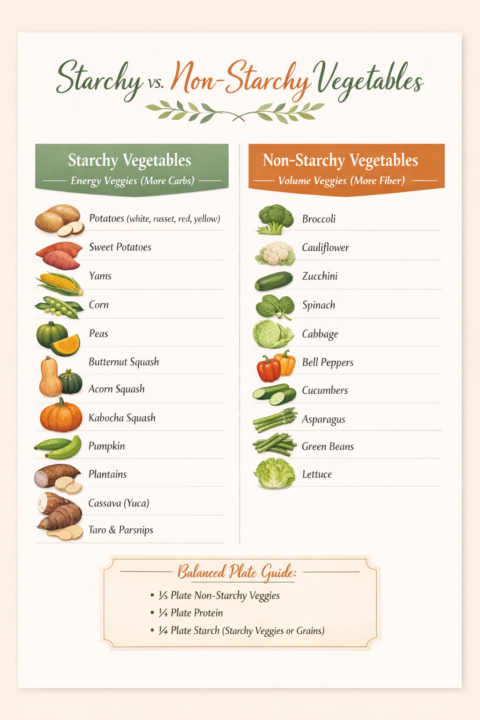
Hey everyone! I’m Naomi, a Registered Dietitian and Christian Life Coach, and I run Weight Loss and Faith, a community for Christian women who want to lose weight (especially that stubborn belly fat) while keeping their faith at the center of it all. Inside you’ll find: 🍇 Real, evidence-based nutrition guidance (what to eat, how much, what to combine) 🙏 Prayer sessions and devotionals 🦋 Accountability and genuine sisterhood 🍇 Movement guidance that works with your body 🦋 A full journey from Day 1 to sustainable, lasting results If you’ve been trying to get healthier but keep starting over, feeling stuck, or doing it without support, this community was built for you. Right now it’s completely free to join, and early members get grandfathered in at no cost even after we move to paid access. Would love to have you. 🦋 🔗 https://www.skool.com/foodfaithfellowship/about Come join us!!’
0
0

🔥
2h •
Unlock🔓 more 💫
🔓 Curious what's inside? 👉unlock-more.netlify.app 15 FREE resources. New ideas. New skills. New opportunities. Your next "aha!" moment could be one click away. ✨ Applications are still open. Join us and unlock more. 🚀

1-30 of 15,182

skool.com/classifieds
The #1 public place to advertise your Skool, learn how to promote your group and collaborate with Skoolers. Real connections & growth without spam.
Leaderboard (30-day)
1

🔥
+542
2
🔥
+513
3

🔥
+424
4

🔥
+368
5

🔥
+323
Powered by