Activity
Mon
Wed
Fri
Sun
May
Jun
Jul
Aug
Sep
Oct
Nov
Dec
Jan
Feb
Mar
Apr
What is this?
Less
More
Memberships
Lead Generation Insiders 🧲
1.8k members • $1,497
AI AUTOMATION INSIDERS
3.7k members • Free
Lead Generation Secrets
22.9k members • Free
Automation Station
3.3k members • Free
AI Automation Agency Hub
308.6k members • Free
7 contributions to Lead Generation Secrets

Feb 16 •
Remember all LLM's have their pros and cons
I'm in Claude desktop asking about OpenClaw and the best configuration for a windows user, after going back and forth a couple times i get this reply: "That's after my knowledge cutoff, so I had nothing on it". I ask when is your most recent knowledge cutoff? Reply "End of May 2025 — so OpenClaw/Clawdbot is about 6 months outside my window". I aksed in Perplexity and got "Why you can skip it - OpenClaw works on Windows and Linux just fine; no Apple‑only requirements. - For cloud‑model workflows, any always‑on box with 2–4 cores and 8–16 GB RAM is fine. - You’d also be adding a whole new ecosystem (macOS) when you’re currently Windows/Android." etc, etc. Claude is great, I'm not bashing it here - just remember all LLM's have their pros and cons.
0
0

Feb 6 •
How I Structure Cold Emails at Scale (10k/day)
This is the campaign structure I use across almost everything I run, helping me scale to 10k cold emails a day. Let’s start with follow-ups. The data is clear: Most prospects don’t convert on the first email. They need 3-5 touches, spaced over 2-3 weeks. What doesn’t work: • 2 emails over two weeks • 8-10 emails fired off in a few days What does keep working, across industries: Email 1 Plain text. No links. No tracking. Emails 2–5 Short follow-ups. One link max. Timing Business hours only. Always in the prospect’s timezone. That’s the whole structure. This is the same 3-part setup I reuse again and again. Now, replies. A few rules I never break: • Don't forward replies to a separate inbox (that’s an easy way to trash deliverability) • Use saved snippets to answer fast Speed to lead wins deals. • Tag interested leads immediately And most importantly: Set all of this up before the campaign starts. Otherwise, it'll get hectic. Take a few minutes and clean this up in your setup. It makes everything downstream easier.
1 like • Feb 10
after reading this I added one more email to my current campaign and spread it out a bit more. Thanks
Feb 10 •
I Stopped Sending Looms. Replies Went Up.
Alright, I want to break down a strategy that used to work insanely well, stopped working for most people, and is now quietly working again if you apply it the right way. You’ll probably recognize this. A few years ago, Loom videos crushed. You’d send a cold email like: “Hey, mind if I record you a quick Loom?” They’d say yes. You’d spend 10 minutes recording a custom video. Send it over. Replies would spike. Why did it work? It worked because it felt 1-to-1. The prospect believed you sat down, thought about them, and made something specifically for their business. That’s the psychology. Now here’s the problem: Doing this at scale is brutal. Recording 10 minutes per prospect doesn’t scale past a handful of leads a day. So people abandoned it. Big mistake. The strategy didn’t stop working. The format did. Instead of sending a Loom, you switch the deliverable. Here’s what works now: You ask permission to do research, not a video. Something like: “Would it be useful if I put together a quick breakdown of your company vs competitors? I can send it over in 24 hours.” That’s it. What happens in their head: – “They’re going to spend time on me” And that’s the win. Now the real unlock: You don’t actually need to do this manually. With automation, you can generate: – mini audits – competitor snapshots – opportunity breakdowns – teardown-style reports All personalized, fast and scalable. From the prospect’s perspective, it feels just as personal as the old Loom videos. From your side, you’re not burning 10 minutes per lead. This is what I call a reverse lead magnet. Instead of giving away a generic PDF to everyone, you offer something that appears custom first, then deliver it at scale. If you want to see exactly how I set it up… Comment “Reverse” and I’ll break it down.
0 likes • Feb 10
reverse

Feb 5 •
Cold email copy
Hey everyone! After getting amazing advice from @Max Khalus and other members of the community, including Jay, I've completely rewritten my cold email draft. Hey {{firstName}}, Was digging into {{companyName}} and something stood out. You’ve nailed acquisition but... What happens after someone buys for the first time? We’ve seen wellness brands struggle with retention not because of product quality. But because buyers didn’t fully understand how results happen. That reminded me of a system that Noorbru used to boost reorders by over 15 percent. It’s called the Educational Retention System. If this is something you’re seeing, happy to share how others have been tackling it this quarter. – Lucas
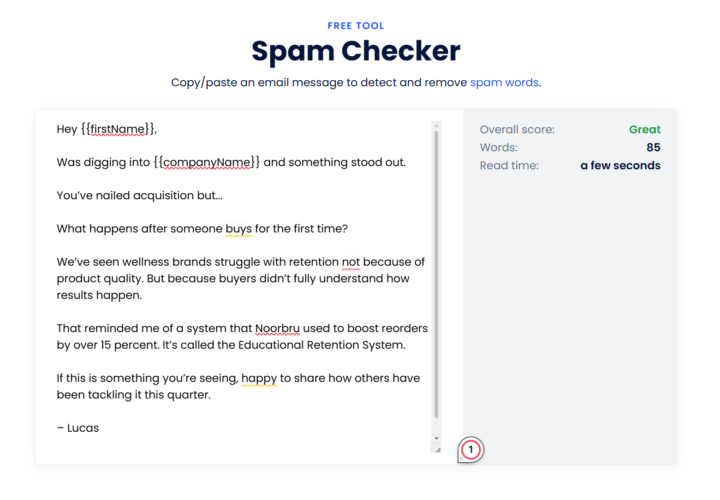
2 likes • Feb 6
You're making the first part of the email all about them - great job! Remember also - the subject and the first sentence have to work together to 'make' them open the message. You didn't share the subject but right now they're seeing: "Subject", and then under it "Hey {{firstName}}, Was digging into {{companyName}} and som..." It's personalized (which is good) but there's no real reason to open it. Make them curious...make it sound like it's from a colleague...give them a reason to open it.
Jan 12 •
The Deliverability Mistake Almost Everyone Makes
Most people track the wrong metrics. Health scores. Open rates. Dashboards that look reassuring. None of that actually tells you if your cold email is working. There’s only one deliverability question that matters: Where did the email land? • Primary inbox • Promotions • Spam That’s it. That’s the game. How I Actually Judge Deliverability I don’t guess. I test inbox placement. The simplest way to do this is by sending emails to seed accounts and checking where they land. Here’s how to read the results: Inbox (Primary) You’re good. This is where replies come from. Promotions Not ideal. Usually a copy issue. Spam System problem. Infrastructure, domains, or sending behavior needs fixing. If you don’t know where your emails are landing, you’re flying blind. Here's the real takeaway 👇 Instantly lets you run daily automated inbox placement tests with one click. It shows you exactly where your emails are landing - inbox, promotions, or spam. No guessing. No false confidence. It’s free, takes under a minute to set up, and gives you more signal than most “health scores” ever will. Once you track placement, deliverability becomes obvious, not mysterious. If you want the step-by-step setup for inbox placement testing, comment “Placement”, and I’ll send it over.
0 likes • Jan 13
got it, thanks!
0 likes • Jan 23
@Jay Feldman Just ran the test and got 100% inbox!! Almost done with my funnel and then it's time for the real deal...
1-7 of 7

Active 5h ago
Joined Nov 30, 2025
Powered by