
Write something

2d •
You're the man now, dawg!
AI says, "You know that's a deep cut reference". 😅 Movie reference: Finding Forrester. Great film.

Feb 16 •
App Deployment and Scaling Question
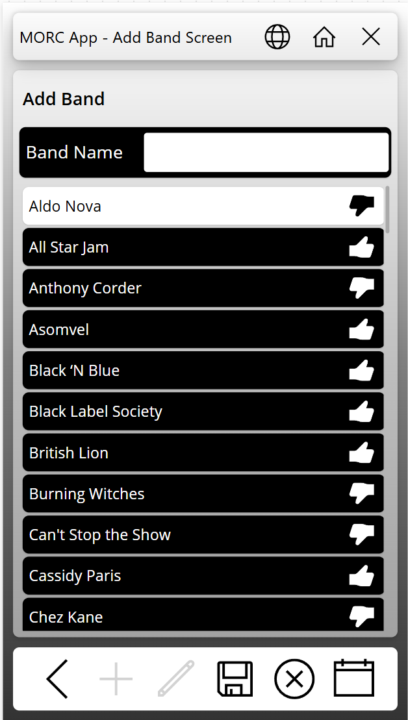
So, I have an app that I have been working on in my personal tenant for a music cruise we are going on in a few months. I posted screen captures in a Facebook group for people going on the cruise. There was interest from several people in using the app. Have any of you published an app for something similar where you may not know how many users will use it, or when? In looking at the PA licensing Microsoft is doing away with the Per-App Plan and going to a model where if someone uses it, then you get charged through Azure billing (Pay As You Go - or PAYG). The App is mainly going to be used during the one-week period of the cruise. Would it be better to remove the sharing of the app with the users, remove the connection between the app and Azure billing, or both? I don't want to be picking up the tab for 10$ per person per month in between. How would you go about billing the users to reimburse the cost of the Azure billing? I have attached some screen captures here in case anyone is interested.
15d •
Understanding Model-Driven Apps
🤔 Entities, forms, views, relationships, roles, and permissions >> "My current project is a Model-Driven App (CRM) with Business Central integration. My role focuses on implementing entities, forms, views, relationships, roles, and permissions. However, I feel that I don’t yet have a complete overview of how the whole system works. I can connect small pieces, but I don’t fully see the big picture." --- #️⃣ The Mental Model: A Database with a Living Face The most important thing to understand about Model-Driven Apps (MDAs) is that they are not built like traditional applications. Most software is built code-first — a developer writes logic, and the UI is crafted around that logic. MDAs flip this: they are data-model first. Everything you see on screen — forms, views, dashboards — is generated automatically from the underlying data structure you define. This is why they're called "model-driven." Think of it this way: you define the shape of your data, and the app emerges from that shape. #️⃣ The Four Layers (and How They Stack) It helps to think of the whole system as four distinct layers sitting on top of each other. 1️⃣ Layer 1 — The Data Layer (Dataverse) At the very bottom is Microsoft Dataverse, which is essentially a cloud-hosted relational database with superpowers. Every "entity" you create (like Account, Contact, Opportunity, or a custom one) is really just a table in Dataverse. The columns (fields) you add to that entity are the columns of that table. The relationships you define between entities are foreign keys — Dataverse just makes them feel more semantic (one-to-many, many-to-many, etc.). This layer is the source of truth. Everything else in the app is a view into or interface over this layer. 2️⃣ Layer 2 — The Metadata Layer (the "Model") On top of the raw data sits metadata — the definitions of how data relates, behaves, and validates. This includes your relationships (which entities are connected and how), field types and validation rules, and crucially, Business Rules (declarative logic you define without code, like "if Status = Closed, make Revenue required"). The metadata layer is what makes this a model-driven app — the model is this rich description of your data and its rules.


Feb 9 •
Real Time Notifications
I'm building a canvas app that is my group is using to transition away from Microsoft Access. One feature the users really liked from Access was a 'real time' pop up that gave them relevant information. Usually this is centered around an event with a Datetime for either start or end. I believe in Access this was accomplished by running a check every 3 minutes for events (which are now stored in a few different SharePoint list, nothing premium here) which have a Start Time or End Time in the next 3 minutes. I'm trying to accomplish the same thing in Power Apps. I'm thinking of running a timer, but once the user navigates away from the screen the timer is running on, will the time continue to count down? Will the code execute when the timer runs out? I'm also thinking through if 3 minutes is the right amount of time. The timer will start when the user launches the app, and execute every 3 minutes, which means whatever code goes in there will check multiple SharePoint lists 20 times per hour.
Feb 3 •
I Learned Another Lesson on SharePoint Multiline Text Fields
I have been struggling with a multiline text field returning HTML DIV tags in the first and last record of a collection when I point it to this particular column. I don't remember how many times I have heard Darren say, "Make sure you select plain text when adding a text column in SharePoint." Well today CoPilot was able to give me a correct answer for why the text was showing up wrapped in HTML. It suggested checking the column type. When I looked at the settings, there it was, plain as day. The first record showed up with <div class="ExternalClass3EF1E2D3305044989EAF2F23DE178BF6"> where the class name changed each time I ran the app. The last record had </div> after the single digit number. No matter how I tried using the Substitute function, the next time I opened the app for editing the class changed, and the Substitue functions did not work anymore.

1-30 of 372

skool.com/learn-power-apps
A community of people who are enthusiastic about and trying to learn about Microsoft's Power Apps!
Leaderboard (30-day)
1
+7
2

+2
3

+2
4

+1
5

+1
Powered by