Activity
Mon
Wed
Fri
Sun
Mar
Apr
May
Jun
Jul
Aug
Sep
Oct
Nov
Dec
Jan
Feb
What is this?
Less
More
Memberships
Power Platform Hub
171 members • Free
Azure Innovation Station
750 members • Free
Learn Microsoft Fabric
15.2k members • Free
Learn Power Apps
2.5k members • Free
The Microsoft Stack
108 members • Free
49 contributions to Learn Power Apps

26d •
New Content Notification: Generate PDF With HTML Text Control
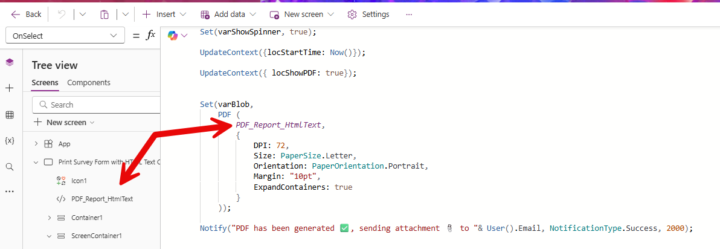
Hey Guys 👋👋 Check out the PowerApps template I created showing you how to quickly generate PDFs using the HTML Text Control with the PDF() Function. It’s lightweight and efficient for generating PDFs. This method is 10x faster than using PDF() Function with containers/screens. Download the .msapp file and the accompanying File Guide by clicking the link below:👇👇👇 Generate PDF With HTML Text Control - Ultimate JumpStart Kit · Learn Power Apps

2 likes • 24d
i've tried using the pdf control and it is a bit hit and miss. i need to render multiple pages which becomes weird, and i don't get correct page breaks. wonder if this will help with those issues
25d •
New Content Notification: Animations to Your Popups
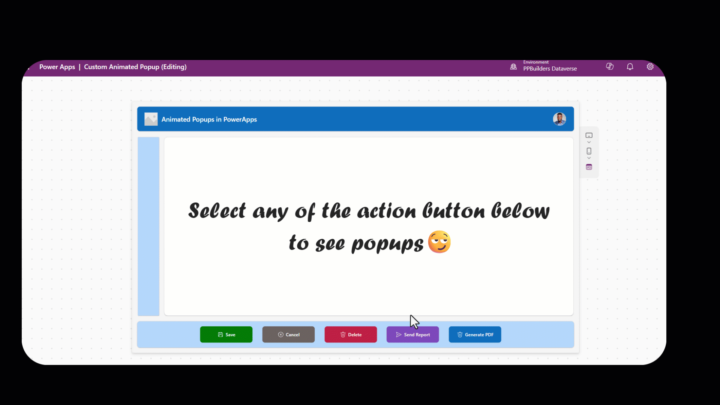
Hi everyone! 👋 Have you ever wanted to make your confirmation popups in Power Apps feel more dynamic and user-friendly? Adding a simple animated icon can provide instant visual feedback—whether it's a success checkmark after saving, a loading spinner during processing, or a custom animation for deleting or exiting. Download the .msapp file and the accompanying File Guide by clicking the link below:👇👇👇 https://www.skool.com/learn-power-apps/classroom/dad31542?md=6bc86480a72c4975a7d4a0cbd7ec1eac
1 like • 24d
so much more engaging for the user
28d •
New Content Notification: Gallery with multiple views template
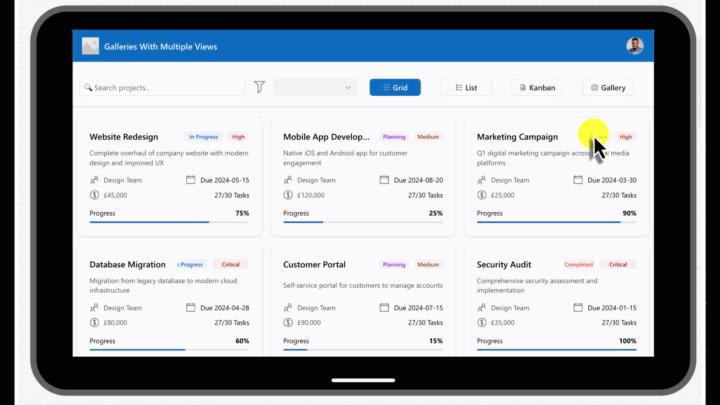
Hey everyone! 👋 I've created a handy Power Apps template that lets you display the same dataset in four different views: Grid, List, Kanban, and classic Gallery. This is a great way to help users explore and understand their data from various perspectives—whether they prefer a compact table-like layout, a detailed vertical list, a visual board for tracking progress, or a card-based overview. Download the .msapp file and the accompanying File Guide by clicking the link below:👇👇👇 https://www.skool.com/learn-power-apps/classroom/b0248ad1?md=19dd9817801048458a4254060961fbf0
1 like • 26d
that's sick! well done @Elvis Eyobor
Apr '25 •
PowerApp Image Capture, save to Onedrive with Power Automate
Does anyone have a working solution for this? i have seen old demonstrations, that don't seem to have the same functionality with the current versions now of power
0 likes • Apr '25
i've got this working now ;-)
Apr '25 •
New Job - New Requests
Hi All just got a new job recently, and they are wanting some apps created. 1st question. is it possible to have an image loaded in a canvas app, and then upon clicking anywhere on the image, recording the X,Y coordinates wanting to store that data, and also mark on the image where we have clicked. the goal is to have several images and then when they are clicked on, the data gets stored - this can then produce a 'heat map' of highly clicked areas? does that make sense?
0 likes • Apr '25
i have tried similar approach i have the image control, and am using on select property none of these work // Collect(ClickData, {X: Round(Self.X - Bucket.X, 0), Y: Round(Self.Y - Bucket.Y, 0)}); // Collect(ClickData, {X: Round(Self.X, 0), Y: Round(Self.Y, 0)}); // Collect(ClickData, {X: Round(Screen1.Width * Self.X / Self.Width - Bucket.X, 0), Y: Round(Screen1.Height * Self.Y / Self.Height - Bucket.Y, 0)}); am i missing something here, or do i need to use a button control like you mentioned and not just use the image / onselect
0 likes • Apr '25
can i see an example at all? i have actually tried using the PoCClickCoordinates PCF addin it seems to be ok.. it does depend on the screen size however, and if the app is zoomed at all
1-10 of 49

@bad-johnson-7532
MS fan boy
20+ years in IT, Systems Engineer / DevOps Engineer
always looking to learn more
Active 6h ago
Joined Jan 16, 2024
australia
Powered by