Activity
Mon
Wed
Fri
Sun
Apr
May
Jun
Jul
Aug
Sep
Oct
Nov
Dec
Jan
Feb
Mar
What is this?
Less
More
Memberships
Learn Power Apps
2.5k members • Free
Power Apps Templates
120 members • $25/m
The Microsoft Stack
108 members • Free
151 contributions to Learn Power Apps

2d •
You're the man now, dawg!
AI says, "You know that's a deep cut reference". 😅 Movie reference: Finding Forrester. Great film.

1 like • 2d
Ask it to open the pod bay doors...
Feb 16 •
App Deployment and Scaling Question
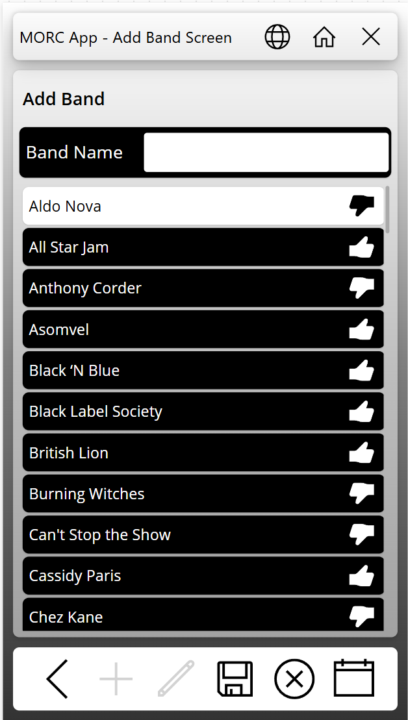
So, I have an app that I have been working on in my personal tenant for a music cruise we are going on in a few months. I posted screen captures in a Facebook group for people going on the cruise. There was interest from several people in using the app. Have any of you published an app for something similar where you may not know how many users will use it, or when? In looking at the PA licensing Microsoft is doing away with the Per-App Plan and going to a model where if someone uses it, then you get charged through Azure billing (Pay As You Go - or PAYG). The App is mainly going to be used during the one-week period of the cruise. Would it be better to remove the sharing of the app with the users, remove the connection between the app and Azure billing, or both? I don't want to be picking up the tab for 10$ per person per month in between. How would you go about billing the users to reimburse the cost of the Azure billing? I have attached some screen captures here in case anyone is interested.
0 likes • 17d
@Darren Neese say more... Here's the link to the cruise: Rock Music Cruise | Monsters of Rock Cruise
0 likes • 14d
With rock stars singing too
Feb 17 •
Screen Use Patch Statement in User Defined Function
I tried to move the screen use patching into a user defined function and then called the function from the various screens in my app. The patch is writing to a SharePoint list. I also have the App.OnError writing to another list. After changing the Screen Use patching I started noticing a bunch of errors stating that conflicts exist withe the changes on the server. Has anyone gotten this to work in a user-defined function?
0 likes • 24d
This is coming from App.Formulas and the only Patch statement there was patching Screen Use
1 like • 22d
@Rachell Jova the patches worked fine on each screen and info saved to the screen use list. I changed the app to just save to the collection on each page and then patch when the user submits the "form" at the end. I might lose visibility of some of the screens being visited but it was causing delays on the screen transitions that users were complaining about. I'm wondering if the information was cached from the function call from the first screen, and then it runs again trying to save the visit to the next screen before the screen name is updated causing it to conflict with the previously patched record.
Feb 3 •
I Learned Another Lesson on SharePoint Multiline Text Fields
I have been struggling with a multiline text field returning HTML DIV tags in the first and last record of a collection when I point it to this particular column. I don't remember how many times I have heard Darren say, "Make sure you select plain text when adding a text column in SharePoint." Well today CoPilot was able to give me a correct answer for why the text was showing up wrapped in HTML. It suggested checking the column type. When I looked at the settings, there it was, plain as day. The first record showed up with <div class="ExternalClass3EF1E2D3305044989EAF2F23DE178BF6"> where the class name changed each time I ran the app. The last record had </div> after the single digit number. No matter how I tried using the Substitute function, the next time I opened the app for editing the class changed, and the Substitue functions did not work anymore.

0 likes • Feb 10
@Darren Neese too smart for my good for sure

Feb 4 •
container sizing
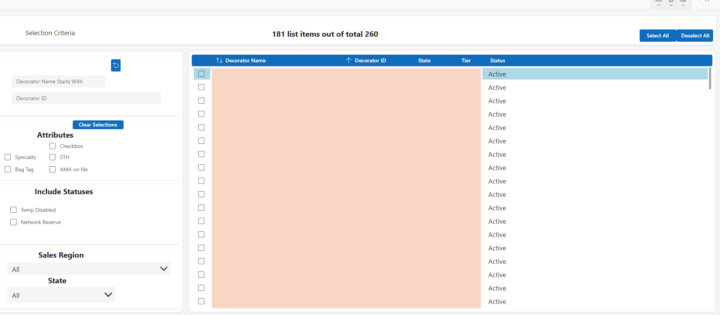
So I'm using one of the premade screen templates (sidebar) and experiencing some weird results on how the Main container is being displayed on preview. I'm using all the available space in my gallery and container - but when I click preview, there's all this extra space on the right. I can supply all my container info if needed... all the other containers seem to work as expected on the page. it's happening on 2 different screens.
0 likes • Feb 7
@Jen Gefvert can you attach screen shots of the whole screen where the child items are not expanding to fit the container? It is hard to tell what is not resizing from the attached images
2 likes • Feb 10
@Jen Gefvert be careful toggling scale to fit if you have sized a bunch of containers or controls already. I had several hours of rework one time after changing that setting and then changing back. It made all sorts of messes with my app. You could set the containers to be based on the parent width/height. Then they expand or contract as needed. Or use the built in horizontal or vertical containers and set them to stretch.
1-10 of 151

@dustin-rocksvold-6086
A hydroelectric operator delving deep into the Power Platform
Active 2d ago
Joined May 13, 2024
Pioneer, CA
Powered by