Activity
Mon
Wed
Fri
Sun
Apr
May
Jun
Jul
Aug
Sep
Oct
Nov
Dec
Jan
Feb
Mar
What is this?
Less
More
Memberships
Learn Power Apps
2.5k members • Free
Super Power Labs Accelerator
66 members • Free
Power Apps Templates
120 members • $25/m
Tech Workshops
65 members • $25/m
The Microsoft Stack
108 members • Free
490 contributions to Learn Power Apps

Feb 16 •
App Deployment and Scaling Question
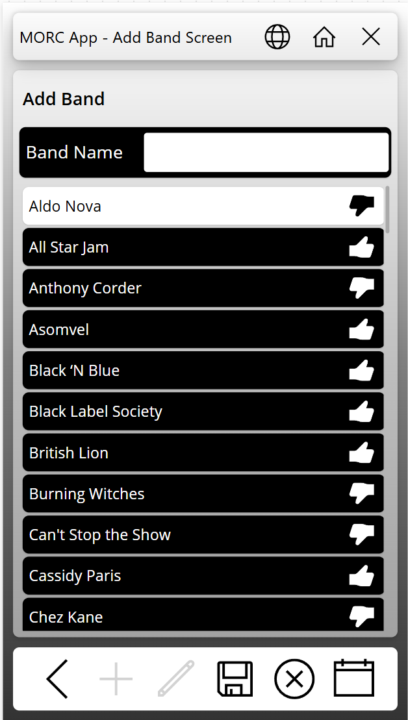
So, I have an app that I have been working on in my personal tenant for a music cruise we are going on in a few months. I posted screen captures in a Facebook group for people going on the cruise. There was interest from several people in using the app. Have any of you published an app for something similar where you may not know how many users will use it, or when? In looking at the PA licensing Microsoft is doing away with the Per-App Plan and going to a model where if someone uses it, then you get charged through Azure billing (Pay As You Go - or PAYG). The App is mainly going to be used during the one-week period of the cruise. Would it be better to remove the sharing of the app with the users, remove the connection between the app and Azure billing, or both? I don't want to be picking up the tab for 10$ per person per month in between. How would you go about billing the users to reimburse the cost of the Azure billing? I have attached some screen captures here in case anyone is interested.

0 likes • 12d
@Dustin Rocksvold Cool
Feb 3 •
I Learned Another Lesson on SharePoint Multiline Text Fields
I have been struggling with a multiline text field returning HTML DIV tags in the first and last record of a collection when I point it to this particular column. I don't remember how many times I have heard Darren say, "Make sure you select plain text when adding a text column in SharePoint." Well today CoPilot was able to give me a correct answer for why the text was showing up wrapped in HTML. It suggested checking the column type. When I looked at the settings, there it was, plain as day. The first record showed up with <div class="ExternalClass3EF1E2D3305044989EAF2F23DE178BF6"> where the class name changed each time I ran the app. The last record had </div> after the single digit number. No matter how I tried using the Substitute function, the next time I opened the app for editing the class changed, and the Substitue functions did not work anymore.

1 like • Feb 3
Glad u found a solution to this
Jun '25 •
PowerApps Competitors
Who has tried other lowcode platforms out there.. Share you experience with us.. i wanna hear it😃
0 likes • Oct '25
@Jason Smith Super cool
0 likes • Jan 28
@Kurt Larson yea lots of great platforms out there.. but there in a few decades learning to code would be like learning binaries..lol

Jan 16 •
Finding my way back here.
I've been MIA probably since the changes to whop, but not necessarily due to that. I had just finished my initial project, and then was thrown into other work stuff - not focused on app development. Since then, however, I've created another app for an Incentive program in my dept based on an old defunct template that I found in a Microsoft Teams blog from 2020. It needed a ton of work to even function, as I think the initial project was abandoned along the way... I digress... Anyway, I was able to present the incentive app to a dept VP who was pretty blown away that we could do all this in power apps. Now I've been asked to do a new app for a vendor profile. I'll be able to pull in a lot of the data I used in my first app (vendor contact database) to create this one. I'm here to spark some new ideas and refresh my learning to make this one the best yet!

1 like • Jan 18
Awesome—super excited you're getting that VP-level hype and reusing your vendor data to speed things up! For the profile app, I'd keep it super simple: one main screen with vendor details, a quick search bar up top, maybe color-coded status tags, and an attachments spot for contracts/docs. Make it mobile-friendly so folks can use it anywhere. What’s the one or two things you really want users to do or see on a vendor profile? Any features you’re already set on? Let’s make this one your best yet! 🚀
1 like • Jan 27
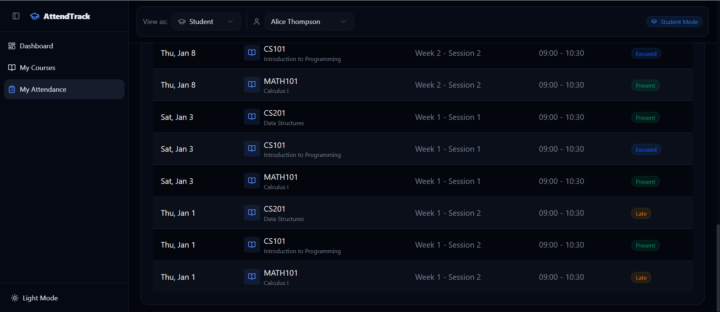
@Jen Gefvert For filter purposes, I think its better the UI updates as you perform an action

1 like • Jan 26
Awesome
1-10 of 490

@elvis-eyobor-3582
Community Moderator🚨
We are here to help you escape PowerApps hurdles 🧑⚕️
Active 11d ago
Joined Sep 16, 2023
Powered by