Activity
Mon
Wed
Fri
Sun
May
Jun
Jul
Aug
Sep
Oct
Nov
Dec
Jan
Feb
Mar
Apr
What is this?
Less
More
Memberships
Road to Partner | Nico Seoane
16.2k members • Free
Synthesizer: Free Skool Growth
40.7k members • Free
Voice AI Accelerator
7.7k members • Free
AI Assistant Lab
268 members • Free
UpHex Ads Lab
715 members • Free
LeadIndicator.ai
561 members • Free
HLKern
458 members • Free
Q's Mastermind
5.7k members • Free
The Chatbot Challenge
1.5k members • Free
77 contributions to Assistable.ai

1d •
Sonnet 4.6
If possible to include the LLM Sonnet 4.6 @Jorden Williams ? The performance of Haiku in chat for Spanish is great and also for voice... but I thing Sonnet in Voice it well be awesome, thank you!
0 likes • 8h
Great! 🔥 Thanks
6d •
New Tools: Get Sheet is working ?
The New Tools: - Get Sheet -> gets information from a google sheet and returns it to the AI - prompt-able URL inputs. - Is working ? and this new tool have a columns or Rows limits to work fine with the Bots ? (I have a E-commerce Client with 4000 products... I want to know is this New Tool work for them? Thank you @Jorden Williams @Hari Prathap Balamurugan @Assistable Ai
0 likes • 4d
We have any tutorial how to use the "Get Sheet or API with a custom tool" ? @Jorden Williams @Assistable Team @Hari Prathap Balamurugan
1 like • 1d
@Jorden Williams This solution is similar like the RAG you build with Buildshit an SupaBase I supposed ? 🤔 It well be great if you can make a video tutorial on this... and definitely the AI love small chunks, thank you Jorden

Mar '25 •
Tools v2 Notes & Get Sheets & Docs tool how-to
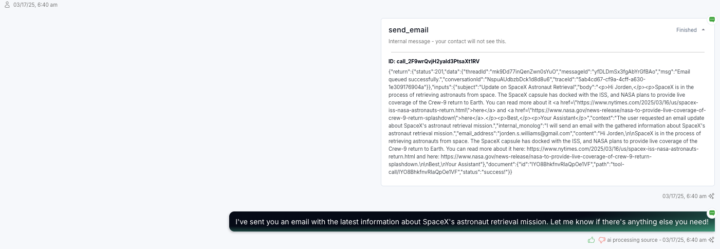
Major changes in functionality, accessibility in chat and voice tool call logs include inputs, outputs and more. There updates makes multi-calendar, multi-timezone booking native along with some other cool stuff. Direct accounts get first access to tools v2 including the revamped make ai call, send email & self scheduling, as well as the new tool sets search the web, get sheet, get doc, update appointment details and more. ChangeLog: - Check availability, book appointment, reschedule appointment, cancel appointment, and check appointments have now become -> Check availability, book appointment, update appointment details and get user calendar events. This allows the bot to do some new cool things like multi-calendar book from just the prompt alone, dynamically change the timezone of the requests for multi-timezone bookings and more. - Update details and update address has now become -> Update User Details which now updates every GHL field besides tags and custom fields (these are other tools). So changing timezone, address, name, contact info, etc is all accessible by the AI now. - Send email has been audited and recreated with fallbacks and information protocol so the AI will know to collect an email before sending the email and understand whether the send was successful to the email (to re-collect it). - Self-schedule has been audited and recreated to... well self schedule. The schedules will be editable, cancelable and viewable in the AI portal in the sub-account. New Tools: - Get Sheet -> gets information from a google sheet and returns it to the AI - prompt-able URL inputs. - Get Doc -> gets information from a Google Doc and returns it to the AI - prompt-able URL inputs. - Search the web -> searches the web and returns the results to the AI to use for conversation, research or more. --- These will all be released in a bit into production for both chat and voice and accessible via the tool menu under tools v2 for direct users only -- resold users will get access at a later date once resellers have been briefed and given documentation.
1 like • 9d
Great news Thank you @Jorden Williams ...Any update on when the Get Sheet and Get Doc tools will be live? or tutorial how we can implement ?

26d •
Redo OAuth connection this morning
All bots were disconnected this morning, re-do OAuth and it should fix it.
1 like • 25d
I have the same problem… @Jace Nelson that fix the problem for you ?

Feb 20 •
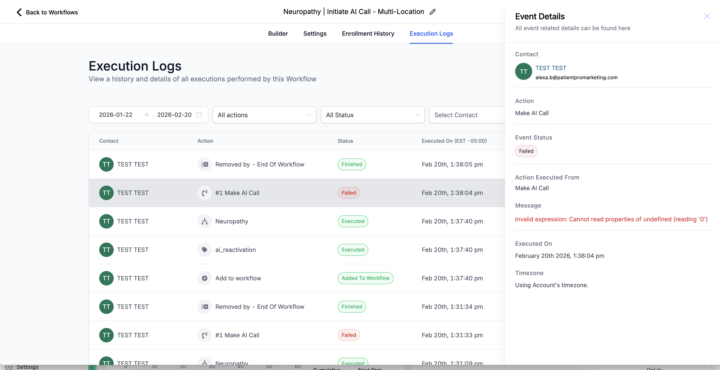
Failed - Invalid Expression?
Temp solution (I think?): Claude may be having downtime. I switched to GPT 5.2 and voice calls are working again. Anyone else getting this? Was working fine earlier. Testing on other assistants now
1 like • Feb 20
May be in your case is for this ... Claude is not working
0 likes • Feb 20
The SIP trunking Telnyx also don´t work
1-10 of 77

@ignacio-piaggio-6004
Pizza, Tacos and other things ;) (SEO and Digital Marketing for the hispanic market)
Active 1h ago
Joined Jun 17, 2024
ciudad de mexico
Powered by