Activity
Mon
Wed
Fri
Sun
May
Jun
Jul
Aug
Sep
Oct
Nov
Dec
Jan
Feb
Mar
Apr
What is this?
Less
More
Memberships
AI Agency Insiders
6 members • Free
UpHex Ads Lab
718 members • Free
LeadIndicator.ai
561 members • Free
Automated Marketer
3.6k members • Free
GoHighLevel w/ Robb Bailey
12.8k members • Free
Business Automation Academy
152 members • Free
Kourse (Free)
113k members • Free
The Chatbot Challenge
1.5k members • Free
AI Automation Agency Hub
311.8k members • Free
288 contributions to Assistable.ai

30d •
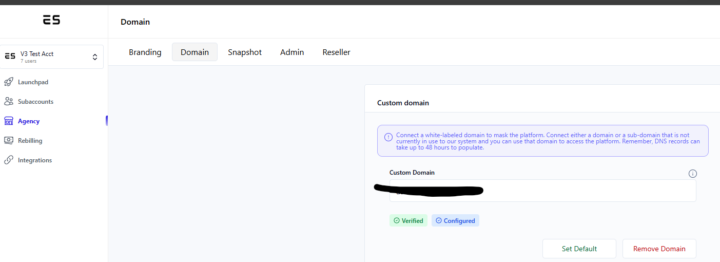
WL Domain Upgrade
TL;DR: We’ve officially moved our domain system "in-house." Previously, we used a third-party service (Coalias) to handle your custom domains. It worked, but it wasn't up to our speed standards. So, we built our own Native Domain Wrapper to give you a faster, 100% white-labeled experience. What this means for you: - Faster load times for your site. - Rock-solid branding (no more "grey label" routing). - Total control over your tech stack. Quick Action (Takes 60 seconds): To get on the new, faster system, just remove and re-add your domain in your Agency>Domain tab and refresh your DNS records. We will be sunsetting Coalias in the near future so please take this week to update your DNS for a better experience. Thanks!

30d •
NEW UI & UPDATES 🔥
@Jorden Williams I know you and the team have been working your a$$ The new updates look insane and amazing. Everything's running smoothly, but I need to manually re-add some knowledge bases, agent tags, and re-sync some connections. It looks amazing.
1 like • 30d
@Dylan Essad Will get that updated in a few minutes. Thanks!
1 like • 30d
@Dylan Essad Should be good

30d •
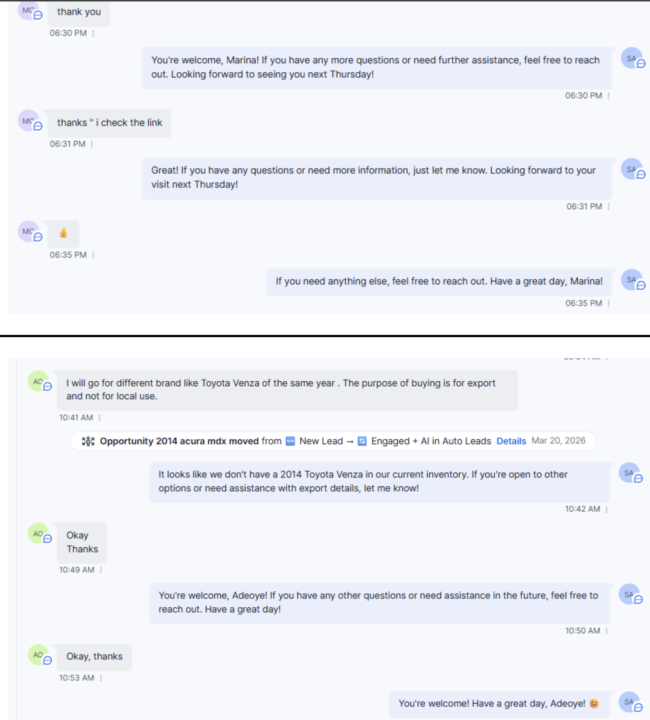
Best Approach for avoiding AI repetition? | SMS
Many customers will end by saying thank you, then send like an emoji, then liking the message and the AI will respond to all of those messages and sound SUPER repetitive. Any way to avoid this? See attached!
1 like • 30d
@Karl Brussolo You can adjust the prompt and that can help some of these but its not 100% and also varies depending on the model. What we might do is create an end_chat tool or something similar to our end_call tool

Mar 2 •
URGENT - Help Needed! 🚨
I have my workspace through a reseller - and I've got no billing issues. Today, I woke up to this message inside my Assistable account... (pic included below) "Congrats! You are over the limits of your current plan - that means you are growing quickly. Your plan currently allows for 0 sub-accounts, and you currently have 113 sub-accounts. You can achrive accounts you are not using to stay under your limits or increase your limits by upgrading" Context - My reseller has confirmed that there are no issues on their end either, and they don't know why I'm getting this error. I've been with this reseller for over a year with no issues - so I know it's not that. My reseller has ensured that my account is set up with more than enough subaccounts - but every 10ish minutes or so, the subaccount total resets back to 0. I am able to create AI bots - but my team is not able to connect them to Assistable. We tried integrating from Assistable to GHL using the Assistable dashboard. We also tried to integrate from GHL to Assistable through the integration settings. How do I get this fixed urgently? I have over 100 active clients on this setup?

0 likes • Mar 2
@Hannah Newman can you DM the URL you're on with that screenshot you shared? thanks

Mar 1 •
Follow Up Texts
How can I only make the AI send a follow up text if it's the AI bot texting. Like I don't want to make a GHL automation where the trigger is the person replies bc they may be replying to another workflow where it's not the Ai replying but like a regular GHL automation. So how can I make it that the AI follows up after like 30 min if the person doesn't reply specifically to the AI if this makes sense.
0 likes • Mar 2
@Gabriel Matatov right now we do the followups via workflows. We're actually adding workflows in Assistable as well that will be released soon. I will look into adding ai follow up options directly in the ai assistant builder as well.
1-10 of 288

@michael-copeland-1876
Chief Product Officer | Assistable.ai
#1 App of all time in GHL Marketplace
💤📞💰mikecopeland.us
Active 9d ago
Joined Jul 29, 2024
Powered by