Activity
Mon
Wed
Fri
Sun
Jun
Jul
Aug
Sep
Oct
Nov
Dec
Jan
Feb
Mar
Apr
May
What is this?
Less
More
Memberships
Agency Flywheel Hub
4.6k members • Free
AI Automation Society
355.9k members • Free
Clief Notes
27k members • Free
AI Money Lab
72.1k members • Free
[Archived] KubeCraft (Free)
11.2k members • Free
238 contributions to Clief Notes

9h •
Agents are just folders.
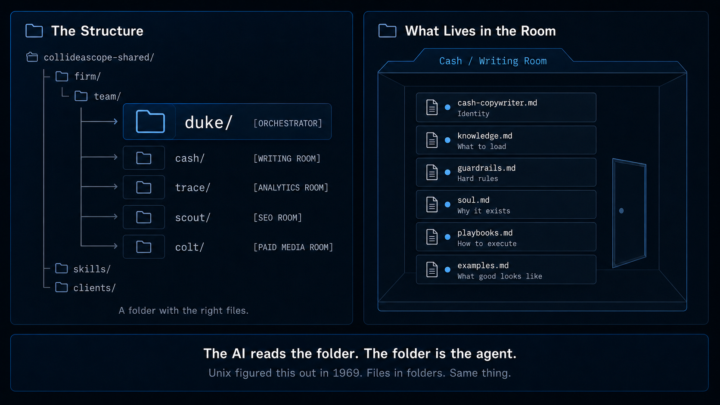
There have been some good questions in my previous posts about my agents, so I want to clear up a few things. I call them agents because it helps me think and stay organized. But strip the jargon and here's what's actually happening: a folder with the right files in it tells an AI who it is, what it does, and what good looks like. Unix figured this out a long time ago. I remember working on mainframes in my early 20s. Files in folders. It wasn't powerful because it was complex. It was powerful because it wasn't. Unix came out in 1969; I was using it from 1998 to 2002. The "writing room" is a folder. Cash lives in it. His instructions, his guardrails, his examples, his voice reference — all files. The AI reads the folder and knows how to behave. The room gives it context. The files give it structure. I have 15 of these rooms. Duke orchestrates between them. The naming isn't the point. The structure is. Here's the part most people miss: almost every agent in my system has a human counterpart. A real expert whose domain knowledge shaped the instructions — and who can tell me when the agent gets it wrong. Cash's counterpart knows copywriting. Trace's counterpart knows data. That feedback loop is how the system actually improves. You're not building AI. You're building infrastructure. Build the foundation. Build the structure. The agents are just what you call it when the rooms start working together. My lesson: don't copy me, don't copy Jake, we all learn from each other, and then you make it your own. Stick to the fundamentals. Watch Jake's videos; it will rewire your brain and change how you think about AI. There are no shortcuts. You have to build a foundation first. Links to referenced posts: https://www.skool.com/quantum-quill-lyceum-1116/visualized-my-agent-team https://www.skool.com/quantum-quill-lyceum-1116/the-folder-system-became-my-agency

1 like • 2h
Curtis you were probably working with tape and punch cards LOL

21h •
finally built headless wordpress website :D
Inspired by @Curtis Hays, I finished an experiment that I had started a few weeks ago. I started my company as a local web design agency in 2014. I've pivoted a few times since, where our core offer is that of Fractional CMO services, but we still do some agency type work for existing clients, friends, and family. I was ready to throw in the towel on web builds just because they take so much time and I hadn't cracked the code on building sites with ongoing content. I finally got it this evening! We've gotten good at building unique sites using Claude with next.js, files live in github, website runs on vercel. This evening I was able to get a headless WordPress environment where I can add/edit/delete content, but the design still lives in Vercel! I realize this might seem like a small thing for some, but it's a ginormous win for the 8 SIGNAL team :D It's gonna save us sooooooo much time rebuilding from next.js to Elementor. Huge shoutout to Curtis. By sharing his win, he inspired me to dig further into this and figure it out! Here's the site that was previously just a "static" site on vercel, now all the content is coming from a wordpress install: https://century-rentals.vercel.app/ P.S. If you have a better way of managing websites that require a CMS and SEO/AEO, don't hold back. I won't be deflated. I'm always looking for ways to improve and do things better. P.P.S. Website's for a buddy, and still not finalized yet, so I'm taking some liberty to mess around with him about baseball because he knows less than I do, and I don't know much LOL!
0 likes • 2h
@Paul Kouwen many benefits to headless WordPress setups and yes you can server side render SSR and incremental server render ISR.
1 like • 2h
@Ruben Aguirre dynamic websites or components are things like dashboards that require upon a query to go fetch data and build it. Other dynamic capabilities are checking the local inventory and seeing if the piece of equipment is available at the time of query. Think of items that you have in WordPress where you rely on the loop to display the information

7d •
The stack that works for me
There are two skills in Claude that I use over everything else that have been really successful for me. I love the folder system here and I use something similar just to keep things organized. As I'm sure most people have heard of Superpowers and I think it's good to a point. Superpowers is good at brainstorming and asking me the questions I didn't consider but it's bad on execution. That's where GSD or Get Shit Done comes in. It can take the plan from Superpowers, break it down into Phases and Waves and then you verify at every checkpoint to make sure a certain feature works. This effectively allows me to "one-shot" apps and make sure it works along the way. The part of the stack that I don't have nailed down yet (leaning into my cyber security background a bit) is security and just trying to make sure we cover stuff like prompt/code injection for example. Does anyone else have a similar stack or different process?
4 likes • 6d
@Russell Klimas Exactly — “exposed by a tool, not failed by it.” If you're running into error after error with Jake’s Method / ICM, it’s almost never the method itself. It’s almost always incomplete context. Think of it like this: You’re the best chef in your circle. You’re hosting a backyard barbecue. You spared no expense on ingredients, prepped everything perfectly… but you forgot the one secret ingredient that actually makes the dish. What hits the table tastes like generic diner food. Same thing with AI AI doesn’t fail. It simply delivers exactly what the context allows. No more, no less. When using Jake’s Method or ICM, the difference between clean one-shot builds and constant errors usually comes down to: - Crystal-clear definition of the final desired outcome - Tight, focused context files (I keep mine under 150 lines each) - One task, one outcome — chained together properly Most people fail because they either expect the AI to magically fill in the gaps, or they dump multiple sub-tasks into a single prompt and wonder why it falls apart. Give it the full map up front — role, constraints, success criteria, architecture decisions, everything. Do that consistently and the errors drop dramatically. How's your Context MD file structured right now? That’s usually where the real leverage is.
0 likes • 17h
Sure, I have no problem pointing you in the right direction... However, I've found that posting to the members will give you more eyeballs for help. Without even looking at your project, you're probably asking too much up front. Remember, one task - one output. Get your first one right then move on to the next. Whatever you do, do not stack 10 items without having run 10 complete tests. This is the primary mode of failure. DM me if you need additional help. ((I've so been in your shoes...darn right frustrating!))

3d •
Built an always-on AI Chief of Staff that texts me.
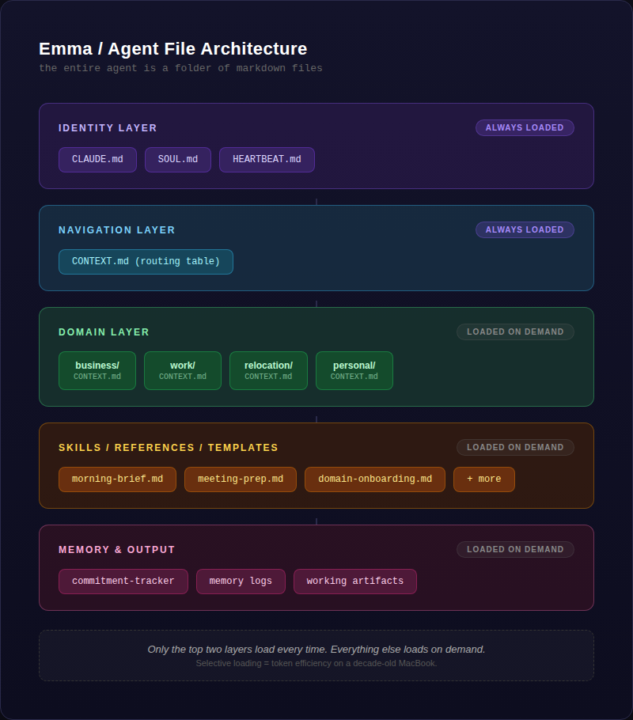
I've been in this community for about a month now and wanted to share where things stand with one of my builds. This isn't polished by any stretch. I do have a few other workflows like content-creator, document-creator, but I needed something to help me navigate my day-to-day as I begin a couple side quests outside my normal 9-5. The goal was simple: I didn't want another chat window I have to remember to open. I wanted something that knows my priorities, reads my calendar, checks my email, and texts me when I need a nudge. Not a chatbot, more like a Chief of Staff. And the goal is to operate within the bounds of the subscription with no extra costs, while also maximizing token efficiency. The other thing I didn't want to do is implement an orchestrating harness yet (OpenClaw, Hermes, etc). The challenge for myself was to keep this as simple as possible without inflating scope. Someone in this community said once: 'constraints are just as, if not more, important than your requirements. What do you NOT want your build to do?' I've definitely taken this to heart in my workflows. ## Planning I've made a few posts about this in comments, but I cannot stress the importance of planning before you build. My method was simple: - First I brain dumped context via voice dictation and transcribed this. Simple tools: VoiceMemos, copy, paste. - Next, I worked through the planning phase with the chat function of Claude in Opus 4.6. I wanted pushback, challenge, and for the model to force me to think deeper and keep me honest. This produced the product requirement document, or PRD. This was a multi-day process (a week?) in my free-time. - For the architecture build, I used Cowork. Handed it the PRD, answered a few basic questions, and then it went on it's way. Got it uploaded to a private git repo. - Currently, I'm working thru further debugging and walking thru the checklist within the PRD in a phased approach. As you'll see below, I have setup a remote screenshare so I can also let Cowork see what I'm doing. This was the most essential because we work TOGETHER to make things happen. it's like working side-by-side with my developer and engineer.
3 likes • 3d
#deepdive #davescorner
1 like • 1d
@Justin Solomon now all I got to do is catch up LOL I'll have something this week
11d •
Looking for design inspiration?
There are many of us coming from all professions other than web development. Yet most of us need a website. I for one am not a designer and I need help. Over time, I have create a list of design resources for inspiration. These can be particulary good at providing you llm a reference style so you can BREAKOUT of the Vibe Coded Slop. Here’s a curated list of the best design idea resources for visual inspiration in 2026. These are the go-to platforms used by professional designers, illustrators, and creatives for UI/UX, graphic design, branding, illustration, product design, fashion, architecture, and more. Top All-Around Visual Inspiration Platforms Rank Resource Best For Why It’s Great 1 Pinterest -- The ultimate visual discovery engine. Create boards, infinite scrolling inspiration 2 Behance (Adobe) -- High-quality curated projects from top global designers 3 Dribbble -- UI/UX, illustration, motion. Shot-based inspiration, very trend-forward 4 Awwwards -- Daily awards for the best websites and digital experiences 5 Designspiration -- Clean moodboarding. Minimal, beautiful interface focused purely on visual inspiration SPECIALIZED DESIGN INSPIRATION SITES SitesUI/UX & Digital Product Design - Mobbin – Best for real mobile & web app UI patterns (thousands of screenshots) - UI8 – High-quality UI kits + inspiration - Lapa.ninja – Beautiful landing page gallery - Pageflows – User flow & interaction inspiration - Refero.design – Real-world SaaS interface references - Screenlane – Daily curated mobile app designs Graphic Design & Illustration - Abduzeedo – Daily design & illustration articles + galleries - It’s Nice That – Creative projects across disciplines - Creative Bloq – News + inspiration roundups - Illustration Daily / The Illustration Room - MIMO (Made in Moon) – Beautiful curated design feed Branding & Logo Design - Logopond – Logo inspiration - Brand New (UnderConsideration) – Brand identity case studies - BP&O (Branding, Packaging & Opinion) – In-depth branding reviews
1 like • 10d
@Apeksha Gadekar Hee hee, getting ready to drop my "Greatest Hits". Trying really hard to provide insightful resources for noobs --> pros. Thanks for your comment
0 likes • 1d
@Qayyum Khan #davesresorces thxs
1-10 of 238
@david-vogel-5627
Submarines to Mountain Tops My diverse path built a unique skill set. Now I’m all in on AI — helping SMBs save serious time and cut costs.
Active 1h ago
Joined Mar 11, 2026
Powered by