

8d •
Big Win, Launched my Ai Agency!
Hey community!! yesterday I Launched MinAITaur, my Human Tech consulting agency!! We dedicate to mitigate your bureaucracy and uplift your job!! I decided to start on a clean slate, everything from 0. I am so happy, everything has been possible thanks to Jake's teachings and ways. The Agency is a mix of organizational psychology consulting and IT automations using Claude! We help you redesign your Northstar giving your human capital the proper space and the repetitive tasks an architectural system which helps you mitigate it to stay more human than ever before!!! Here is my brands branding proposition. Everything is still in Launch state, happy to help anyone who resonates with this message and if you guys would like to follow I would be thankful to have you there as well. Socials: ig & fb: @minaitaur, www.minaitaur.io. (PD: webpage is not launched yet)


7d •
1st App done! Whoa…
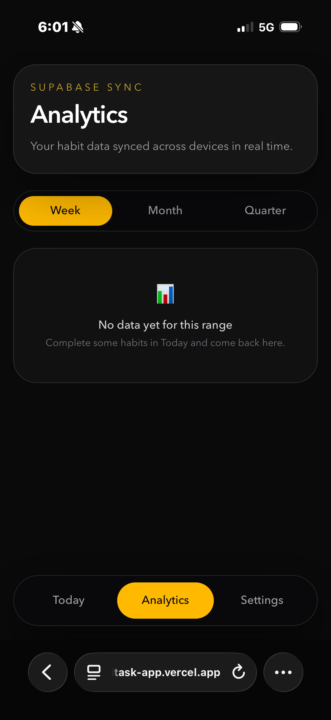
Completed a HABIT Tracking app. “Set your daily HABITS you want to improve on and let the 8th wonder of the world, COMPOUND INTEREST , prosper you in achieving goals and creating new BETTER habits. OPTION MENU Displays your analytics from results of a week, month, quarter, etc. Steps: 1. told Claude chat what I wanted. I said it needs to be a free setup, no subscriptions or fees to start and it recommended I use GitHub, vercel and Supabase. This is to store the data it records when users check off tasks for their daily habits and tracks results. I wanted Oauth so people can login with email. Daily quotes revolving in the ui to keep up motivation. 2.told Claude chat to make me a plan to effectively build this organized and as a pro engineer. 3. Converted the chat into a short Claude Md file and a context file. 4.told it to give me a pro CS Eng folder structure and save it to my docs. 5. Pushed it to git hub and I told it to build. All from VScode we went to work…. And had more than 50% worth of tokens left, as I even used it for other ideas while it was building out task app. This was amazing. Thank you @Jake Van Clief !!! Looking forward to more content of yours. Now time to work on the UI.

6h •
Mini-Series Part 2: The "Token Crash" & The Keyboard Epiphany
In Part 1, I was riding high. I had Chrome, Edge, and Firefox all running simultaneously, tripling my speed on a massive D365 rebilling project. I felt like I’d cracked the code to being "efficiently lazy." Link: Mini-Series Part 1: The "Manual Hell" Rebill Project · Clief Notes But the victory was short-lived. I was driving the car at 100mph, but I didn't realize how much fuel I was burning. The Crash: 3 Hours to Zero The next morning, I fired up all cylinders. It was beautiful—until it wasn't. In under 3 hours, I burned through my entire token allotment. I was dead in the water with a 1.5-hour wait until my limits reset. With the clock ticking and sales reps still needing updates, I had to go back to doing it manually. And that’s when the "Aha!" moment happened. The "Tab" Breakthrough While I was clicking and typing manually to pass the time, I realized something: I wasn't really using the mouse. I was mostly hitting Tab and Shift-Tab to navigate the D365 fields. I asked Claude: "Can Playwright just 'Tab' through the browser instead of searching for elements and taking screenshots for every move?" Claude’s answer: YES. My jaw dropped. From "Visual Driving" to "Macro Speed" The old workflow relied on Claude "seeing" the screen via screenshots to make sure it was in the right spot. It was accurate, but heavy. I had Claude rewrite the interior workflow to a deterministic loop: 1. The Setup: I open the URL, set the filters, and select the first row. 2. The Loop: * Tab to Invoice → Enter. 3. Repeat. I added small buffers (100ms between tabs, 4s for page loads) to ensure D365 could keep up. See the video for how the flow runs in real life! The Result: 90% Savings & 10x Efficiency I asked Claude to evaluate the two methods. The numbers were staggering: Old "Visual" Flow: - Tool Calls: ~500 calls per 50 orders - Token Usage: 100% (High Burn) - Logic: Screenshot-dependent (Slow)

4h •
Most people in vacant land investing are sitting on a second opportunity they’re not even seeing yet.
You can be closing deals, underwriting parcels, sending offers, and still be exposed to one thing, inconsistent cash flow between wins. And it’s not a skill problem. It’s a structure problem. Now imagine this: While your land pipeline does what it does best (big, slower, higher-margin wins) there’s a parallel system quietly handling the “in-between” gaps, something lighter, faster to turn over, and built around digital product-based ecosystems that operate without physical inventory headaches or constant manual effort. Not instead of land investing. Alongside it. Think of it as building a second lane that runs on: - scalable online storefront systems - automated product distribution models - internet-based value exchanges that don’t depend on waiting months for a deal to close This isn’t about replacing what works. It’s about removing pressure from it. Because the real risk in any deal-based business isn’t lack of deals, it’s relying on only one rhythm of income. The investors who last the longest aren’t just good at acquisitions, they’re good at building support systems around their acquisitions. Vacant land can remain your core strategy. But the question is: What’s quietly supporting your cash flow while you wait on your next close?
0
0
1d •
Mini-Series Part 1: The "Manual Hell" Rebill Project
Following up on my previous post about automating month-end, I want to pull back the curtain on the project that really started it all. It involves a massive company reconstruction, a "manual hell" task, and a midnight breakthrough that tripled my productivity. The Problem: A Reconstruction Hangover On January 1, 2026, our company underwent a major reconstruction. Customers were assigned new sales reps, but the final list of who owned which account wasn't finalized until April. In the meantime, we kept invoicing as usual. The invoices were correct, but the Sales Rep field on the historical records was now wrong. To fix it, we had to go back and update thousands of already invoiced sales orders. The Manual Workflow (or: How to lose your mind): 1. Search for the Sales Order. 2. Click Invoice. 3. Click Rebill. 4. Change the Sales Rep. 5. Click OK. 6. Hit Esc to exit. 7. Repeat... hundreds (or thousands) of times. Enter Claude Code & Playwright I had just started using Claude Code on March 19th after watching @Jake Van Clief ’s videos. Two weeks later, this assignment landed on my desk in the middle of my usual accounting duties. Since I didn’t have backend API access to D365 F&O, I turned to the Playwright MCP. If I couldn't talk to the database directly, I’d have Claude "drive" the browser just like a human would. The Automation Logic: - Open Chrome to the D365 Sales Order URL. - Open the filters tab. - Add filter information (Customer account, dates for Q1 2026, and identifying which sales orders had the wrong rep). - Execute the "Rebill" click-path automatically. The "Aha!" Moment at 00:30 AM It worked, but it was real slow. D365 isn't exactly a speed demon. My boss was happy ("as long as we don't have to do it, I don't care how slow it is"), but I knew we could do better. Earlier that day, I was running it in one browser and it was taking forever. While the kids were finally asleep that night, I had an idea: Can I run this on more than one tab?
1-28 of 28

skool.com/quantum-quill-lyceum-1116
Jake Van Clief, giving you the Cliff notes on the new AI age.
Leaderboard (30-day)
1

+693
2

+621
3

+420
4

+414
5

+281
Powered by