
Write something

Jun 30 •
Foreign Fraudsters
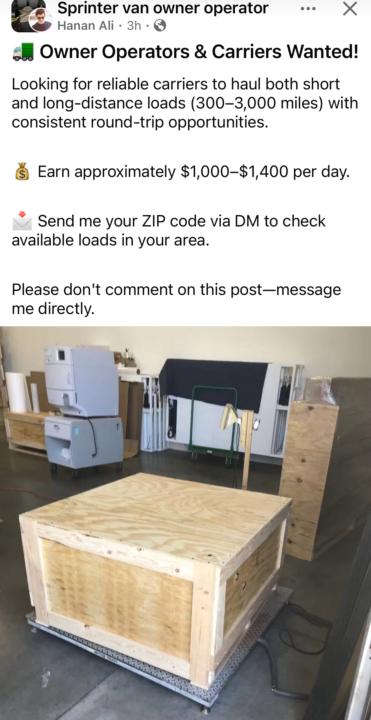
I post a lot of content primarily photos of work we do on social media. Lately I have increasingly seen images of our warehouses, crating, equipment being used by others. Primarily foreigners trying to get business as brokers or dispatchers etc. This is a post by a dispatcher that I don’t know, using a picture that was taken by me in my warehouse. If they are willing to advertise stealing other people’s photos. I don’t think they will have a problem with stealing your money. #papafreight

5d •
I killed manual carrier vetting for $0 (weekend build)
Hey everyone — carrier vetting was eating my week. Pull up SAFER, type the MC#, screenshot, repeat. And if a load goes sideways later, good luck proving what you checked and when. Fixed it over the weekend for $0. Now I paste an MC# into a spreadsheet and the row fills itself in: 1) Requested a free WebKey from FMCSA at mobile.fmcsa.dot.gov (login.gov account + short form). Same data as SAFER, straight from the source. 2) Made a Google Sheet: MC#, Legal Name, DBA, Allowed To Operate, Out Of Service Date, Checked On. 3) Free account at make.com (1,000 operations/month free). 4) Built one 3-step scenario there: Sheets – Watch New Rows → HTTP – Make a request to mobile.fmcsa.dot.gov/qc/services/carriers/docket-number/[MC#]?webKey=YOURKEY → Sheets – Update a Row. It doesn't replace calling the carrier or checking the cert of insurance. What it kills is the manual lookup, and it leaves me a time-stamped log of every carrier I ran — which is worth having with all the talk about documenting your vetting process. Happy to answer questions if a step doesn't make sense. Hope it saves someone the headache.
1
0
6d •
Excerpt from the Cargo Van class on Dispatchers
If you go online into forums on Facebook, Reddit, X etc it would have you believe it is the Dispatchers that have the freight. Dispatchers are the only way to get freight for your cargo van. This is not True! Dispatchers perform a legitimate and important job in Freight Transportation but they are not licensed or regulated by Federal laws like Freight Brokers are. Carrier Dispatchers look at load boards (loads posted by brokers) and try and negotiate rates with freight brokers on your behalf to keep your cargo van moving. Dispatchers work for the carrier! A Dispatcher works for you Not the other way around.

9d •
Close only counts in horseshoes
We came so close to Canada and the US finalizing a trade deal. Unlike horseshoes close does not count or help either countries economy. The below was pasted by a US economist, this was to show the real trade advantage the US had. Politicians who are to represent "We the People" on both side of the border are certainly not doing this IMO. Canada politicians stated POTUS is taxing his own people. CDN government after break down are now taxing Canadians as they implement tariffs. Unless both governments get back to the table, make a deal for the people, we the people will pay the price. Thoughts? The US would actually be a surplus If you remove fuel and hydro from trade between Canada and the US, the trade deficit for the US would actually be a surplus. In 2023, the US recorded a trade deficit of $36 billion with Canada, but when you exclude energy exports, the surplus is approximately $85 billion. This indicates that the US has a significant advantage in the trade relationship, particularly in services, which has a surplus with Canada.
May 1 •
Coast to Coast Cargo Van Deliveries.
If you have not been in our Cargo Van class. It’s full of 10 years of experiences and info about moving freight in this non-CDL space. I share my experiences and that of my drivers. The first and final mile is where the most usage of our cargo van comes into play but we have many projects and national contracts that take our Cargo Vans OTR.

1-30 of 596

skool.com/freightgroup
Welcome to our Community of Logistics Professionals who know that in Freight...there is always more to Learn. A helpful group of Mentors and Mentees
Leaderboard (30-day)
1

+20
2

+11
3

+10
4

+5
5

+5
Powered by