
Write something

7d •
Metaball animation YT tutorial
I am trying to follow the YT tutorial below made by @Victor Stepanov but the code only works for older versions of Blender. I am slowly bomping into bugs and managing to fix them. I am starting this Accountability thread to, not only finish the tutorial, but to learn as much as possible from it. I hope to find answers and explanantions to how and why things do and don't work. Let's go!

Sep 20 •
Learning
Day 1 Blender python for artists. I was pretty surprised at how well the introduction was able to teach me. The advice to stop the video so I could putter around in blender was fun! I learned something new and was able to use it immediately.
2
0
Jun 29 •
Using "portable" Blender
Just started the "Blender Python for Artists Part 1". I use Blender on Linux (currently Kubuntu distro) and like to maintain strict control over which version I am using. To do this I use a “portable” installation which sets up a separate copy of the blender software for development. This way I can explore changes and scripts without impacting my main Blender application.
Jan 31 •
Finally a Late December Mini-Challenge Project Good Enough to Share
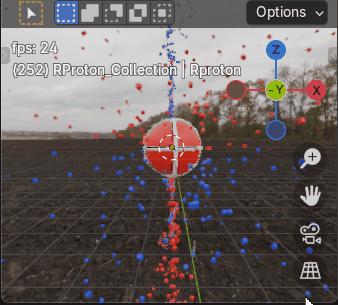
Here’s my late December Mini-Challenge Project. Originally Charge field 'Tornado and Debris’, now a Blender python Charge field physics, Proton with Charge Recycling model that contains top and bottom charge and anti-charge intake vortices, that I developed with ChatGPT help, good enough to share. All matter constantly recycles charge and anti-charge. It may not look like it at the moment, the animation shows a red, right spinning proton in Earth’s northern hemisphere’s vertical emission field, with a downward spiraling vortex of blue, left spinning anti-charge cubes (CW toward -z) entering the proton’s top spin axis pole while a vortex of red, right spinning cubes (charge) spirals upward (CW toward +z) into the proton’s bottom pole. After some delay, both charge and anti-charge is re-emitted by the spinning proton back into space, radially outward from the proton’s opposite hemisphere’s 40deg latitude, closer to the proton’s higher angular momentum equator. At this scale, with respect to the proton, I believe most charge would be too small to see, although electrons are essentially overgrown charge. Take it from this old has been engineer, Miles Mathis' Charge field physics makes much more sense than Quantum Theory, The proton spins with a driver function, add_continuous_rotation(thank you Victor). There are four particle systems, two with handlers and two without. HDRI functions are included, again thank you Victor (not to mention a gif), you’d need to provide a properly located hdri image to use them. The ps’ settings could use some changes. Please enjoy.
1-15 of 15

Leaderboard (30-day)
1

+8
2
+3
3

+3
4
+3
5

+1
Powered by