Activity
Mon
Wed
Fri
Sun
Oct
Nov
Dec
Jan
Feb
Mar
Apr
May
Jun
Jul
Aug
Sep
What is this?
Less
More
CG Python Academy
1.4k members • Free
2 contributions to CG Python Academy
Mar 2 •
Итоговый проект по второй части
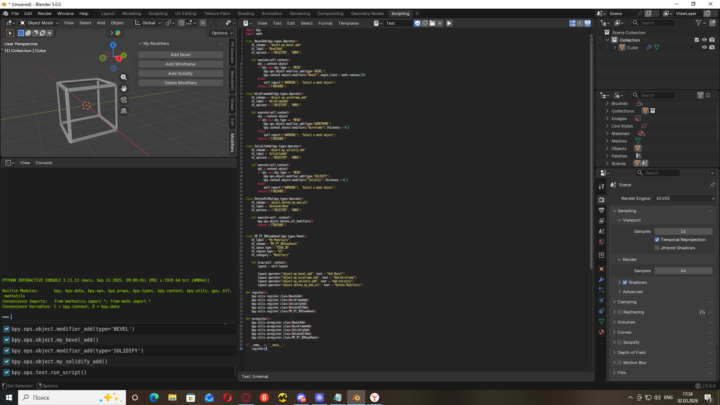
I have created a tool in the 3D viewport, which has 3 basic modifier buttons and a button to remove all modifiers. I also have a couple of questions for you as a specialist. How do you rate the profession of a technical artist? Is it a good profession for the future? Is there a chance for someone like me to become a technical artist? And here is the project code: import bpy import math class BevelAdd(bpy.types.Operator): bl_idname = 'object.my_bevel_add' bl_label = 'BevelAdd' bl_options = {'REGISTER', 'UNDO'} def execute(self,context): obj = context.object if obj and obj.type == 'MESH': bpy.ops.object.modifier_add(type='BEVEL') bpy.context.object.modifiers["Bevel"].angle_limit = math.radians(20) else: self.report({'WARNING'}, 'Select a mesh object') return {'FINISHED'} class WireFrameAdd(bpy.types.Operator): bl_idname = 'object.my_wireframe_add' bl_label = 'WireFrameAdd' bl_options = {'REGISTER', 'UNDO'} def execute(self,context): obj = context.object if obj and obj.type == 'MESH': bpy.ops.object.modifier_add(type='WIREFRAME') bpy.context.object.modifiers["Wireframe"].thickness = 0.1 else: self.report({'WARNING'}, 'Select a mesh object') return {'FINISHED'} class SolidifyAdd(bpy.types.Operator): bl_idname = 'object.my_solidify_add' bl_label = 'SolidifyAdd' bl_options = {'REGISTER', 'UNDO'} def execute(self,context): obj = context.object if obj and obj.type == 'MESH': bpy.ops.object.modifier_add(type='SOLIDIFY') bpy.context.object.modifiers["Solidify"].thickness = 0.1 else: self.report({'WARNING'}, 'Select a mesh object') return {'FINISHED'} class DeleteAllMod(bpy.types.Operator): bl_idname = 'object.delete_my_mod_all' bl_label = 'DeleteAllMod' bl_options = {'REGISTER', 'UNDO'} def execute(self, context): bpy.ops.object.delete_all_modifiers() return {'FINISHED'} class MY_PT_3DViewPanel(bpy.types.Panel):
Jan 29 •
Capstone Project for Part 1
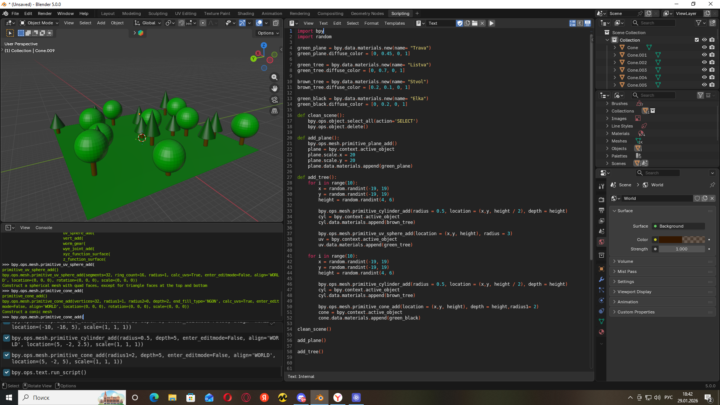
I made a script that clears the scene if there was anything superfluous), and adds two types of trees. With each click of the script, the trees are positioned differently, as well as their height. Script and screen import bpy import random green_plane = bpy.data.materials.new(name= "Trava") green_plane.diffuse_color = [0, 0.45, 0, 1] green_tree = bpy.data.materials.new(name= "Listva") green_tree.diffuse_color = [0, 0.7, 0, 1] brown_tree = bpy.data.materials.new(name= "Stvol") brown_tree.diffuse_color = [0.2, 0.1, 0, 1] green_black = bpy.data.materials.new(name= "Elka") green_black.diffuse_color = [0, 0.2, 0, 1] def clean_scene(): bpy.ops.object.select_all(action='SELECT') bpy.ops.object.delete() def add_plane(): bpy.ops.mesh.primitive_plane_add() plane = bpy.context.active_object plane.scale.x = 20 plane.scale.y = 20 plane.data.materials.append(green_plane) def add_tree(): for i in range(10): x = random.randint(-19, 19) y = random.randint(-19, 19) height = random.randint(4, 6) bpy.ops.mesh.primitive_cylinder_add(radius = 0.5, location = (x,y, height / 2), depth = height) cyl = bpy.context.active_object cyl.data.materials.append(brown_tree) bpy.ops.mesh.primitive_uv_sphere_add(location = (x,y, height), radius = 3) uv = bpy.context.active_object uv.data.materials.append(green_tree) for i in range(10): x = random.randint(-19, 19) y = random.randint(-19, 19) height = random.randint(4, 6) bpy.ops.mesh.primitive_cylinder_add(radius = 0.5, location = (x,y, height / 2), depth = height) cyl = bpy.context.active_object cyl.data.materials.append(brown_tree) bpy.ops.mesh.primitive_cone_add(location = (x,y, height), depth = height,radius1= 2) cone = bpy.context.active_object
1-2 of 2