Activity
Mon
Wed
Fri
Sun
Jun
Jul
Aug
Sep
Oct
Nov
Dec
Jan
Feb
Mar
Apr
What is this?
Less
More
Memberships
Clief Notes
26.3k members • Free
82 contributions to Clief Notes


0 likes • 19h
here you go king, welcome to the club! https://www.skool.com/quantum-quill-lyceum-1116/classroom/7634b927?md=992b5f67cee14da09fcd86d12977b18e

21h •
Silly question
This might be a dumb question but what exactly are the practical benefits of taking the folder based approach? Does it provide more efficient use of tokens, more consistent results? How can we demonstrate this so we can sell this idea to others? I tried creating a sample home page using the folder based approach versus standard claude.ai but couldn't really see a big difference.
2 likes • 21h
first id start by understanding it before you're planning on selling it big dog. Yes, the things you said. Those are the benefits. Now hit the classroom button.
1 like • 21h
@Alejandro Morales you already have your foot in the door being here brotha, turn on some of Jake's videos and get dirty with the workspace_blueprint - this system teaches you *how* to think, it's not tools you just copy and paste into your repo - but that's what makes it even more insane that we're getting this value for so cheap. Utilize it. Happy learning king

17d •
From 2 Hours to 10 Minutes: First Major Automation Win
This is my first major win applying what @Jake Van Clief ef teaches. Since subscribing to Claude Code on March 19th, I’ve been able to show so much progress that my company has now upgraded me to the Max 5x subscription. Looking forward to pushing the boundaries of what’s possible and continuing to improve our processes! As a Finance Manager responsible for month-end closing, I wanted to see what Claude Code could actually achieve—and it delivered! Even without Azure or backend access to our ERP system (D365 F&O), I didn't let that stop me from being "efficiently lazy." Claude Code showed me how to use the Playwright MCP to control Chrome and handle the heavy lifting for me. The script now automatically downloads the monthly trial balance, populates an Excel template, identifies discrepancies via color-coding, and even takes screenshots to document numbers from various reports. I’m already tackling my next big automation project—a task that is notoriously tedious when done manually. Stay tuned for that post, as well as more month-end automation updates in the near future! I had Claude code describe the workflow: Common Reconciliation — Monthly Close Automation with Claude Code + Playwright MCP Every month-end I run a single slash command (/mec-common) and pass it a month number. Claude then drives the entire reconciliation process end-to-end, touching both a live D365 ERP system and a multi-sheet Excel workbook — no manual steps. The workflow in three phases: Phase 1 — Trial Balance Claude navigates to the D365 Trial Balance page, clears any stale filters, sets the correct date range, triggers a recalculation, and downloads the export. The Excel file is placed in the right folder, and the data is pasted (values only) into the reconciliation workbook's Trial bal D365 sheet. A full workbook recalculation is then forced before anything is read. Phase 2 — Revaluation Check Claude loops through ~50 reconciliation sheets. On each sheet it finds the last row where column C says "Revaluation" (there are two — the second one holds the actual diff) and reads the value in column G. If the diff is outside ±1, the sheet tab is colored red. One sheet (150070) is always flagged red and requires manual review regardless.
0 likes • 22h
@Allan Durhuus we should start another *slightly less efficient* inner circle 😂🫰
1 like • 22h
@Allan Durhuus us
22h •
THE IDE: BEST FRIEND? OR MORTAL ENEMY
I've seen some people asking about IDE's, and though this may be a bit _dense_ for a beginner, it's worth it - I went from 0 technical computer experience to vibe coding and my first IDE was nvim and i'm so happy I stuck with it. ymmv of course, but i think this matters more than people realize. if you’re reading `context.md` files, following references, comparing drafts, auditing agent output, checking diffs, jumping between workspace layers, and constantly moving between docs, then your ide is not just where the text lives. it’s part of the workflow. that’s really all i’m trying to say here. also this is still kinda scratching the surface. the real sauce is when your tools start piping into each other cleanly. if theres an audience for this, I have plenty more to share. but this is also not me trying to sell anybody on nvim as a religion lol (although nvim do go brrrr). i use _lazyvim_ and i like it a lot, but the actual takeaway is bigger than that: - move through context fast - compare artifacts without friction - change workspace scope fast - make file navigation structural instead of annoying - keep git/review close to where you think if you can do that in something else, sick. keep cooking. but i'm a man of culture. and if i have to get something done, i have a shortcut for it. lemmebreakitdown4ya ## 1. treat links like movement this is probably the biggest one for me. in markdown i use `gf` to open the link under the cursor and `gF` to open it in a vertical split. tiny feature, huge difference. instead of reading a router doc and then manually hunting for the next file like a caveman, i just move. with finesse. elegance. poise.`context.md` points to a workflow doc? go there. workflow doc points to a voice guide? go there. that points somewhere else? keep going. it makes the workspace feel traversable. and that is a massive deal in icm because the whole system is built around context handoffs. if following those handoffs feels clunky, you are adding friction right where the method is supposed to be clean.
1
0

24h •
Built an always-on AI Chief of Staff that texts me.
I've been in this community for about a month now and wanted to share where things stand with one of my builds. This isn't polished by any stretch. I do have a few other workflows like content-creator, document-creator, but I needed something to help me navigate my day-to-day as I begin a couple side quests outside my normal 9-5. The goal was simple: I didn't want another chat window I have to remember to open. I wanted something that knows my priorities, reads my calendar, checks my email, and texts me when I need a nudge. Not a chatbot, more like a Chief of Staff. And the goal is to operate within the bounds of the subscription with no extra costs, while also maximizing token efficiency. The other thing I didn't want to do is implement an orchestrating harness yet (OpenClaw, Hermes, etc). The challenge for myself was to keep this as simple as possible without inflating scope. Someone in this community said once: 'constraints are just as, if not more, important than your requirements. What do you NOT want your build to do?' I've definitely taken this to heart in my workflows. ## Planning I've made a few posts about this in comments, but I cannot stress the importance of planning before you build. My method was simple: - First I brain dumped context via voice dictation and transcribed this. Simple tools: VoiceMemos, copy, paste. - Next, I worked through the planning phase with the chat function of Claude in Opus 4.6. I wanted pushback, challenge, and for the model to force me to think deeper and keep me honest. This produced the product requirement document, or PRD. This was a multi-day process (a week?) in my free-time. - For the architecture build, I used Cowork. Handed it the PRD, answered a few basic questions, and then it went on it's way. Got it uploaded to a private git repo. - Currently, I'm working thru further debugging and walking thru the checklist within the PRD in a phased approach. As you'll see below, I have setup a remote screenshare so I can also let Cowork see what I'm doing. This was the most essential because we work TOGETHER to make things happen. it's like working side-by-side with my developer and engineer.
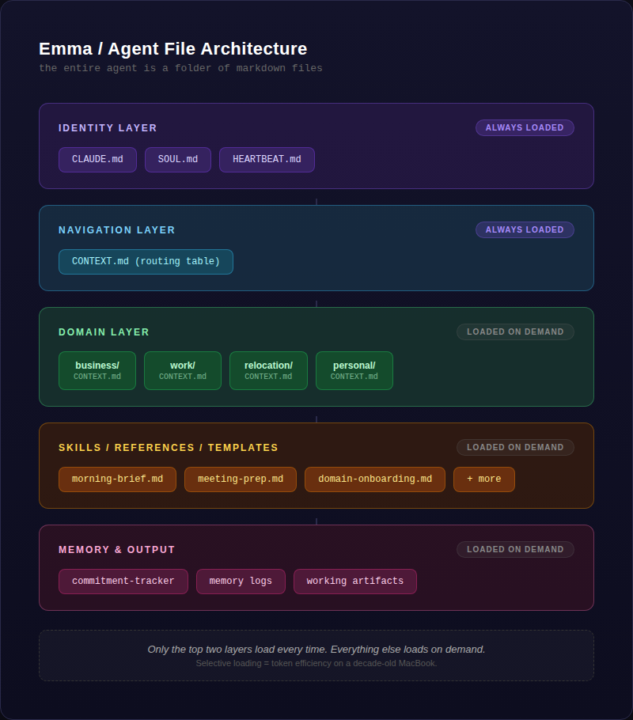
1 like • 23h
Haha, bro this is awesome you're picking it up quick! Good on you for going thinnest viable route to function, *this* is how you actually learn quick - but one thing I will say is, now that you have the experience of setting up the routing yourself and the orchestration layer you can just grab hermes it will save you a lot of time and heartache. You seem super capable, but a good rule of thumb is *why build today, if a better, easier version is downloaded in minute?* But it seems like you took the challenge as a learning opportunity so I give you kudos for that. But it's a slippery slope wanting to build an optimization layer for everything, so just be careful of that. Also your note about telling the agent to do the work for you made me smile so hard, when I first started I remember running commands that claude code would output lmfao. You set up a solid little memory system for your messaging agent, this is really solid work for someone only using AI for a month, but it's clear you have some sort of technical background. How long did this take you if you don't mind me asking? Hermes would have had this all set up in 30 minutes, set and forget until you experience a friction. Excited to see more posts from you, I can tell you're going to bring a lot of value to the community.
1 like • 23h
@Justin Solomon yeah you're gonna fit right in, welcome home big dog. <3 this is exactly the mindset you should have. I try to give my advice erring on the side of caution because most people don't come in with this mental model, you're gonna be teaching me shit in a week just watch
1-10 of 82
@yucky-yuckyyyy-6607
nvim go brrrrrr
just trying to distill abstract concepts
probably adding an nvim keybind as we speak
Active 8h ago
Joined Mar 17, 2026
Powered by