Activity
Mon
Wed
Fri
Sun
Jan
Feb
Mar
Apr
May
Jun
Jul
Aug
Sep
Oct
Nov
Dec
What is this?
Less
More
Memberships
Learn Power Apps
2.5k members • Free
Power Apps Templates
126 members • $25/m
Learn Microsoft Fabric
14.5k members • Free
KubeCraft (Free)
11.1k members • Free
Coding AI
677 members • Free
AI Gadget Studio
922 members • Free
PM Mastermind
1.8k members • $27/month
Data Engineering Community
296 members • Free
22 contributions to Learn Power Apps

Jun '24 •
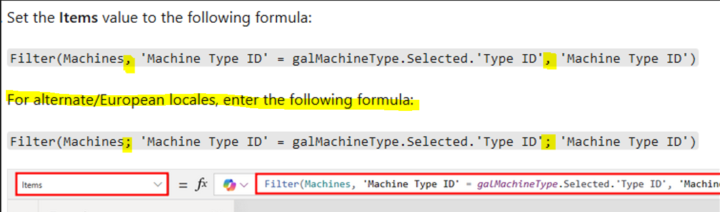
Minor (but critical!) differences in writing a formula
I was today years old when I realized why sometimes when I apply a formula EXACTLY as I'm seeing it demonstrated, it doesn't work for me! Never really noticed that sometimes its a semicolon and sometimes its a comma, but when the formula doesn't work I just go hunting for another tutorial. LOL! 🤣

1 like • Jun '24
Is this something where Microsoft has made a change in the parameter from one to the other or is just inconsistent and is a comma in some places and semicolon in others?
1 like • Jun '24
Ah, that's good to know. I could see that being an issue almost akin to the way we have to escape > and < signs in xml because commas are used differently in different jurisdictions especially when you talk about numbers and whether the jurisdiction uses a decimal or comma separator.
Jun '24 •
User Info in a Power App
@Darren Neese Hi Darren. A lot of times when I see you building Power Apps, you create a table to hold user details. Please can you clarify why you do it this way rather than simply pulling in their M365 user profiles instead? I've seen a few YouTube videos by other creators where they simply access the M365 profiles in their Power Apps, so now I'm not sure whether that was merely for simplicity of their demo or if it's OK to do it either way?
3 likes • Jun '24
@Darren Neese Great information and way to think through the potential bottlenecks that will keep an application from scaling. So many times, people forget that data retrieval has a cost, sometimes in actual dollars (or insert whatever currency you are using here), but most often in terms of performance and user experience. In the database world, we would provide views for developers around the data that they actually needed for an application as it is always faster to retrieve just the data you need rather than all columns and potentially, rows from a table. There was always that developer that couldn't help themselves from retrieving more data than they need thinking they will need it later. These days, when you are developing in a platform such as Power Apps, you don't have a DBA to advise you on those types of performance issues (in my day, not all that long ago, DBAs were really responsible for the performance of not only the database, but the apps, helping the devs constantly tune their queries to achieve the best performance) and you have to act as both the developer and the DBA thinking through all of the performance ramifications of your design decisions. I am hearing more and more about how the constant changes Microsoft is making to things across the Power Platform and Dataverse stacks have killed an application's performance overnight, so thanks for sharing from your experience in this aspect. We won't be able to avoid all of the potential performance-killing changes, but knowing about this potential pitfall is very helpful.
Jun '24 •
AI tool to generate ERD's
https://www.eraser.io/diagramgpt Sharing this useful tool I learned about today via LinkedIn. Simply input your narrative and it will generate flow charts, entity relationship diagrams, cloud architecture diagrams and sequence diagrams.
2 likes • Jun '24
Wow, that is really cool. Thanks for sharing!

May '24 •
Combine an image and pen input
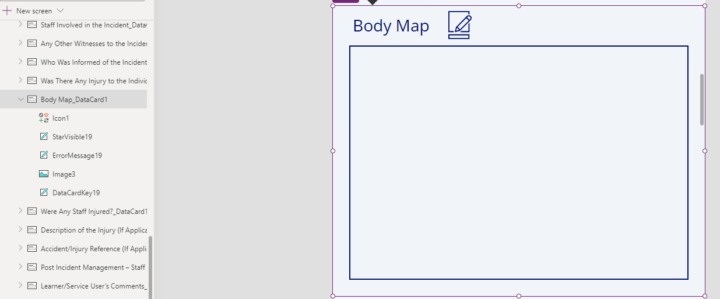
Hi Power Appr's I have an edit form to submit data back to my SharePoint list, one of the data cards is an image. For this image is it possible to combine an image and pen input to show and submit in the form? So a body image has a pen input overlayed to mark up an injury area and combined together to save in the image. Do you have any solutions or recommended way to achieve this ? Any help or direction appreciated. Many thanks
0 likes • May '24
@Scott Simpson Thanks for sharing!

May '24 •
See Your Fellow Students Worldwide!
See Your Fellow Students Worldwide! Add your pin and see others! - https://super-power-labs.skoolmap.io/

1 like • May '24
Done
1-10 of 22

Active 6h ago
Joined Apr 2, 2024
ISTJ
Roseburg, OR
Powered by