Activity
Mon
Wed
Fri
Sun
Jun
Jul
Aug
Sep
Oct
Nov
Dec
Jan
Feb
Mar
Apr
May
What is this?
Less
More
Memberships
FunnelHub Community
2.3k members • Free
Dental Marketing Agency Owners
1.9k members • Free
OfferLab
9.5k members • Free
ChatGPT Users
12.7k members • Free
AI Scaling Specialists
1.1k members • Free
GoHighLevel Growth Systems
1.3k members • Free
Active Solutions
3.5k members • Free
Agency Owners
19.9k members • Free
Automate Business AI
5.9k members • Free
20 contributions to GoHighLevel w/ Robb Bailey

Oct '25 •
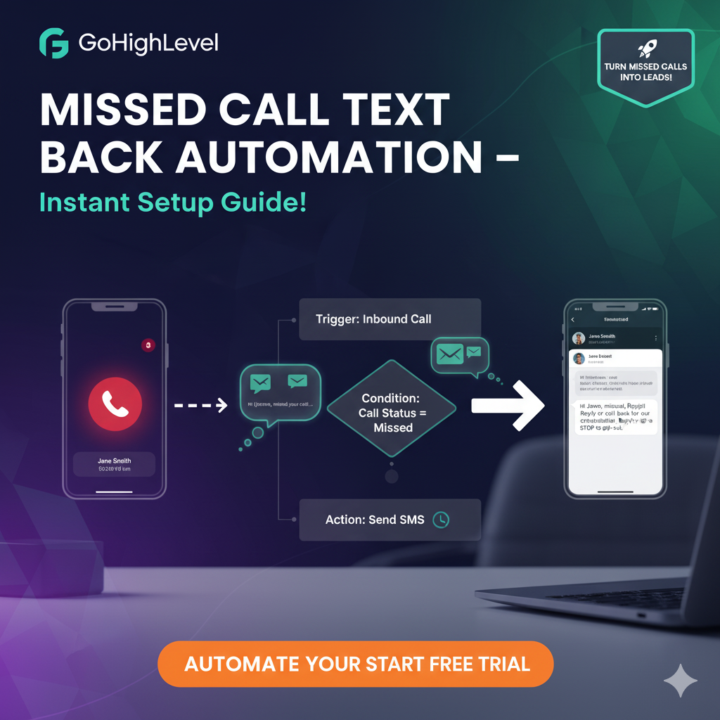
Missed Call Text Back Automation in GoHighLevel
Hey GHL fam! 👋 Missed calls = lost leads? Not with Missed Call Text Back automation! Here’s a short, actionable guide to set it up in GoHighLevel. Let’s do this! Step 1: Create Workflow Dashboard > Automations > Workflows > + Create Workflow. Name it “Missed Call Follow-Up”. Trigger: Inbound Call. Hit Create. Step 2: Set Missed Call Trigger In trigger settings: - Choose Call Status: Missed. - Optional: Filter by number/campaign. - Enable Run Once Per Contact to avoid repeat texts. Test with a dummy call. Step 3: Add SMS Action Drag Send SMS from sidebar. Write a short message: - E.g., “Hi {{contact.first_name}}, missed your call! Reply or call back for [offer].” - Use merge fields for personalization. - Keep it <160 chars, add “Reply STOP to opt-out.” Step 4: Configure & Test - From Number: Pick a GHL-registered number (Settings > Phone Numbers). - Delay: Wait 1-2 mins for natural feel. - Test: Simulate a missed call, check SMS delivery in Conversations tab. - Publish: Go live, monitor in Analytics > Workflows. Step 5: Avoid Pitfalls - Don’t skip delay – instant texts feel robotic. - Keep texts short and compliant (opt-out). - Save as template for reuse. - Track replies, tweak if low response. Done! Your missed calls now spark leads. What’s your favorite GHL automation?

Nov '23 •
🔥 Introduce Yourself! 🔥 [Start Here... ]
Aloha! Welcome to GoHighLevel w/ Robb Bailey... This community helps GHL users + agency owners get the tools and resources needed to generate sales and make a positive impact on the world. Step 1: Introduce yourself below! (✄ copy/paste template 👇) - Where are you from? - What are you working on? - What immediate help do you need? Step 2: Discover How to Unlock all the FREE BONUSES in the Classroom and get your TRAININGS! Step 3: Unlock Agency Masters Elite by signing up for (or upgrading) GHL here! ------------- You’re here to claim your bonuses. But why are we here, giving away bonuses? Our mission is to add you to our collection of success stories. You can see a couple hundred of them here. Here’s the good news: They all started out just like you, reading a welcome post from us, just like this. Here’s the bad news: You’re not getting the same step-by-step system they all got. Here’s the other good news: You’re getting today’s step-by-step system - which is the best version yet. Why? Because we are always learning and improving the entire system. Which means you’re starting with the best we have and, as it improves, you will automatically get those improvements. Cool? Cool. -------------------------- Best practices in this community: • Level up by posting result shares, insights and thoughtful comments. • Help others level up by liking 👍 good result shares, posts and comments. • Be kind - no self promotion here. • If you need help, just ask the community 💪 Aloha y’all, 🌴 Robb
Poll
1260 members have voted
![🔥 Introduce Yourself! 🔥 [Start Here... ]](https://assets.skool.com/f/8cc8fa31674344818a2652b568e101f2/d920f84e17de459db377129ce1a57eb1002ce2ae73db4ad3bedbef4181cb4790-md.png)
2 likes • Oct '25
@Stevie Mclaughlin welcome abroad to the group
0 likes • Oct '25
@Leon Marrano III Welcome
Oct '25 •
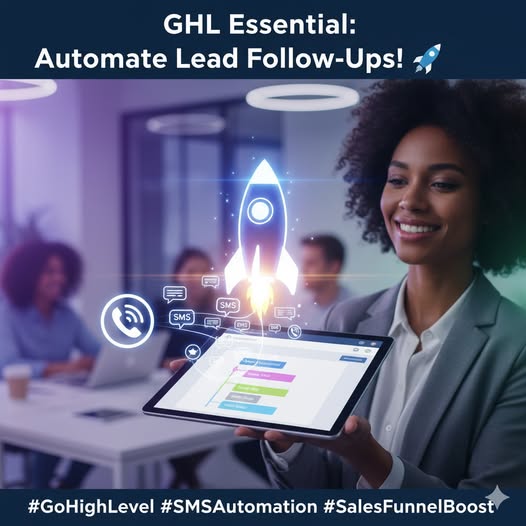
Automate Lead Follow-Ups with SMS in 5 Steps!
Automate Lead Follow-Ups with SMS in 5 Steps! Want to boost engagement? GoHighLevel’s SMS automation instantly connects with leads, with 98% open rates! Here’s how to set up a simple SMS follow-up. Let’s dive in! 1. Go to Workflows Log in → Automations → Create Workflow. Name it SMS Follow-Up. Ready to roll! 2. Add a Trigger Drag a "Trigger" block. Select “Form Submitted” or “Contact Tag Added” (e.g., “Hot Lead”). This kicks off the automation. 3. Insert SMS Action Connect a “Send SMS” block. Write a short message like: “Hey {{contact.first_name}}, thanks for signing up! Reply STOP to opt out.” Keep it compliant! 4. Add a Wait Step Add a “Wait” block (e.g., 1 day), then another SMS (e.g., “Ready for your free consult? Book now. Stack 2-3 messages for a drip. 5. Test & Activate Click “Test” to send a preview to your phone. All good? Hit “Publish” and assign to your sub-account. Watch replies pour in! Pro Tip: Short, punchy SMS with clear CTAs convert best.
2
0

Aug '25 •
Hello
I’m new here and excited to be part of this community! I’ve been exploring GoHighLevel and looking forward to learning from all of you, sharing ideas, and maybe picking up a few tips along the way. Looking forward to connecting with you all
0 likes • Aug '25
@Corinne Audet Welcome to the community! GoHighLevel is a powerful tool once you start exploring its workflows, automations, and integrations. If you share what you’re currently working on or struggling with, you’ll find plenty of people here ready to guide you. Looking forward to seeing your progress

Aug '25 •
Excited to be here
Hello guys! Excited to be here. My name is Danielle Tucker, and I specialize in investing and e-commerce. Looking forward to learning, sharing, and growing with you all.
0 likes • Aug '25
@Danielle Tucker Welcome, Danielle! 🎉 With your background in investing and e-commerce, you’re already well-positioned to leverage AI and automation to scale both faster and smarter. This community is a great place to swap strategies, test new ideas, and uncover growth opportunities that can boost your portfolio and online ventures. Excited to see what you’ll build here!
1-10 of 20

@joshua-elijah-1096
Smart systems, Better conversions, Real growth-driven marketing Expert | Let’s build a client journey that actually works for your business
Active 180d ago
Joined Jul 17, 2025
Powered by