Activity
Mon
Wed
Fri
Sun
May
Jun
Jul
Aug
Sep
Oct
Nov
Dec
Jan
Feb
Mar
What is this?
Less
More
Memberships
Chase AI Community
52.5k members • Free
Lead Generation Secrets
22.8k members • Free
Free AI OFM Course
3.8k members • Free
Grow Channels Community
21.8k members • Free
Content Academy
14k members • Free
GrowthOperator.com
48.5k members • Free
Faceless Creators
11.7k members • Free
Tube AI Masterclass (Free)
8k members • Free
Faceless Films (Free)
4.1k members • Free
5 contributions to Content Academy

Aug '24 •
Sharing my latest production system
I had issues organizing, managing, storing extremely large (10 TB) raw footages, and efficiently pulling them for editors to work on. Sharing my current workflow, in case anyone finds it helpful - I use a NAS and Dropbox for perpetual storage - Gdrive for editorial flow - save corresponding raw footage to folders for editors - each Gdrive folder also has media assets and sounds for each content piece - I Auto rename all files in Dropbox via automations using a set rule (such as date_location_description) - Each content gets a new google drive folder with name of the folder being content ID - As the editor edits the video we will collaborate on Frame.io or other tools - Once content has been produced and published, I DELETE the raw media from that GDrive folder (to save storage space, but the downside here is you cannot easily find the raw files if you have to reedit the video later) What’s your workflow? Would love to discuss! Let’s make our systems better together 🍀
May '24 •
Airtable storage, upload platforms
I saw many of you (including @Stephen G. Pope ) like to attach the video / photo creative to the relevant airtable record (like picture attached). I'm concerned airtable storage will run out shortly. Is there a workaround to this? My current thought process: 1. attach the images for easy approval process, but once creatives/captions are approved, the creatives get automatically deleted (backed up to Dropbox or Google Drive prior) 2. Maybe there's a way to link to google drive or dropbox where it'll show previews? 3. Any better practices? ------------------------------------------------- Another question I have is on repurposing content. When you repurpose content across different social media platforms, you often need different things (for example, tiktok photo asks for 'titles' and 'captions', whereas Instagram post only needs captions, and Twitter has different character limit...) Does anyone have a good operating procedure for planning/logging such differences into airtable? Right now I just have a single select column where I select the platform from dropdown (i.e. if i posted on Twitter, I choose Twitter) Thanks in advance for your opinions and tips!
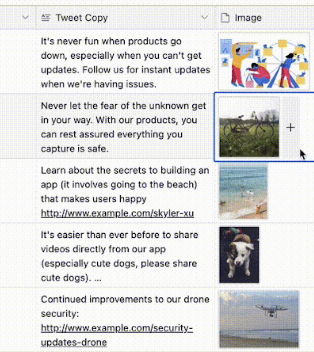
0 likes • Jun '24
@Stephen G. Pope Using the attachments for thumbnails is a great idea! Thanks Stephen, appreciate you.
Apr '24 •
Airtable templates and columns
I need an expert opinion on how best to structure airtables for all content types planned, and how to get it scheduled as drafts into each platforms, reflecting the granular level of details. If I create all formats of contents (carousel, photos, short form video, long form video, short text (tweets), long text (blog), And even for the same platform, you need different items to upload the post (for example, tiktok photo posts need a title and a caption, while a video tiktok upload only needs caption). Also if platforms are different, the link to music needs to be different too (i.e. you cannot use tiktok music on instagram). In this case, if I want to record every content piece into airtable with a reference number, how do I reflect all the granular differences or requirements for best optimized uploads to different platforms? Do I create a separate table (with columns reflecting all items required) for each content format? One table for tiktok videos One table for instagram One table for youtube shorts So on and so forth? Thank you in advance for your answers and responses!
2 likes • May '24
@Stephen G. Pope Hi Stephen, yes, but unfortunately it’s out of my budget atm. So I’m looking to build something I can use in the interim while I save up. My contents are a mix of photo, text, and video, so I’m looking for something to accommodate it all. I’ll gladly take whatever resource or tip you can give me, but if you’d like to gate-keep it for the purchasers, I can totally understand. Thanks always for your content. @Stephen G. Pope
0 likes • May '24
@Stephen G. Pope Thanks Stephen, will take a look
Jan '24 •
Instagram or Tiktok scraping
Has anyone used Bardeen or other similar software to automate data collection on social media? For example, getting all data (username, follower count, 10 most popular posts from reels, deeplink or URL listed in the profile, description of profile... etc) into airtable or google sheets? If yes, would you kindly provide any tools or systems you've used to accomplish this? I have 100's of profile URLs of instagram and tiktok profile I'd like to scrape information of, but doing it manually won't make sense :( Thanks in advance for your responses and comments!
0 likes • Feb '24
@Ben Bender Because I don't have a strong programming skill. Also, wouldn't pulling so many (I'll be pulling thousands of post/profile data) requests on either make.com or Zapier be extremely costly? My understanding was that they charge in proportion to the automations made? Do you personally have experience using the tools you listed to pull massive data for minimal costs? Appreciate your response!

👑
Aug '23 •
Update: New KEDB Version 2 Drops Friday—Save $1,000 (40%)
Hey Everyone, Save $1,000 (40%) on version 2 of the Kontent Engine DB if you pre-order by Aug 17th. Just $1,497 instead of $2,497. I've learned a lot by building (and perfecting) automated content systems over the past 2 years. I've also helped 150+ clients multiply their content output and productivity. Now I've taken all that experience to build version 2—the best version yet of this one-of-a-kind system. What's new? 1) It's quicker to install and easier to use. All thanks to a simpler Airtable interface and better training. We also added more sample workflows, content guidelines, and team SOPs. You can speed up adoption by taking these templates and dropping them into your team. Juan (a client)—recently tripled his content output (from 1 to 3 pieces/day) with 2 fewer video editors (in just 30 days of using the system). You can check out his story and 7 others RIGHT HERE. 2) I also added better support for written content, ChatGPT, and images/graphics. For tweets, blogs, and text posts. 3) We've also made improvements to auto-posting and analytics by switching to Metricool. It's easier to use compared to Ayrshare and it's much more cost-effective. But I'm also raising the price on August 17th because there is so much value here. Even version 1 was vastly undervalued (my clients told me so). But if you BUY NOW you'll get the old price of $1,497 and a FREE upgrade to version 2 when it comes out Wednesday. Act Now: Don't wait or you'll miss the chance to save $1,000 (40%). TAP HERE TO BUY Have any questions? reply back here and I'll give you a quick reply.
1 like • Aug '23
@Stephen G. Pope thanks for the response! Yes would be keen to discuss, I’ve compared many of them in depth and happy to share resources on the call or in this group. Is the call only open to people who purchased the airtable system?
1 like • Aug '23
@Stephen G. Pope cool! What would be the cost for Make and Zapier and any other software costs per month? As Make and Zapier charges for certain #of automations, I want to make sure it’s not costly. For context, I’m trying to upload total 30-40 videos per day, across total 9 social media channels /and brands
1-5 of 5
