Activity
Mon
Wed
Fri
Sun
Feb
Mar
Apr
May
Jun
Jul
Aug
Sep
Oct
Nov
Dec
Jan
What is this?
Less
More
Memberships
Assistable.ai
3.2k members • Free
AI Automation Society
236.2k members • Free
Automation Station Premium
111 members • $97/m
5 contributions to Assistable.ai

23h •
Voice AI in GHL All-in-One Widget
Does anyone now a way to get the Assistable Voice AI inside of the GHL All-in-One Widget?
0 likes • 7h
Update Fields Is there a way to update a Field from the data summarized/extracted from a ChatGPT response? Use Case: The Voice AI Floating Orb does not accurately capture Contact Information (like it does from a Phone Call). I am attempting to send the Transcript through a ChatGPT Action so that I can summarize and extract the information, which I have successfully done. What is the best way to pull that data to update the correct Contact Fields?

Jan '25 •
orb wont update contact name?
I tried a few calls and could get this to work? Just kept my name as orb?
0 likes • 23h
@Chase Fowler I just ran into this issue. Has anyone found a fix?
0 likes • 8h
@Jorden Williams & @Ben B is there a fix/solve for the Orb not capturing Contact information?

Oct '25 •
Orb Assistance
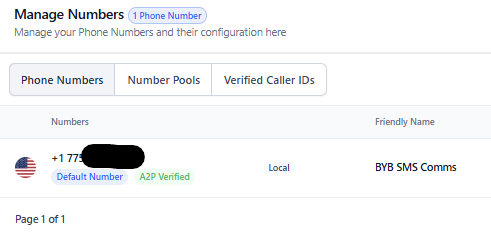
I have an orb installed on a website. The current GHL snapshot has an LC number that we use for sms automations. It's A2P verified. I was able to import that number and use it with my AI Assistant to book an appointment via SMS but when trying to do the same via the website orb, I keep getting an "Error with contact details" and the web voice call can't seem to book the appointment on the calendar. Do I need to buy a different phone number on the Assistable side or can I use the LC number already in use on the GHL side? Trying to solve the "issue with contact details" when using the orb.
0 likes • 23h
Has anyone found a fix for the Orb not capturing Contact Info?

Dec '25 •
Update User Details Not Working - Support Did Not Help
I have tried 10 different ways to get my voice bot (Orb) to create a contact and book the appointment. It has only worked ONCE. I spoke with support and they were not help and never go back to me. Here is my prompt: ##SCHEDULE CALL 10. You are to get them to schedule a REAL call with Isaac to learn how they can get Roxy. We are currently taking on 10 new companies under the beta pricing. a. Collect: first name, last name, phone, email, and time zone. Call the tool update_user_details to save the information. -Always confirm phone -ALWAYS ask them to spell out their email and then repeat it back SLOWLY, ensuring phonetic clarity. Example: "for your email, did i get it right as m-a-d-h-u-r-j-y-a at g-m-a-i-l dot c-o-m?" b. Ask them for their preferred date and time for the consultation, and use the get_availability tool to confirm the slot is open. c. Once a suitable date and time are found, use the book_appointment tool to schedule the consultation. d. If you schedule the consultation use the appointment_requested tool to add a tag to the contact.
0 likes • 23h
Has anyone found a fix?
1d •
Floating Orb
I have an agent that is capturing all of the data/fields correctly when calling to/from the associated phone number. However, the Floating Orb is not capturing the Contact Information (ID, Name, Phone, Email). Anyone else having this issue or have a fix for it? Thanks.
0
0
1-5 of 5

@gabe-ross-8550
Co-Founder at Personify. Husband & Dad to 7 Kids.
Active 21m ago
Joined Dec 15, 2025
Powered by