
Write something
Pinned

Mar 15 •
Welcome to Clief Notes. Here's where to start.
1. Watch the intro video and introduce yourself in the intro post here 2. Start with The Foundation (free course). Concepts, folder architecture, prompting framework. Everything else builds on this. 3. Check in at the bottom of each lesson. Polls, discussion posts, other members working through the same stuff. Use them. 4. When you're ready to build real things, move to Implementation Playbooks (Level 2). When you're ready to build your own tools, Building Your Stack (Level 3). 5. Post your work. Ask questions. Help others when you can. What are you here to build?
Poll
4331 members have voted
Pinned
3d •
🌶️ CINCO DE MAYO FIRESALE — STARTS NOW 🌶️
Locked in for the next 5 days only. Ends May 5th at 10:00 AM EST. No exceptions. 🎉 Premium: $27 → $14/mo 🎉 VIP: $97 → $67/mo The closest you'll get to our original launch pricing. We're doing this because the community has shown up for us, and we want to show up back. 🤝 🔥 Already a member? Read this carefully. To lock in the new rate, you need to: 1. Cancel your current plan 2. Resign under the new price That's the only way the system can apply the new rate. We have way too many members for manual refunds, so we can't refund anyone who just signed up at current pricing. But the savings stack month over month, so if you plan to stick around (and you should 😁), the math works out fast. 🚫 A few ground rules: Please do not DM myself or Jake about pricing, exceptions, or extensions. We love you, but we're a small team and we need to stay focused on building. Everyone gets the same window. Everyone gets the same deal. If you miss it, you miss it. We'll do more things for the community down the road. ⏰ The clock: 🟢 LIVE NOW 🔴 Locks May 5th, 10:00 AM EST - Premium gets you The Vault and Afternoon Tea calls. - VIP gets you The Drawing Room, High Tea, and bespoke folder builds from Jake himself. If you've been on the fence, this is the moment. 🚀 Tag a friend who needs to be in here. Let's make Cinco a movement. 🎊 🌶️🌶️🌶️

11d •
Mini-Series Part 2: The "Token Crash" & The Keyboard Epiphany
In Part 1, I was riding high. I had Chrome, Edge, and Firefox all running simultaneously, tripling my speed on a massive D365 rebilling project. I felt like I’d cracked the code to being "efficiently lazy." Link: Mini-Series Part 1: The "Manual Hell" Rebill Project · Clief Notes But the victory was short-lived. I was driving the car at 100mph, but I didn't realize how much fuel I was burning. The Crash: 3 Hours to Zero The next morning, I fired up all cylinders. It was beautiful—until it wasn't. In under 3 hours, I burned through my entire token allotment. I was dead in the water with a 1.5-hour wait until my limits reset. With the clock ticking and sales reps still needing updates, I had to go back to doing it manually. And that’s when the "Aha!" moment happened. The "Tab" Breakthrough While I was clicking and typing manually to pass the time, I realized something: I wasn't really using the mouse. I was mostly hitting Tab and Shift-Tab to navigate the D365 fields. I asked Claude: "Can Playwright just 'Tab' through the browser instead of searching for elements and taking screenshots for every move?" Claude’s answer: YES. My jaw dropped. From "Visual Driving" to "Macro Speed" The old workflow relied on Claude "seeing" the screen via screenshots to make sure it was in the right spot. It was accurate, but heavy. I had Claude rewrite the interior workflow to a deterministic loop: 1. The Setup: I open the URL, set the filters, and select the first row. 2. The Loop: * Tab to Invoice → Enter. 3. Repeat. I added small buffers (100ms between tabs, 4s for page loads) to ensure D365 could keep up. See the video for how the flow runs in real life! The Result: 90% Savings & 10x Efficiency I asked Claude to evaluate the two methods. The numbers were staggering: Old "Visual" Flow: - Tool Calls: ~500 calls per 50 orders - Token Usage: 100% (High Burn) - Logic: Screenshot-dependent (Slow)

3h •
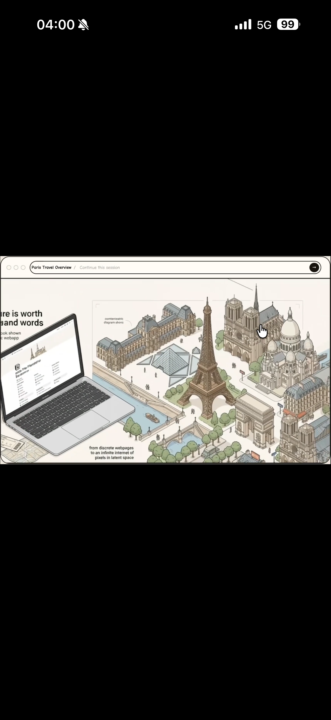
This made me rethink how we design interfaces
I ran into something recently that kind of messed with how I think about interfaces. It’s called “Flipbook” — instead of clicking buttons or filling forms, you just explore by clicking into an image. Every click generates a new visual. No UI in the traditional sense… just navigation through meaning. Addy Amani shared it here:👉 https://www.linkedin.com/in/addy-amani/ It made me realize how much of what we build is still “input → output” when maybe people understand things faster when they can see them instead of filling them out. Not saying this replaces anything yet… but it definitely made me pause. Feels like there’s something here.

🚀
⭐
Mar 2 •
Who's here? Drop your intro.
Tell us three things: 1. What you do (job, industry, student, career-changer, whatever) 2. What brought you to Clief Notes 3. One thing you're trying to figure out right now related to computing or AI I'll respond to every single one. And read each other's intros too because the person who's stuck on the same problem as you might already be in this thread. I'll go first I am Jake, I have been working in tech for 15 Years, building with Generative AI for 3 Years straight now! Excited to teach and learn! That's it. Simple, scannable, gives you data on who's joining and what they need, and keeps the feed clear for content that retains people past week one.
1-30 of 935

skool.com/quantum-quill-lyceum-1116
Jake Van Clief, giving you the Cliff notes on the new AI age.
Leaderboard (30-day)
1

+775
2

+721
3

+456
4

+397
5

+385
Powered by