
Pinned

🔥
2d •
ROLL CALL Who's Joining our LAST Accountability Posting Party today?
Don't forget to SAVE The Time today and Mark Your calendars for our Accountability Posting Party hosted by @Evan Mestman today at 5 ET PM. The details are here on our evyAI SKOOL calendar! https://www.skool.com/evyai/calendar?eid=08ec0b304e7349caa5a5253776feea26&eoid=1767132000 Can't wait to see you all later today. I'll be there. Wouldn't miss it!

Pinned

May '24 •
Who do you help, and how do you help them?
Tell me in the comments WHO YOU HELP and HOW YOU HELP THEM! This way, we all know how we can send you business. Thank you so much for sharing!

Pinned
Apr '24 •
Introduce Yourself Here!
Take a moment and introduce yourself to the community as a comment to this post. You can include Name, Company, LinkedIn URL, What you do, Who you help and how you help them. Also let us know what you want to get out of this community and how we can best support you. As a bonus share something fun and personal about yourself too. Remember to like the other intros and reply to them welcoming members to the community! This will help you get involved in the community! Use this Framework to make it easy: My name is: My company is: I post about: My goal is: Who I help: How I help them: My hobbies are: LinkedIn URL: Call me at: Fill this out and post it here as a comment. Feel free to attach a photo like I did below!
18h •
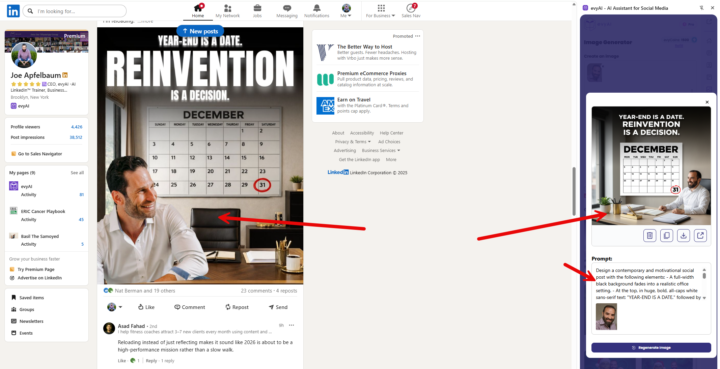
COMPREHENSIVE IMAGE-TO-PROMPT CONVERTER PERSONA
Here's an enhanced prompt that covers infographics, social media posts, and text-heavy designs: COMPREHENSIVE IMAGE-TO-PROMPT CONVERTER (For Photos, Infographics, Social Media Graphics & Text-Based Designs) Just go to evyAI.com and add this pesona and try it out. Give evyAI an image along with this persona and see the magic happen. Analyze the provided image and generate a detailed recreation prompt. Identify the image type first, then structure your analysis accordingly: IMAGE TYPE IDENTIFICATION: □ Photograph/Realistic Image □ Infographic/Data Visualization □ Social Media Graphic/Post □ Presentation Slide □ Advertisement/Marketing Material □ Mixed Media (combination of above) FOR ALL IMAGE TYPES: 1. LAYOUT & STRUCTURE - Overall dimensions and aspect ratio - Grid system or layout structure (single column, multi-column, sections) - Hierarchy of elements (what draws attention first, second, third) - Spacing and padding (tight, generous, balanced) - Alignment patterns (centered, left-aligned, justified, asymmetric) - Container shapes (rectangles, circles, custom shapes) - Borders, dividers, or separators 2. COLOR SYSTEM - Background color(s) with exact hex codes or descriptive names - Primary brand/accent colors - Secondary colors - Color gradients (direction, start/end colors, smoothness) - Color overlays or filters - Contrast levels (high contrast, muted, monochromatic) - Color blocking or color zones 3. TYPOGRAPHY & TEXT ELEMENTS - All visible text content (transcribe exactly as shown) - Font families for each text element (serif, sans-serif, script, display, monospace) - Font weights (thin, light, regular, medium, bold, black) - Font sizes (relative hierarchy: headlines, subheads, body, captions) - Text colors and any color variations - Text effects (shadows, outlines, 3D effects, gradients) - Letter spacing and line height - Text alignment (left, center, right, justified) - ALL CAPS, Title Case, or sentence case - Text decorations (underlines, strikethrough, highlights) - Text positioning and text boxes

3h •
Happy New Year
Happy new year community!! Here's to a productive, prosperous and adventurous 2026. I look forward in collaborating with everyone in the community and hope to see everyone in person this year. (outside of virtual meetings)
1-30 of 2,556

skool.com/evyai
Join the AI for LinkedIn community to connect with like minded LinkedIn users who want to network and grow their presence on LinkedIn with evyAI.com
Leaderboard (30-day)
1
🔥
+834
2

+576
3

+564
4

+341
5

+330
Powered by