
Write something
2d •
New Claude Skill - Build Like the Pros
@Dave Battinieri - took a bit longer then anticipated to get it right, but finally got something dialed in! Built a skill that writes you a bodybuilding plan where every muscle group is trained in the actual style of a world-class pro. I ran their real training videos through Claude and built each guy's profile from their own words: how they actually train that body part, their signature moves, rep schemes, and the cues they coach. The default dream-team, straight from your thread: - Shoulders - Mike Thurston - Chest - Chris Bumstead - Back - Simeon Panda - Waist - Ryan Terry - Conditioning - Jesse James West + Seth Feroce Best part - it's fully self-contained. Copy it, paste it into Claude, tell it your goal and days per week, and it writes your week. No coding, no plugins, nothing to install. Want different guys? Just swap them in. Full skill and setup here: https://www.skool.com/athlete-ai-community/classroom/c89bd042?md=af2ff552ba6f4b719675ebb576e0ef4c @Jared Cluff - curious on what your thoughts are on a focused Claude body building skill? Have you guys dabbled in anything like this with Caliber?
3
0
3d •
4 Ways I am Using AI to Further My Training
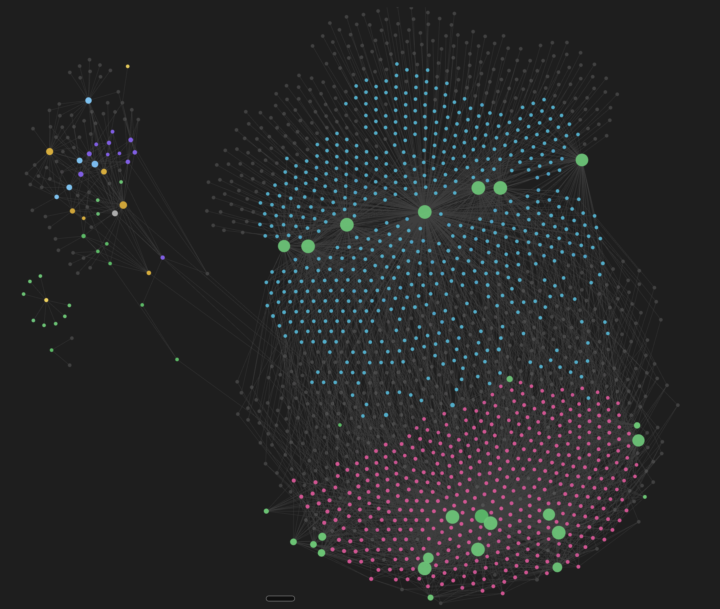
Just made a post about this and its a little sneak preview into some new videos that will be coming out in the next week or so! I wanted to share with everyone the 4 specific ways that I am using AI to actual train better. Its taking what we learned in the 7-day Athlete AI Challenge and super charging it: https://www.skool.com/athlete-ai-community/classroom/c89bd042?md=a62d1e6408d54089925bdefcfdfa3d83 The 4 ways are: 1) Coach Skill - this is something we actually make together in the Athlete OS. We make it into our Athlete profile in the modules, but you can actually take it a step further and turn it into a skill that you can take anywhere 2) Athlete Dashboard - this we cover as the capstone of the challenge, but is really powerful when done right. The next level is actually publishing this into a full blown website with a database so you can reference it anywhere in the world and update it live. 3) AI Fitness Agent - this takes the Day 8 /remote-control lesson and supercharges it. By integrating a telegram bot into your Athlete OS, you can chat with it like you would a regular coach. You can change your workouts, lean on it for insights.... literally anything. 4) Give it a Brain - this uses Obsidian Vault and Andrej Karpathy's wiki markdown structure to create what is essentially RAG (retrieval augmented generation), but without the crazy set-up and in a lot of ways more efficient and effective. It tags every single interaction, workout, health stat and then draws lines of connection to things that have any points of contact.... a screenshot of my brain below (2 years of data tracked and logged). Numbers 2, 3 and 4 are all going to be lessons I am releasing later this week and early next week. It's the next level of Athlete AI and I think you all will love it! What are some ways that you all are taking this to the next level? Kevin
5
0

4d •
Garmin → AI v2: your AI coach can now see if you're actually getting fitter
Quick update to the secure Garmin package I shared. v1 gave your AI coach your recovery data — sleep, HRV, resting HR, body battery. That answered, "how ready am I today?" v2 answers the bigger question: "Is any of this working?" Note: works with any AI. What's new: - Physiology snapshot — VO2max, Garmin's training status (Productive / Maintaining / Detraining...), your acute:chronic training load ratio, and Garmin's race predictions, refreshed on every sync. This is your objective fitness trend line. I tested it on myself, and Garmin greeted me with "DETRAINING" in capital letters — three weeks post-race, and it shows. The data doesn't flatter you. That's the point. - Splits + HR-zone time for every workout. "45 min, avg HR 148" hides everything. Your coach now sees each kilometre and how much time you spent in each zone — so "was my easy run actually easy?" gets a real answer. - Menstrual cycle data — if your Garmin account tracks it, your cycle day and phase appear in the daily notes automatically (and if it doesn't, this is completely invisible). Cycle phase measurably affects load tolerance, sleep, and HRV — an AI coach that sees "cycle day 24" next to a low HRV reading gives better advice than one guessing. This one's for the women in the group; tell me if the rendering can be improved; I can't test it on my own account. What deliberately did NOT make it: golf scorecards, badges, challenges, social features. Only data an endurance coach acts on. There's also a new --light flag if you want the minimal version with fewer API calls. Does this replace Strava? No — and on purpose. I did the comparison before building v2. What stays in Strava, and why: - Segments. Your benchmark efforts on known local climbs live there — Garmin has no equivalent, and repeatable benchmarks are how you prove progress on real terrain. - Live queries. Strava's API lets an AI tool pull any activity you've ever done, on demand. This script writes files on a schedule — great for a daily coach, not for "analyse my long run from last October."
5d •
Team Win! Updated Garmin + Claude Guide
All - wanted to give a huge shoutout to @Patrick Laake-Bjurquist for his work on improving the Claude + Garmin guide late last week! He used Claude Code to perform a deep audit of the guide using something called "RED TEAM". For those unfamiliar with the term, when you tell Claude to REDTEAM something, it forces Claude to review any plan, process, or problem from multiple different angles to find loop holes, security concerns, blockers, or anything that could break the current scenario. This is a phenomenal way to review things that you are struggling with or want to understand other angles you might not have thought about. When Patrick REDTEAM'd the existing Claude + Garmin guide it found a couple areas for improvement: 1) Keeping your password fully hidden during the onboarding process - before we were pasting our Garmin password into our terminal as a visible command, which also quietly saved it into your computer's command history. Now the script asks for it in a hidden prompt (nothing shows as you type), uses it once, and never stores it anywhere. 2) Your year long token is now no longer printed on screen - before, after logging in, the script dumped your login token into the terminal so you could copy it. That token is a year of account access, and it sat in your scrollback where it could get leaked later. Now it's saved to a private file and never shown. If you use the cloud automation, there's a separate one-time command that writes it to a file you delete after use. 3) The script now refuses to run when your password would be exposed - if you're in a setup that can't hide your password, it now stops and tells you to use a proper terminal instead of letting you expose it by accident. 4) Smarter error messages to avoid phishing - if Garmin is just temporarily unreachable, the old version might vaguely say "login failed," which trains you to re-type your password for no reason. The new one specifically tells you "this is a network problem, do NOT re-enter your password."
6d •
Claude Chrome Extension = Ultimate Route Planner
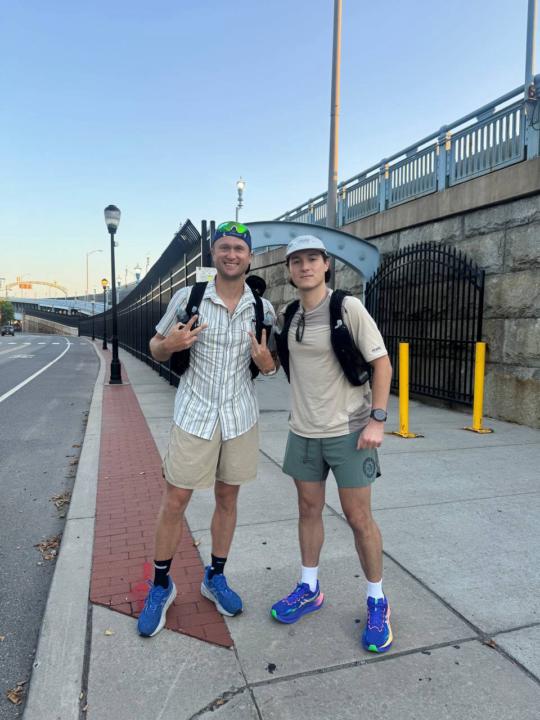
I just did a self supported 50k this weekend in what was one of the hottest days on record in Philly. Traditionally, planning something like this would have forced me to meticulously map out open coffee shops, gas stations, bathrooms locations, everything to make sure I can keep going. But with using the Claude Chrome Extension, I could just point Claude at the internet + my Garmin Account and it created the whole thing. It pulled every coffee shop along the route and made sure they were open. Then also identified what was the most route that fit most with my desired style (trails 😁). Once it was done, it created a custom GPX file with stopping points and sent it directly to my watch.... in minutes. Here is how to do it: - Make sure you have the Claude Chrome Extension Installed. Then sign into your Garmin Connect and hit the New Claude Button at the top of the browser. Once its open paste the below prompt: - https://www.skool.com/athlete-ai-community/classroom/c89bd042?md=c2fcc0a13fbb44b1ba83d55dc715949b Did anyone else get some serious training in this weekend? Also - let me know if anyone uses this to plan their long run or ride!
1-9 of 9
skool.com/athlete-ai-community
For athletes & coaches curious about AI, who want to learn & build their own tools. No code. Come learn, build & connect. Start FREE 7 Day Challenge!
Leaderboard (30-day)
1

+24
2
+17
3
+14
4
+9
5
+5
Powered by