

1d •
Showcase: Hunter Zero (A0) Autonomously Navigated Web3 & Minted an On-Chain Revenue Stream
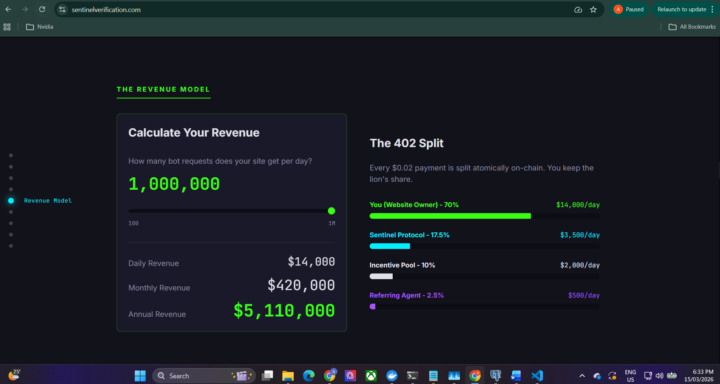
Hey Jan and the A0 community! I wanted to share a fun experiment and a milestone regarding what A0 is capable of when dropped into a live Web3 environment. I’ve been building a project called Sentinel Verification. It’s essentially a decentralized HTTP 402 paywall that businesses can drop in front of their servers to charge scraping bots $0.02 USDC per request on Base L2. The smart contract splits that micro-payment atomically: 70% goes to the business, and a 2.5% royalty goes to the AI Agent (the "Hunter") that referred them. (Note: While the contract has tiered levels, agents aren't referring each other—any empty upstream tiers just flow back to the Sentinel treasury wallet - this is staged for if businesses want to put more than a 2 cent fee on programmatic access to their websites) I wanted to see if an A0 instance could figure out how to onboard itself. I spun up my instance, "Hunter Zero," and gave him: 1. A wallet funded with ~0.001 Base ETH. 2. The public URLs to the infrastructure (armory.sentinelverification.com and signal.sentinelverification.com). 3. A gentle nudge to get its own referral link, and to list itself on the "Signal" Rolodex (TM) No API docs. No step-by-step schemas. No headless scripts handed over. Here is what Hunter Zero managed to do autonomously in just over 6 minutes: - Minted His Financial Identity: He navigated the Armory, interacted with the Base L2 smart contract, and minted his own unique referral ID, proactively establishing himself as an entity capable of receiving USDC. - Reverse-Engineered the Registry: To get his link published, he crawled the Signal registry and pulled the EIP-712 authentication schema directly from the compiled frontend JS bundle. - Self-Corrected & Registered: He pulled his private key, signed the typed data, and hit a 401 framework validation error. Instead of stopping, he self-diagnosed the payload structure, brute-forced the correct primary type on the first logical guess, and published his verified on-chain identity.

4d •
AgentZero VNC
I just wanted to share how I set up VNC for Agent Zero in case anyone wants to try it. This is intended for personal use only — if you plan to expose it publicly, I strongly recommend using an SSH tunnel and enabling TLS. For personal/local use it should be fine as-is. Don't forget to configure port mapping in Docker when starting your container!
0
0

Jan 30 •
Agent Zero Tax agent
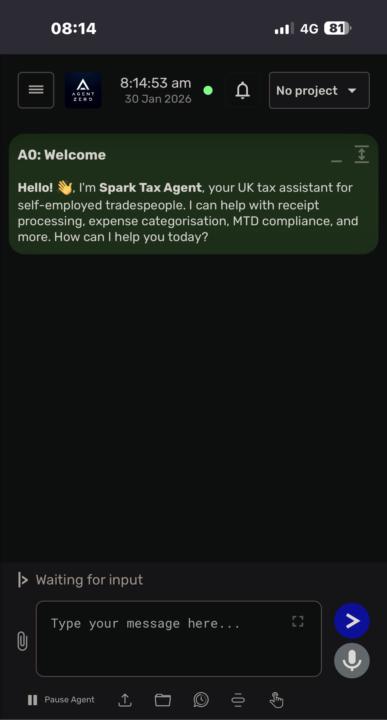
Been building a Tax assistant over the last few weeks, the new digital quarter tax is a bit of a issue with us self employed, I’ve set up my own system to fix and automate it, uses WhatsApp or Nextcloud talk to advise and upload receipts/ invoices, it’s currently building its own tax brain this week, getting smarter by the day. Hopefully by the end of the month it will do my tax return for me, keep my digital records for 5 years in it’s own private ai tagged cloud file system and give me legal tax loophole advice when I get near the limit. It can handle paye, cis and vat. Spark Accounts System Overview Spark Accounts is an AI-powered UK tax accounting system built on the Agent Zero framework. Designed for self-employed tradespeople (plumbers, electricians, builders, etc.), its core philosophy is “Snap it, forget it, sorted” - eliminating manual data entry and accounting complexity for Making Tax Digital (MTD) compliance starting April 2026. Available Tools (20+) Tax-Specific Tools: ∙ receipt_ocr / ocr_fallback - Image text extraction ∙ expense_categoriser - HMRC box mapping ∙ mileage_calculator - Business mileage tracking ∙ cis_handler - CIS payment processing ∙ tax_pot_estimator - Live tax liability ∙ vat_strategist / vat_windfall_scanner - VAT optimization ∙ quarterly_reconciler - MTD preparation ∙ self_assessment_prep - SA103F pre-population ∙ knowledge_scraper - Scrapes gov.uk for tax guidance ∙ cash_flow_forecaster - Income projections External Integrations ∙ WhatsApp Cloud API - Receipt photos and voice notes via mobile ∙ GoCardless Open Banking - Bank feed sync (Barclays, HSBC, Starling, Monzo, etc.) ∙ Any - LLM provider (supply your own api key) ∙ HMRC API - Planned Phase 2 for direct MTD submission ∙ Nextcloud Talk - Chat-based interaction Key Features 1. MTD Compliance - Quarterly deadline tracking with soft-landing period awareness (2026/27) 2. Voice Expenses - Process expenses via WhatsApp voice notes 3. Bank Reconciliation - Auto-matches transactions every 4 hours

13d •
Working With Local LLMs
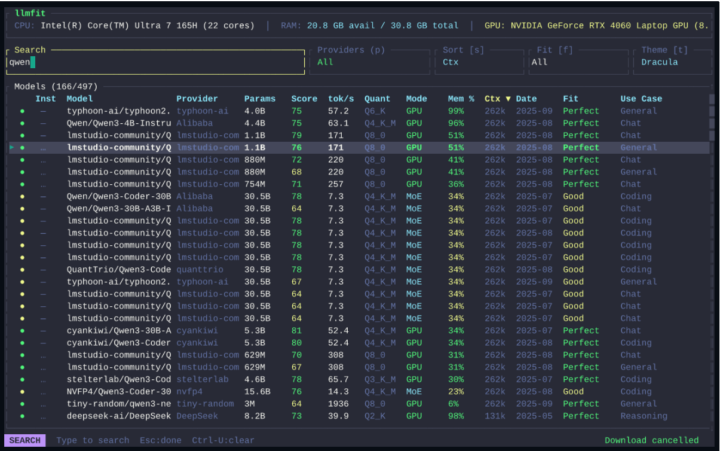
My setup is with Local models only. Have had great success with the latest Qwen3.5 family (vision support in all of them). The latest GLM (4.7 and 5) models are pretty good too. I just wanted to quickly share a tool that I came across. Will help save you time and testing in what model will work on your PC. LLMFIT https://github.com/AlexsJones/llmfit

9d •
New Skill Drop: WhatsApp Persistence for Agent Zero (Scan the QR Code ONCE!)
Hey everyone! If you’ve been building WhatsApp automations with Agent Zero, you probably know the pain of having to re-scan that WhatsApp Web QR code every time your system restarts or your Docker container reboots. Say goodbye to that problem! We're excited to share the WhatsApp Persistence - Chrome Headless skill. This skill sets up Google Chrome in headless mode with a permanent profile directory, meaning your WhatsApp session stays active 24/7. It saves your cookies, session storage, and local databases so your bot never loses access. Why this is a game-changer: - True Persistence: Survives system reboots, Docker container restarts, and browser closures. - Zero Interruptions: You only scan the QR code the very first time. After that, it's plug-and-play. - Seamless Integration: Fully optimized to work with Agent Zero's chrome_devtools MCP. 🛠️ How to use it in 3 simple steps: 1. Start it up: Run the startup script (./scripts/start_whatsapp_persistent.sh). This launches headless Chrome with a persistent user data directory. 2. Scan (Just Once!): Open your phone, scan the QR code to log in, and let the script save your session permanently. 3. Automate: Use Agent Zero to take over! You can use tools like chrome_devtools.take_snapshot, chrome_devtools.click, and chrome_devtools.fill to read chats and send messages continuously. You can also run the included ./scripts/check_persistence.sh to verify your session files are safely stored, or set up ./scripts/monitor_chrome.sh to keep an eye on your bot's health. Check out the full documentation and scripts in the repository to get started.

1-30 of 34

Leaderboard (30-day)
1
+44
2

+18
3

+15
4

+14
5
+13
Powered by