Activity
Mon
Wed
Fri
Sun
Nov
Dec
Jan
Feb
Mar
Apr
May
Jun
Jul
Aug
Sep
What is this?
Less
More
Non-Fiction Author Lab
1.1k
Free
157 contributions to Non-Fiction Author Lab

Jul 27 •
How to give proper attribution for photos in your book
I use photos from DepositPhotos.com in some of my books. However, I’ve never been totally sure how to give proper attribution for the photos. What is the correct way to do this? Is it enough to say the following in my copyright notice? “All images used in this publication have been licensed, purchased, or obtained from sources that permit commercial use.” ….OR….“Images are royalty-free for commercial use.” ....OR....is there some other way to word this that would be better? OR do you write the name of each Photographer's Nickname underneath each photo like this "Photographer's Nickname/DepositPhotos" OR do you write the name of each Photographer’s Nickname/DepositPhotos with the page number of their photo in the copyright notice? I’ve asked Amazon about this and they said I could do any of the above, but I wanted to double-check that information. @Elissa Graeser @Kate Duncan

1 like • Aug 4
@Barb H Sorry to have missed your tag last week! Thanks for tagging me in again. 😊 I would say that it sounds like your images are decorative, so in that case, I wouldn't worry about including image credits below each one—instead, yes, a copyright page credit is totally fine! I think you're all set to go with your current draft ("All images used in this book are licensed from DepositPhotos under a Standard License that permits commercial use.")—no need to worry about the "royalty-free" language or anything else. Since they don't require a credit line, you can really say whatever feels most appropriate to you, provided that it's accurate. And just so you're not worrying, I want to reassure you: Since DepositPhotos doesn't require a credit line, that means that no one does and there's really no huge pressure to get this perfect! Including this credit line is really just about looking professional, nothing more. As for how to write the company name, again, I wouldn't stress about it, but generally the Chicago Manual of Style recommends that one uses the styling that the company itself uses, so in this case, that would be DepositPhotos (or depositphotos.com). That being said, it's definitely no big deal, so if a different styling feels more appropriate to you, that's fine!
0 likes • Aug 5
@Barb H Of course! Tag me in any time 😊

Aug '25 •
Book Cover Warnings
There are some common issues that come up when it comes to images on book covers ... sharing so you know!
4 likes • Aug 4
@Joe Tyndall You should be all set with Libre Cason Text! Unfortunately, though, Helvetica Neue is not free for commercial use, and its license is actually quite expensive. I would recommend finding a different font for your final formatting. I know Helvetica Neue is iconic, but there are so many other gorgeous fonts out there—I'm sure you'll find something else that you love! As for the screenshots, I want to make sure that I understand. If you're saying that you're currently using screenshots from an outside source as is, then unfortunately, I would recommend swapping those out as well. If that outside source is copyrighted (which is almost always the case), then you would need permission to reprint those materials, and getting permission can be difficult and time-consuming. Screenshots are also likely to be lower-quality images, so even if they look nice on your screen, they might not print well in your final published book. Thus, if you have the ability to re-create the images, that's a win-win! Not to mention that that might give your book a more interesting unique touch since your images will be yours alone. :) I know that these things are a little tedious, but it's great that you're so on top of them!

Jun 3 •
Collecting testimonials & reviews
Quick question for the group — where do you send people to leave reviews for your book? I always assumed readers could only review on Amazon if they bought it there. Is that right? And what platform do you recommend for collecting as many reviews as possible in one place?
1 like • Jun 5
@Owen Bergman Unfortunately, yes, you do—here are the terms! But if someone doesn't qualify to review on Amazon, they can still support you by posting their review elsewhere 😊 Most sites do require users to create accounts or validate their identity in some way, but it really is just to keep out bots, like you say. Barnes & Noble has users confirm their emails, for instance, but as far as I recall, it doesn't subscribe them to an email list or anything—or if it does, it's super easy to unsubscribe! As for how to get reviews on different platforms...exactly the same way you get them on Amazon! If you do want to encourage people to post reviews to a specific platform, you can share the link to your book's pages on Goodreads, Storygraph, etc. the same way you would share your book's Amazon link. :)
4 likes • Jun 5
@Cynthia Moore Amazon does display Goodreads ratings now, yes! That's specifically the numerical/star ratings a book has received. They do NOT currently display reviews across platforms, so if you want Goodreads reviews to appear on Amazon or vice versa, readers have to post them to both sites (which is allowed, by the way!). 😊
May 8 •
What Should Go in the Front of Your Book?
Most authors don’t lose readers in Chapter 3. If they even managed to sell someone on buying their book, they often lose them before Chapter 1 even starts. I just recorded a breakdown of something almost no one talks about when it comes to writing a nonfiction book: the front matter of the book! The title page, copyright page, dedication, table of contents, introduction… all the stuff people either copy from other books or throw in because they think they’re supposed to. Think about each page strategically. Those pages are doing more work than anything else in your book. They’re where a reader decides: - “I’m in”or - “This feels like every other book I’ve seen” If someone opened your book and only read the first 10 pages… would they be hooked or gone? Watch the video and then come back here and tell me one thing you’re changing 👇
2 likes • May 15
@Sharon Foster That particular clause in KDP's rules is a great flag, but according to ALLi (who contacted KDP to clarify the rule), it's just intended to prevent bad actors from releasing books that are intentionally missing content and directing readers to exchange their personal information to receive the remaining content. It's possible that was what the user you saw had done! If you find the comment again, though, glad to look into it further. Here's the ALLi article with more information: https://selfpublishingadvice.org/amazon-rules-for-authors/ Hope that helps! 😊

May 6 •
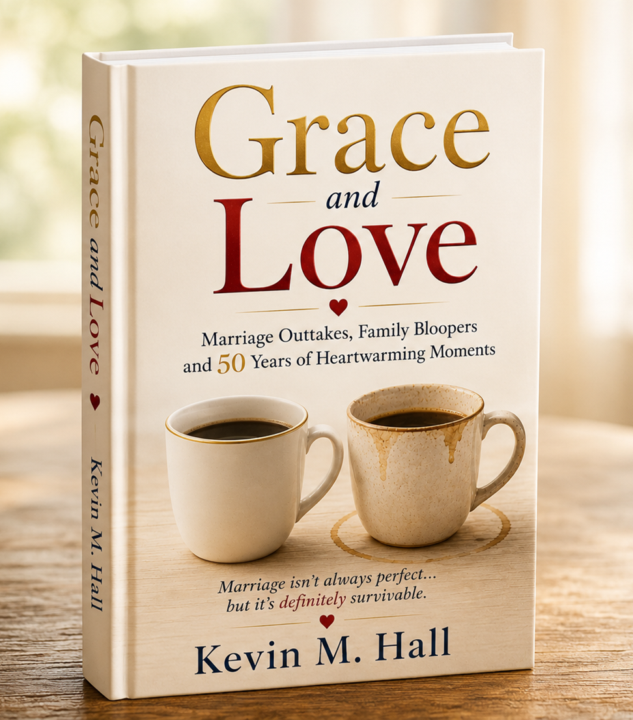
We are getting closer to a final cover design - let me know your thoughts.
Here it is - the latest Grace and Lover book cover design. I have taken a lot of feedback into consideration to create this version. Let me know your honest thoughts. Much appreciated.
2 likes • May 7
I love it!!
1-10 of 157
Active 12d ago
Joined Oct 16, 2024
Powered by