Activity
Mon
Wed
Fri
Sun
Apr
May
Jun
Jul
Aug
Sep
Oct
Nov
Dec
Jan
Feb
Mar
What is this?
Less
More
Owned by Tonia
Work With Cats Podcast Devoted to Exploring Careers With Cats!
Memberships
Bible in a Year | Movie 🎬
752 members • $1/month
Carline Dad Codes
47 members • Free
Resolve School
204 members • Free
Spiritual Beekeeping
273 members • Free
Skoolers
189.9k members • Free
7 contributions to Resolve School

18d •
📅 Feb 16th - MONDAY RESET: TRY ONE NEW THING
Editing can easily turn into “just get it done.” Another timeline. Another export. Another round of fixes. So here’s the nudge for this week: Try one new thing in Resolve. Not because you need it. Not because it’s efficient. Just because it’s interesting. Find a tutorial you’ve never tried. Test a feature you normally ignore. Experiment with an effect you’ve been curious about. Learning keeps editing from feeling mechanical. And sometimes the thing you try “just for fun” ends up becoming part of your real workflow later. COMMUNITY SHARE If you try something new this week, drop it below: • What tutorial did you follow? • What feature did you test? • What surprised you? Link it if you want. Let’s build a thread we can all pull ideas from. WINS FROM LAST WEEK @Benjamin Lanin built a custom arrow in Fusion after following a tutorial, even though he usually avoids Fusion because it can turn into a rabbit hole. @Neil Dasgupta committed to setting a clear editing goal for the next couple of months to stay accountable in his learning. Trying. Showing up. Taking one step forward. That’s real progress. THIS WEEK INSIDE RESOLVE SCHOOL Nothing heavy scheduled. No live calls. Later today, I’ll post a separate thread with three film frames you can vote on. I’ll recreate the winning look (color grade), record the process, and share the PowerGrade so you can experiment with it yourself. Keep an eye out for that post and cast your vote.


1 like • 17d
@Andrew Farmer yes
1 like • 17d
@Andrew Farmer Ill try this and share my first try
26d •
Saturday check-in 👋
Curious what everyone’s in the middle of right now. What are you editing this weekend, where did you get stuck this week, or what finally clicked in a project that used to slow you down? I've been blasting through some "overdue" edits I've been pushing off this week, so I've been a bit quiet here in the community. Drop a quick update below. If you want eyes on something specific, say so.

1 like • 26d
This weekend I've been backing up my computer and updating and changing how I store things. Adding some backup drives and trying to reset where I store these different media files so I can continue doing future projects. That part I never did correctly so I'm trying to reset my system.
1 like • 26d
@Andrew Farmer I think what was happening was I had this older hard drive with all my video project files on it and then it stopped working with all my stuff on it. I might have someone try to fix it but but I need to move forward so my husband got me a thing to hold all my bigger drives in like a case. I’m sorry I don’t know the verbiage and then I reformat at them all and I’m trying to start over because stuff was everywhere and every time I go to work on a video file it comes up with like error codes on where to save all these different options and I just my head was Spinning. It’s like interrupting my workflow so I needed to resolve this.
Jan 28 •
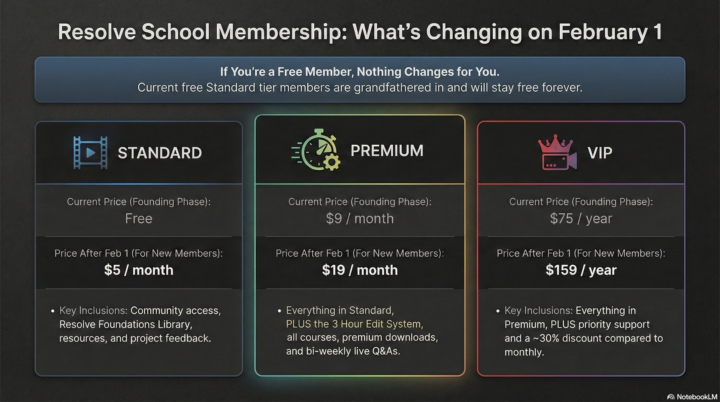
How Resolve School Is Structured (and what’s changing on Feb 1) 🚀
I want to take a moment to clearly explain how Resolve School is structured right now, and what will change when the 3 Hour Edit System officially launches on February 1. This post isn’t about pushing anyone to upgrade. It’s about clarity, so you can decide what makes sense for you without pressure. FIRST, THE MOST IMPORTANT THING TO SAY UP FRONT: If you joined Resolve School for free and are currently on the standard tier, nothing changes for you. You are grandfathered in and will stay free forever. There’s no requirement to upgrade, now or later. Everything below applies to new members joining after February 1, or to existing members who choose to upgrade. How Resolve School is set up right now (founding phase) At the moment, there are three tiers. Standard (free for founding members). This is the community foundation. It includes: • Full access to the Resolve School community • The Resolve Foundations Library • Tools and resources • Sharing projects for feedback • Commenting, discussion, and collaboration with other members This tier exists to make Resolve feel less intimidating and help beginners build confidence. Premium (founding price: $9/month). Premium is where structure and systems live. It includes everything in Standard, plus: • Full access to the 3 Hour Edit System • All current and future classroom courses • Downloadable presets, templates, and LUTs (premium-only) • Bi-weekly live Q&A sessions (every other week) This tier is for people who want a repeatable way to actually finish long-form edits. VIP (founding price: $75/year). VIP includes everything in Premium, plus: • A 30% discount compared to monthly pricing • Priority support for DMs and comments This is simply a more supported version of Premium for people who want faster feedback. WHAT CHANGES ON FEBRUARY 1? On February 1, Resolve School will move to fully paid tiers for new members only.
3 likes • Jan 28
That sounds awesome!
Jan 22 •
Where does editing usually start to fall apart for you? 🤔
Quick check in for everyone working on long form edits right now. When you sit down to edit in DaVinci Resolve, where do you usually lose momentum? For example: • The rough cut takes forever • I keep restarting instead of moving forward • I get stuck tweaking small details • Audio and pacing slow everything down • I never know when an edit is actually “done” • I jump between tasks and burn out • Something else entirely If you had to name the one part of editing that slows you down the most, what would it be? Drop it in the comments. Chances are you’re not the only one feeling that way 😊

1 like • Jan 22
Right away at the settings and all places it needs to store files and media etx
Jan 12 •
Settings Explained
Hello Which of your courses talks about the details in the settings, I am so confused by where to have the files and if they should all be in same folder or in different places?
1 like • Jan 12
thats great yes I didn't know if this content was in one your courses, I will watch these thank you so much
1-7 of 7

@tonia-fleming-7899
Ive been providing comfort and care as a professional cat sitter for over 30 years! When I’m not tending to cats - I’m likely talking about them!
Active 3d ago
Joined Dec 5, 2025
ENFP
Kingston, Massachusetts