

3d •
How to increase the rate speed of the video?
Hey guys, today I just bought DaVinci Resolve 20. I've been watching a lot of YouTube videos trying to turn a long video into a few short clips, and it was so frustrating that I almost felt like giving up. ----- Sorry for the side note! My question is: how do you speed up a video to export at twice the speed?

8d •
Uniform grid of images?
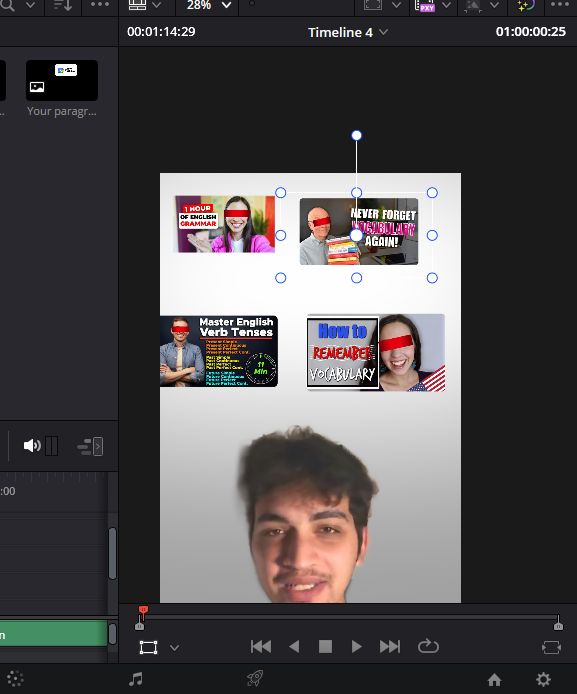
Hey everyone! I need to display a "wall" of YouTube thumbnails. The Problem: All my source images have different original sizes and aspect ratios. When I bring them in, the scales are all over the place. I want them all to be the exact same width/height and aligned perfectly in a grid (X and Y). I've been using guides and manually typing numbers into the Inspector, but it’s taking long. Is there any way to auto-scale these to match and snap them into a grid layout? Maybe a specific Fusion effects I’m missing?

27d •
Zooming in on a video before editing??
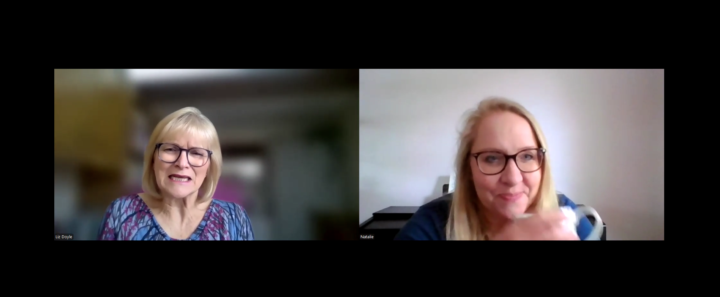
Hi. I'm really new to all this so forgive me if this is a basic question. I am co-ordinating a Christian women's conference in a few weeks. It wil be in person, about 150 attendees. Instead of speakers, we are having interviews and one of the ladies cannot make it on the day so she has been interviewed online and that recording has been sent to me to edit. I didn't realise they would both be on screen and so I need to cut the video down by about half (its currently 11 mins and I need it to be 6. Then I also want to put only the interviewee (the author on the right) on screen but keep the audio for the whole video. Can that be done? Is it a real faff? should I be thinking about it differently? Thanks!
20d •
Fussion - Issues with tracking
I'm learning lots This week I spent the last several days learning Fusion, but I'm still not accomplishing what I want. ***** Goal ****** To change out the iPhone wall paper on the desk with the image of the elephant. Problem is that when I use inteligent tracking it doesn't work as well as I'd like. I've added a few more points to the tracker, but no joy. I really didn't want to go full manual mode, so I'm wondering if anyone has a few pointers to help me out?

🔥
Mar 16 •
Waking Life
I'm curious, first of all, if anybody else here has seen this movie. Came out in 2001, written and directed by Richard Linklater ("Slacker, "Dazed and Confused.) It's a deeply philosophical movie about dreams and reality. What made it work was that the entire movie is presented in rotoscoped animation, with each scene animated by a different artist using custom software by Bob Sabiston. It gives the movie a surreal, dream-like vibe. (Original trailer here.) I've loved it since I first saw it back in 2001. I hadn't watched it in many years (pre pandemic, I'm pretty sure), but have been watching it again over the past few days. I still really enjoy it. I'm bringing it up here because I'm curious: Could you today do exactly this style of animation entirely in Fusion?
1-27 of 27
powered by
skool.com/creator-lab-2518
🥇#1 Ranked DaVinci Resolve community on Skool 🔥
Built for beginners → intermediate creators using DaVinci Resolve.
Suggested communities
Powered by