Activity
Mon
Wed
Fri
Sun
Oct
Nov
Dec
Jan
Feb
Mar
Apr
May
Jun
Jul
Aug
Sep
What is this?
Less
More
Owned by Austin
Learn how to start & grow a profitable land clearing / forestry mulching business.
The Accelerator Program for Land Clearing, Forestry Mulching, and Fire Mitigation Guys serious about growing a profitable business & reputable brand
AI for Non-Techies
689
$67/m
ACQ VANTAGE
1.7k
5.0
Free
617 contributions to OWNR OPS

19h •
Slope pricing help
Was out to quote an 8 acre lot on a fairly decent incline with light/med vegetation tree removal. Since I have a 333g I would like to rent a piece of equipment (like an FAE PT175). Besides the rental price, how would you quote this job assuming they wanted all the little stuff gone but leave the big trees? Note: Each line is 10ft


🍀
0 likes • 15h
Carl — don't throw a per-acre number at this yet. Build it as crew-days, then add the rental on top. 1. Lock your **crew-day** on the 333g first (fuel, labor, wear, overhead, profit). That number is your floor for the days you're on site — rental is separate. 2. **Rental package** = day rate + delivery/pickup + any day you're paying for the FAE while it's sitting. Don't bury that in a soft acre rate or you'll eat it. 3. **Production on that incline:** estimate acres/day for light/med selective (leave the big trees — that slows you down vs a clear-cut mulch). Count the 10ft contour bands across the lot. Moderate slope usually means +10–15% on time/price vs flat; steep is more like +20–30%. Pick which side you're on before you pick days. 4. **Project price** = (crew-days × your crew-day) + full rental package + mob. Then check it a second way (rough acre × your adjusted rate) so you're not guessing once. Before you lock the number, get clear on: max size for "little stuff," whether chips stay on site, and how many rental days you're committing to if weather or access drags. Drop your flat light/med acres-per-day on the 333g if you've got it — we can sanity-check the day count from there.
🍀
Apr '24 •
Start Here: Your $20k Month Game Plan (Watch This)
If you own a land clearing / forestry mulching business and you’re under $20k/month, start here. In July, 12 operators we work with booked $585,000 of work using this playbook. This group shows you how to run the same system. Do this in order: 1. Watch the Start Here video Then come back to this post. 2. Introduce yourself in the comments Copy/paste and fill in: Name City / State Machines Current monthly revenue 12‑month target Biggest bottleneck (pricing, leads, closing, schedule, or crew) 3. Do the Pricing Blueprint Workshop Go to Classroom → Start Here → Pricing Blueprint Workshop Watch “Stop Losing Money On Jobs” Fill out the worksheet under the video Then comment your numbers: “Crew day rate: $, Minimum job: $” 4. Watch 2–3 case studies Still in Classroom, open Case Studies Watch 2–3 that look most like you 5. Start the Kickstarter Mini Training Go to Classroom → Kickstarter Mini Training Work through the modules in order If you already own a real machine and want the exact playbook guys like JT used to hit $172,500 in July, Colby used to hit his first $200k month, and Hayden used to hit $85k first month after getting his machine, then: Book Your OPS Game Plan Call here and we'll map out a plan for your market

🍀
0 likes • Aug 7
@Donnie Foote welcome to the group!
🍀
1 like • 13d
@Dayton Warren welcome to the crew 🤝
🍀
13d •
$2,542 ADS ➡️ $71,772 JOBS
He turned $2,542 in ad spend into $71,772 booked jobs He's joining live on YouTube tmrw at 7am MST / 8am CST / 9am EST Here's the actual scorecard from the operator I'm bringing on tomorrow morning: 134 leads 54 quotes sent 23 jobs won $71,772 in won work $2,542 in ad spend 42.6% win rate $3,121 average job $18.97 cost per lead That's roughly $28 back for every $1 he put into ads He's not a marketer. He's an operator who figured out the math. I'm not telling you who he is yet... You'll find out when he shows up on the stream tmrw What I will tell you is he took action Executed the playbook Pushed thru the challenges We'll talk: - Where those 134 leads actually come from and what he pays for them - How he quotes so 4 out of 10 turn into signed work - What he's learned along the way - The mistakes that cost him the most money 7am MST: https://youtube.com/@theownerop Two things: 1. Comment "IN" so I know who's showing up. 2. Bring one question. We'll answer live, first come first served If you're still stuck hoping the phone rings, you won't want to miss this one. P.S. Real scorecard screenshot attached below

🍀
Aug 22 •
36 Leads + 8 Quotes Sent Week 1
@Ryan Murray came in, made time for the trainings, and actually ran the GAS Playbook in Week 1. Result: leads and jobs already moving, not “I’ll get to it someday.” There’s a strong pattern in here: Operators who move fast, win fast. Operators who “watch later,” stay stuck. If you’ve got a machine and you want the same Lead Engine + Playbook Ryan is using (plus GAS to make it go fast): 👉 Comment “GAS” below and I’ll DM you the details to apply for the next GAS sprint.
7
0

🍀
Aug 22 •
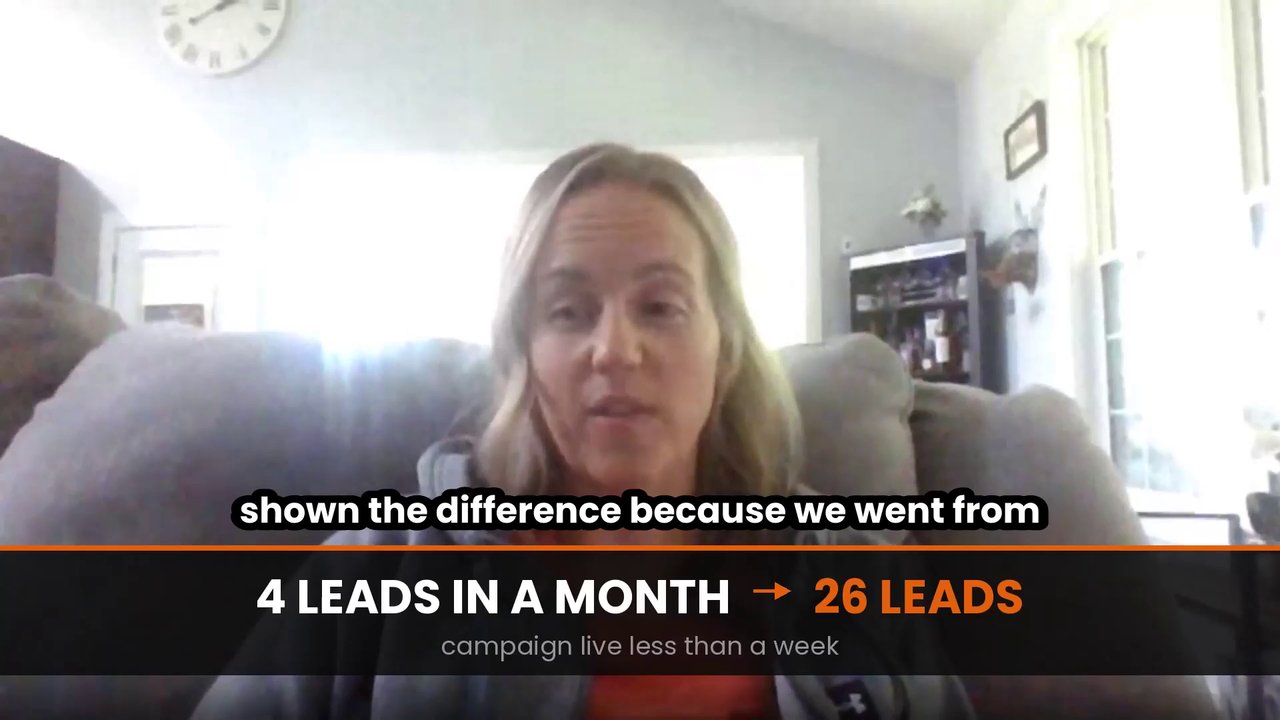
4 leads total → 26 leads in FIRST WEEK (brush clearing)
Alicia and her husband bought a machine to run a brush‑clearing outfit in Indiana. Before GAS: - 4 leads total in a month - No calls, no texts back - Pouring money into the machine with nothing coming in After the Lead Engine + GAS: - 26 leads in under 7 days - 5 site visits booked - “We’re almost scrambling to keep up” Her words: “We were trying to do it on our own and we couldn’t even get a text or a callback. Now we have so many we’re almost scrambling to keep up.” “We went from four leads in a month to 26 in a week… and it hasn’t even been a full week yet.” It only works if you follow the steps and do the work. Want the same 7‑Day Lead Engine + GAS? If you own a land‑clearing / mulching machine and you’re under‑booked, I’ve opened 4 GAS Training call spots for next week. 1. Watch Alicia’s video below 2. Fill out the short application here 3. Comment “GAS” below so I know to look for your application
5
0
1-10 of 617

🍀
@theownerop
Built Bear Claw to $1.4M+ & helped client hit $150k/mo in 6 months
Now helping other land clearing & forestry mulching guys do $40-100k months
Active 6h ago
Joined Apr 13, 2024
Colorado
Powered by