Activity
Mon
Wed
Fri
Sun
Feb
Mar
Apr
May
Jun
Jul
Aug
Sep
Oct
Nov
Dec
Jan
What is this?
Less
More
Memberships
AI Automation Free Community
308 members • Free
Learn Power Apps
2.5k members • Free
4 contributions to Learn Power Apps

Feb '24 •
Please help me give a warm welcome to Tolu Victor!
Please help me give a warm welcome for @Tolu Victor joining the community! I spotted his video content on YouTube and was quite impressed! Welcome!! 😎🎉

2 likes • Feb '24
Welcome @Tolu Victor

Feb '24 •
Patch Sharepoint "Person or Group" column with Office365 list from Combo Box
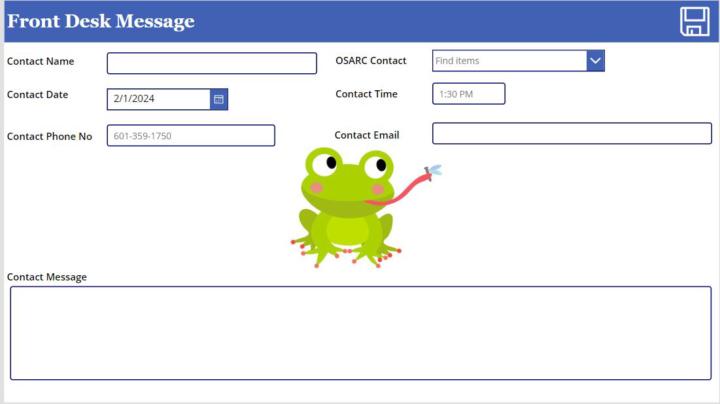
I am trying to Patch a Sharepoint "Person or Group" column with Office365 Users from Combo Box. The Combo Box "Items" code is as follows and works to search Users from the Office 365 connector: Filter(Office365Users.SearchUserV2( { searchTerm:Trim(Self.SearchText), isSearchTermRequired:false } ).value,AccountEnabled=Not("#EXT" in UserPrincipalName )) DefaultSelectedItems = It is blank My Patch function is as follows but does not work. Specifically the Combo box is causing the error: Patch('Front Desk Messages', Defaults('Front Desk Messages'), { Title:txt_ContactName.Text, 'OSARC Contact':cmb_OSARC.Selected.DisplayName, 'Contact Date':Date_Contact.SelectedDate, 'Contact Time':txt_ContactTime.Text, 'Contact Phone No':txt_ContactNumber.Text, 'Contact Email':txt_ContactEmail.Text, 'Contact Message':txt_ContactMessage.Text } ); Reset(txt_ContactName); Reset(cmb_OSARC); Reset(Date_Contact); Reset(txt_ContactTime); Reset(txt_ContactNumber); Reset(txt_ContactEmail); Reset(txt_ContactMessage)
1 like • Feb '24
Your Combobox is based on Office 365 User records. You need to supply a SharePoint user record in order to set it properly. Please consider changing your Formula to the following: Patch('Front Desk Messages', Defaults('Front Desk Messages'), { Title:txt_ContactName.Text, 'OSARC Contact': { Claims:"i:0#.f|membership|" & Lower(cmb_OSARC.Selected.DisplayName), Department:"", DisplayName: cmb_OSARC.Selected.DisplayName, Email: cmb_OSARC.Selected.Mail, JobTitle:"", Picture:"" }, 'Contact Date':Date_Contact.SelectedDate, 'Contact Time':txt_ContactTime.Text, 'Contact Phone No':txt_ContactNumber.Text, 'Contact Email':txt_ContactEmail.Text, 'Contact Message':txt_ContactMessage.Text } ); Reset(txt_ContactName); Reset(cmb_OSARC); Reset(Date_Contact); Reset(txt_ContactTime); Reset(txt_ContactNumber); Reset(txt_ContactEmail); Reset(txt_ContactMessage) I hope this is helpful for you.

Jan '24 •
Hint text on drop down
i have a drop down box, and i can't find how to put "hint text" see circled drop down in the attachment

3 likes • Jan '24
What I would recommend is set a text label behind it and have the fill of the dropdown be lik 70% opacity so you can see it. then set the visibility of that label to be based upon isblank() of the dropdown
Sep '23 •
What Industry Do you Guys Work In?
I want to cater to my target audience's specific industries. Which are you in? For me, it is Information Technology, but I can't assume everyone comes from IT. Please share!
8 likes • Jan '24
Information Technology
1-4 of 4

Active 8h ago
Joined Jan 16, 2024
Powered by