Activity
Mon
Wed
Fri
Sun
Apr
May
Jun
Jul
Aug
Sep
Oct
Nov
Dec
Jan
Feb
Mar
What is this?
Less
More
Memberships
Learn Power Apps
2.5k members • Free
6 contributions to Learn Power Apps

Feb '24 •
Who would be interested in stored procedure workshop?
Now that we can call stored procedures directly from Power Apps, who would be interested in a workshop on learning the basics of what they are all about, but also how to create them?


1 like • Feb '24
Planning to use this soon so that sounds good
Feb '24 •
Workshop Topic for This Friday - Ideas?
Last Saturday, I mentioned that this week we would cover planning & design for Power Apps projects. It turns out there wasn't as much interest in that as I thought. I'm looking for ideas from you guys again! 😂😭🙏🙏 https://www.skool.com/power-apps-community/power-apps-workshops

3 likes • Feb '24
PowerApps & SQL and Combo Box Need Combo Boxes because they are better than dropdown menu's because you can search large sets of data. But Patching a ComboBox to SQL is difficult and very little information out there. Some of the information found does not seem to work.
Feb '24 •
Patch Sharepoint "Person or Group" column with Office365 list from Combo Box
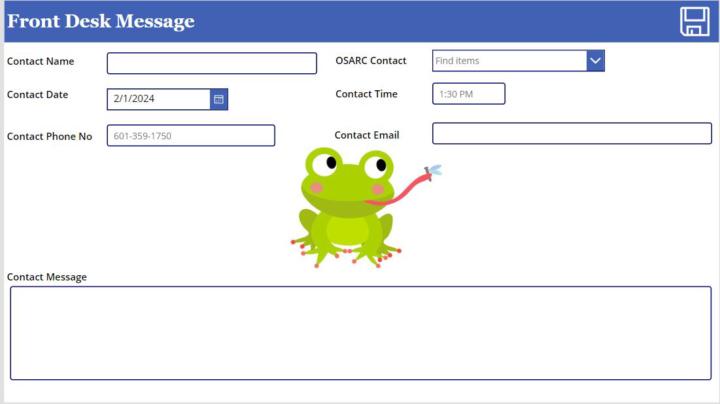
I am trying to Patch a Sharepoint "Person or Group" column with Office365 Users from Combo Box. The Combo Box "Items" code is as follows and works to search Users from the Office 365 connector: Filter(Office365Users.SearchUserV2( { searchTerm:Trim(Self.SearchText), isSearchTermRequired:false } ).value,AccountEnabled=Not("#EXT" in UserPrincipalName )) DefaultSelectedItems = It is blank My Patch function is as follows but does not work. Specifically the Combo box is causing the error: Patch('Front Desk Messages', Defaults('Front Desk Messages'), { Title:txt_ContactName.Text, 'OSARC Contact':cmb_OSARC.Selected.DisplayName, 'Contact Date':Date_Contact.SelectedDate, 'Contact Time':txt_ContactTime.Text, 'Contact Phone No':txt_ContactNumber.Text, 'Contact Email':txt_ContactEmail.Text, 'Contact Message':txt_ContactMessage.Text } ); Reset(txt_ContactName); Reset(cmb_OSARC); Reset(Date_Contact); Reset(txt_ContactTime); Reset(txt_ContactNumber); Reset(txt_ContactEmail); Reset(txt_ContactMessage)
0 likes • Feb '24
Figured it out. For some reason, nothing likes the this part of the patch. Seems to not recognize the ".Mail" part. Email: cmb_OSARC.Selected.Mail Also I turned it into a "TABLE". It patches the Sharepoint Column and also my PowerAutomate works as well. The PowerAutomate sends an email to the person selected in the Combo Box. Patch('Front Desk Messages', Defaults('Front Desk Messages'), { Title:txt_ContactName.Text, 'OSARC Contact': Table( { Claims:"i:0#.f|membership|" & Lower(cmb_OSARC.Selected.DisplayName), Department: "", DisplayName: cmb_OSARC.Selected.DisplayName, Email: cmb_OSARC.Selected.DisplayName, JobTitle: "", Picture: "" } ), 'Contact Date':Date_Contact.SelectedDate, 'Contact Time':txt_ContactTime.Text, 'Contact Phone No':txt_ContactNumber.Text, 'Contact Email':txt_ContactEmail.Text, 'Contact Message':txt_ContactMessage.Text } ); Reset(txt_ContactName); Reset(cmb_OSARC); Reset(Date_Contact); Reset(txt_ContactTime); Reset(txt_ContactNumber); Reset(txt_ContactEmail); Reset(txt_ContactMessage)
1 like • Feb '24
2 things seemed to be wrong: 1) ".....Selected.Mail" have an error message. When I would isolate that one field, it would still cause an error. For example, I made a text label to see what the "....Selected.Mail" was showing. 2) The error kept giving me the error message about "tables" and "records". I saw an example of someone using a table() function so I decided to try that. After watching about 10 different videos and trying 20 different ways it worked. Not sure why "....Selected.DisplayName" doesn't cause any problems but it doesn't. The Sharepoint Column stores the "Display Name" correctly and my PowerAutomate retrieves the email from the Combo Box and it goes to the person selected.
Jan '24 •
Combo Box NOT displaying default data from SQL
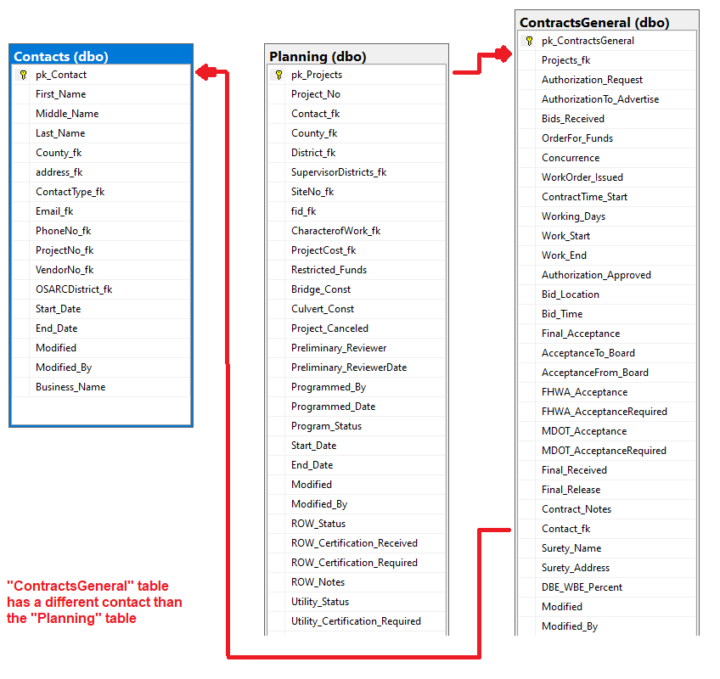
I am trying to use a Combo Box and it is not displaying the "DefaultSelectedItems" data as desire. Here is a summary: 1) The Combo box "Items" are coming from the "Planning" table. 2) Prior to getting to this screen, the Project number was selected from the "gal_Contracts" in which the Project is selected. 3) The Combo box needs to display the "Business Name" from the "Contacts" table. 4) There are 3 SQL tables used here: "Planning", "ContractsGeneral", and "Contacts" 5) The contact for the "ContractsGeneral" is different than the contact for the "Planning" table. Hence, do not confuse the duplicative Contact_fk fields in both tables. That is just the way I keep up with foreign keys. As seen in the below screen shots, the foreign key is displayed from the GRAY box which is looking at the "ContractsGeneral" table. Hence, the foreign key data is there. This is the "Default" setting in the Gray box. LookUp(ContractsGeneral,gal_Contracts.Selected.pk_Projects=Projects_fk,Contact_fk) I tried this in the "DefaultSelectedItems" of the Combo Box and can see table records, but can retrieve the data I want to display. LookUp(ContractsGeneral,gal_Contracts.Selected.pk_Projects=Projects_fk) I tried this in the "DefaultSelectedItems" of the Combo Box and just gives me an error. LookUp(ContractsGeneral,gal_Contracts.Selected.pk_Projects=Projects_fk,Contact_fk) See screen shots to help.
0 likes • Jan '24
LookUp(ContractsGeneral,Projects_fk=gal_Contracts.Selected.pk_Projects,Contact_fk) gives the following error message:
1 like • Jan '24
Found a solution. Instead of completing the Lookup for the "Contacts" SQL table with the column name of "Business_Name", I used "ThisRecord". I am not 100% able to explain the reason this works. This works with the Combo Box. Now the "Business Name" is searchable and displays what is stored in SQL. LookUp(Contacts,pk_Contact=LookUp(ContractsGeneral,gal_Contracts.Selected.pk_Projects=Projects_fk,Contact_fk),ThisRecord) This works with a Text Input or Text Label. LookUp(Contacts,pk_Contact=LookUp(ContractsGeneral,gal_Contracts.Selected.pk_Projects=Projects_fk,Contact_fk),Business_Name)
Jan '24 •
Patch to SQL with Lookup Record
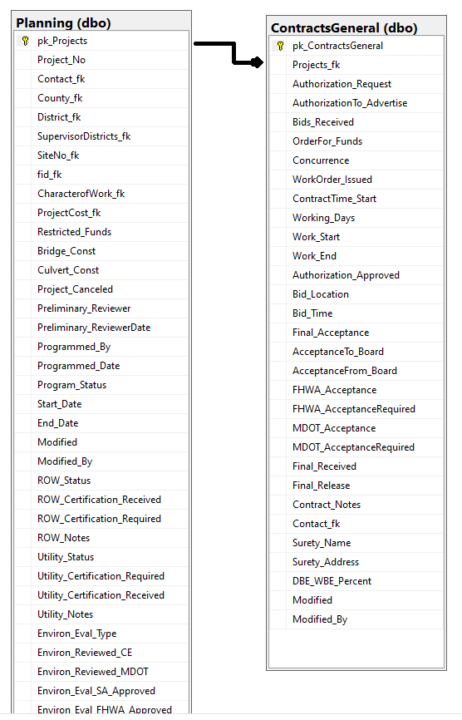
I am wanting to patch to an SQL table using a lookup as the record. Here is a summary of the setup: 1) I have a primary SQL table called "Planning". This table contains basically a project number and primary key that is related to every screen in my PowerApp. 2) A user searches and selects the Project No from a gallery which sources the "Planning" SQL table. 3) Upon selected of the Project No., the user would navigate to a general screen for "Contracts" data, which is the "ContractsGeneral" SQL table. 4) On the "General" screen, the user can add a new record and is blank if there is no record for the Primary Key. Or if there is a record for the Project No's Primary Key, then just modify the data and hit save. 5) For the Patch function, using LOOKUP function for the record is not working. "Invalid argument type (Number). Expecting a Record value instead." Both columns in SQL are INT type. Here is my patch function and screen shots below: If(gblNewGeneralContract, Patch( ContractsGeneral, Defaults(ContractsGeneral), { Projects_fk:gal_Contracts.Selected.pk_Projects, Bids_Received:Date_BidsReceived.SelectedDate, Modified:Now(), Modified_By:User().FullName } );, Patch( ContractsGeneral, LookUp(ContractsGeneral,gal_Contracts.Selected.pk_Projects=Projects_fk,pk_ContractsGeneral), { Projects_fk:gal_Contracts.Selected.pk_Projects, Bids_Received:Date_BidsReceived.SelectedDate, Modified:Now(), Modified_By:User().FullName } ); ); Set(gblNewGeneralContract,false) 6) I was expecting this to work easy. I have several solutions that I could try but wanted to know if anyone has experience this. I could just create a gallery on this screen to select the record but didn't want to clutter up the screen.
3 likes • Jan '24
Found a solution. It was simple. LookUp(ContractsGeneral,gal_Contracts.Selected.pk_Projects=Projects_fk) This also works LookUp(ContractsGeneral,gal_Contracts.Selected.pk_Projects=Projects_fk,ThisRecord)
1 like • Jan '24
@James Lucas Still learning but hopefully posting good examples of what anyone might encounter when learning. I posted another with Combo Box example and still trying to figure it out.
1-6 of 6

@james-hammons-8693
Chemical engineer working in Transporation and civil engineering and developer of PowerApps now
Active 566d ago
Joined Sep 14, 2023
Powered by