Activity
Mon
Wed
Fri
Sun
Jan
Feb
Mar
Apr
May
Jun
Jul
Aug
Sep
Oct
Nov
Dec
What is this?
Less
More
Owned by Sep
The private mastermind for Realtors and Brokers using AI to generate leads, follow up like clockwork, and create leverage in their business.
Memberships
Imperium Academy™
34.5k members • Free
Skoolers
177.1k members • Free
HYROS Ads Hall Of Justice
4.6k members • Free
4 contributions to Content Academy

👑
8d •
Build an AI Sales Agent That Makes $50k/Month
I just upgraded my RAG-powered AI sales agent that generates $50K per month, and in this video I'm showing you how to build it from scratch. Grab the templates inside the No-Code Architects. You'll learn how to create a complete AI sales system using n8n, Supabase, and Airtable that can answer product questions, serve up testimonials with source links, and close deals without you talking to anyone. What makes this different: your RAG database is fully managed through a user-friendly CRM interface. Add, remove, and update documents easily. Process videos, text files, and images. Store rich metadata so your agent always pulls the right information. I'll walk through setting up the vector store, building the document processing workflows, creating your products and leads tables, and connecting everything to an AI agent that actually works.

3 likes • 7d
Looks fire, what niche you think this solves the biggest pain point?

Aug '23 •
How to edit a YouTube video in an efficient way
Step 1 - Pacing - Removeing boring/blank section and Removeing mistake Step 2 - Cuts/Effects - Adding cuts like jump cuts, J cut, L cut etc - Adding effects like zoom in or zoom out to emphasize the important topics Step 3 - B-roll/Graphic - Add B-roll and graphics to give more context to the viewers Step - 4 - music / sound design
0 likes • Aug '23
Nice, didn’t think about different cut styles before.
Mar '23 •
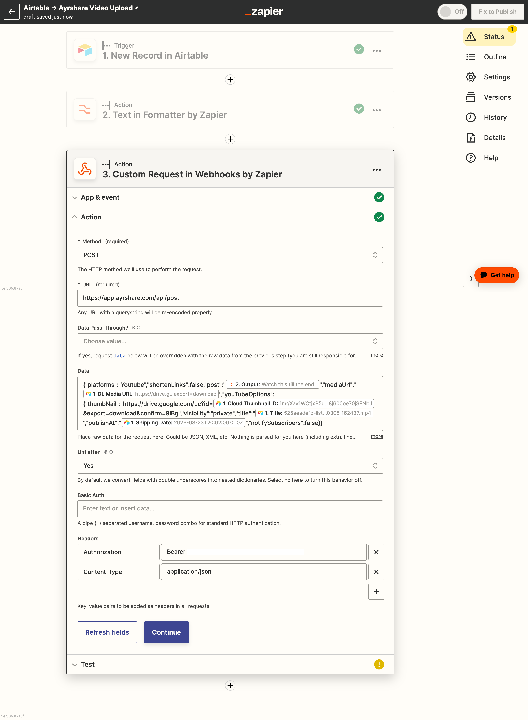
Airtable -> Ayrshare Video Upload (3rd Step Custom Webhook Error)
I'm looking to execute this scenario based off Stephen's most recent upload and stuck on Step 3 running the ayrshare API to Zapier. Everything seems to be placed correctly on my end, though I'm receiving this error. Anyone familiar with this error? would love to solve for this error.
1 like • Mar '23
@Stephen G. Pope That's a good tip, I solved it just a few minutes ago. It was the Data field. I just went over a video from Ayrshare's channel on how they execute the api with youtube and learned how the code is structured. I redid the data with some of the basic requests and got hit with a new error, "requires ayrshare premium" upgraded, and voila! we're on the road. Feels good. Will post update pics for anyone's future reference.

Mar '23 •
Automated Captions in Premiere Pro (Using Descript)
Found a cool solution to generate accurate captions automatically using Descript and have them easily accessible to edit in Premiere Pro (or any other editing software). Notes: You can do this natively in Descript, but my team uses Premiere Pro because Descript is lacking when it comes to complex video editing. Our videos go through a few stages of review using Frame io - this workflow utilises that really well. It's also incredibly important to have a great naming convention for your content files or a Content ID as Stephen calls it. This allows a piece of content to be identified by anyone, even machines not working on the content. ---- start ------ Problem: All my videos need subtitles/captions and Premiere Pro's auto-transcription feature is awful compared to Descript, so I needed a solution that didn't require my team to need to export the video manually, upload to descript, adjust settings, export subtitles/video which is a big time waster. Solution: 2 Zaps, one of which is triggered on an Airtable DB called "Generate Captions". This allows the video editor to generate them when they are ready, there's no point in subtitling a video if it needs massive changes after the fact. Zap 1: Triggered on airtable button push - Downloads most recent version of the video from Frame io using Production ID - Uploads to Descript - Notify editor that Captions are in-progress (There's a few more complexities but I'm trying to not make this too long) Zap 2: Triggered on "New Transcription Ready in Descript" - Finds Google Drive folder (using Prod ID) - Upload SRT file to Gdrive folder - Notify Editor that captions are ready and in the folder Now the editor just drags the SRT file into their project (literally one click) and they have accurate & automatically generated captions for their video. ---- end ------ For context, me & my team generate 500+ short-form videos for creators so this is built for scale. If you've got any better solutions, a question or anything of the sort please comment below, I'm really curious about this community and am trying to provide value where I can 😇
2 likes • Mar '23
Sounds like a fascinating solution. I've been using an IOS app (Captionator) with Final Cut Pro to automate the subtitles, thought it still requires manual editing since it't not completely accurate. I really like what you're doing, seems like the right idea.
1-4 of 4