Activity
Mon
Wed
Fri
Sun
Mar
Apr
May
Jun
Jul
Aug
Sep
Oct
Nov
Dec
Jan
Feb
What is this?
Less
More
Memberships
AI Local SEO & Lead Generation
1.1k members • Free
AI Automation Agency Hub
294.9k members • Free
AI Assistant Lab
271 members • Free
Nexis AI w/Jason
494 members • Free
Assistable.ai
3.3k members • Free
CEO Lab (Courses)
1.6k members • Free
13 contributions to Assistable.ai

8d •
HELP!!!!!!
Hi guys, Im trying to get my outbound call assistant to tag a user once the user confirms they are good to proceed. Ive tried giving instructions in the objective as well as on the agent prompt, neither has worked. I went from minimal prompt to calling the tool by name and ID and booth ways each individually, none of it worked. I thought about doing an if/else but not sure it will interpret the users intent correctly, or even if that will work. Can anyone point me in the right direction?
0 likes • 7d
Addede it prompt to the assistant directly and nothing. Prompt: - If the conversation is about the automations audit when the user is asked if the process sound good and the user responds, call the tool user ID #: 1770433930437x829585563272609800 and add the tag to the contact in the CRM.
0 likes • 6d
Hey@Bernie White, I found that the AI always wants to create its own email so I copied a form ID I needed to include in the email and added the ID to the prompt in the objective. It's ugly but it's the only way I've found to send the email without having to add a call tool in the prompt. The AI will absolutely not call the tool no matter what I've tried and believe me I've been battling this for over a week straight, 10 hrs a day. If you guys want to kick this up the tech ladder please let me know if it is ever resolved or if there is anything I can do to help. Thanks!

26d •
V3 Update: Where We Are, What We’re Fixing, and How We’re Supporting You
Any meaningful upgrade comes with a moment of discomfort. V3 is one of those moments. To support what’s coming next, we had to migrate some core components earlier than planned. While this was the right decision for the long term, we know the timing has caused real frustration. If you’ve experienced call issues, delays, or unexpected behavior, we want to be clear from the start: We see it. We understand the impact. And we’re actively fixing it. Right now, there are three main things we want to acknowledge. First, there is a delay in the AI agent greeting on outbound calls, and this is affecting all outbound traffic. We know how important that first moment of a call is, and we agree that this experience is not where it should be. A fix for this is part of the upcoming patch and is being treated as a top priority. Second, some users are experiencing latency or connection issues. The majority of the platform is operating normally, but we already have a patch in progress that directly addresses these issues and will be rolling out shortly. Third, there is a busy signal issue affecting a small subset of numbers. We currently host over 14,000 phone numbers. Out of those, a few hundred are affected. If you’re one of them, your frustration is valid, even if the issue is isolated. Most of the impacted numbers fall into one of these categories: - Custom Telnyx setups that don’t align with our updated requirements - SIP trunking requests that were never completed - Older numbers still in the final stages of porting from Twilio to Telnyx If you’re affected, there are two paths forward. Option one: wait it out. For many numbers, this will be resolved automatically over the next few days as the patch and cleanup complete. Option two: move faster. You can purchase a new number and let our support team know. If your old number qualifies, we’ll credit your wallet for the entire year for the phone number ($30) for the trade-in. This option is there for anyone who can’t afford downtime.
0 likes • 26d
@Mike Copeland Thanks for the transparency in the update. Totally understandable. We are holding strong and excited for the new system.

Dec '25 •
🚀 Assistable Community — Free Snapshot Drop
Quick context: Last week I ran a free workshop inside the LeadIndicator group. During that session, I walked through the exact Assistable workflows and automations we use internally — the real ones that run our business, support, fulfillment, and scaling. There was a lot of interest in getting those workflows, and since the workshop was positioned as pure value with nothing to sell, I decided to give the entire snapshot away for free to that group. Rather than keep that value isolated, I want to make it available here as well. ✅ What I’m giving you - The full Assistable snapshot - The exact workflows we use internally - No stripped-down templates - No pitch, upsell, or funnel This is not something we normally give out publicly. The only thing I’m asking in return If you’ve found value in Assistable, I’m asking for one small favor: 👉 Go to Google, search for Assistable's TrustPilot page. Leave an honest review on our Truspilot page. That’s it. Reviews matter a lot — especially as we continue to grow and as we deal with the occasional bad-faith review that comes with scale. Your feedback genuinely helps. 📬 How to get the snapshot - leave a review on our TrustPilot page - Comment that you've left the review and I'll DM you.

1 like • Dec '25
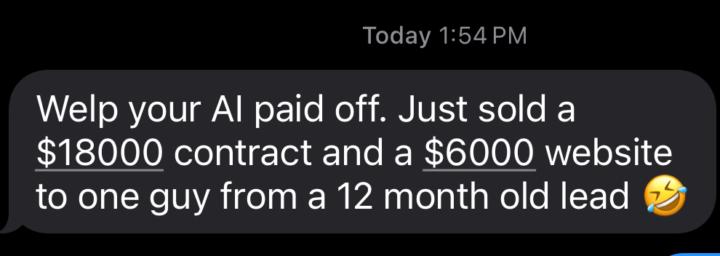
Assistable reviewed, happy to do it @Bernie White

0 likes • Dec '25
That is awesome @Luis Garibay Congrats! Im sure it's running even better now.

Oct '24 •
True Gold Shared on todays Call - Recording
Call Recording: https://fathom.video/share/ssXRJo9iTUYhKmhy__W78sy7W5LkG86F Need Sales Strategies, consider listening to the last half of the call. Here's an overview of the key topics discussed during the meeting: 1. Integrating AI into workflows and call/chat functionality: 2. Monetizing and pricing AI services: 3. Automating and streamlining client operations: 4. Targeting the right clients: 5. Managing client access and permissions: 6. Strategies for lead generation and advertising: The overall theme was on positioning yourself as a strategic AI integration partner, not just a technology provider, and focusing on delivering maximum value to a select group of high-value clients. Remember, this recording is on Fathom. You can AI search the call for specifics. Thanks @Bilal Ahmed @Justin Lee @Luis Garibay @Justin Daughenbaugh and so many others who shared strategies, docs, and technical help

2 likes • Nov '25
Great call, thanks for the recording @Jason Dueck
1-10 of 13

@oscar-fernandez-7245
Marketer, agency owner helping entrepreneurs realize their dreams
Active 9h ago
Joined Sep 17, 2025
Powered by