Activity
Mon
Wed
Fri
Sun
May
Jun
Jul
Aug
Sep
Oct
Nov
Dec
Jan
Feb
Mar
Apr
What is this?
Less
More
Memberships
FromSpamToInbox
205 members • Free
SaaS Agency Community
100 members • Free
Kourse (Free)
113k members • Free
Agency Growth
4.5k members • Free
Frankie Lee Community
421 members • Free
Q's Mastermind
5.7k members • Free
[CLOSED] ItsKeaton Group
1.8k members • Free
Elite Sales Alliance
22k members • Free
Agency World
6.4k members • $1
50 contributions to Assistable.ai

Mar 18 •
Chat Follow-up - Infinite SMS campaign issue
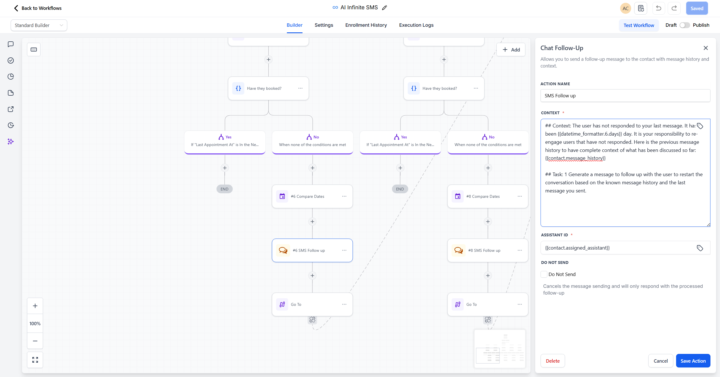
@Jorden Williams @Mike Copeland I recently deployed the following Chat follow-up, and it looks like the follow up message is simply going through the next task in the global prompt with each iteration, resulting in it ultimately booking an appointment for people when it gets to that task even when they have never responded yet. Anyone have any suggestions on how to prevent that within the "Chat Followup" tool? Here is my context within GHL: ## Context: The user has not responded to your last message. It has been {{datetime_formatter.6.days}} day. It is your responsibility to re-engage users that have not responded. Here is the previous message history to have complete context of what has been discussed so far: {{contact.message_history}} ## Task: 1 Generate a message to follow up with the user to restart the conversation based on the known message history and the last message you sent.

0 likes • 3d
Use GPT for follow ups, its way better. I find the Chat follow up is repetitive
7d •
AI SMS Appointment count
Quick question, is there a way to easily report the number of appointments assistable's AI SMS booked in GHL? Trying to report the full value of it to my users and this would help.
0 likes • 3d
@Anthony Castiglia I am looking for something like this too.. We have tags that get added but we remove them later on to keep things clean so I lose that tracking :(
3d •
SMS | Making the AI avoid these sentences
Any advice on making the AI avoid things like: a) "If you have any questions in the meantime, feel free to ask!" & b) "If you need anything else, just let me know." Of course i can add in the response guideline avoid saying X But anything else? Essentially i find it kind of kills the conversation and doesn't allow for more qualifications. Maybe something more along the lines of: "Is there anything else I can help you with?" What's the best way to program that in? I am at 10,700 characters, so I don't want to add TOO much more text.
0
0
14d •
11k Character Prompts | SMS Only | What To Delete?
I have been using assistable for almost a year now and have a few clients, the prompt slowly get bigger over time. They have been working great, but sometimes now they are skipping Task creation. (I have 11k Characters for most clients). Is there something I can do to see how to trim it down? I use GPT Assistable chat, which has helped over the months, but it's now getting tight lol. 1. Can i remove: ## Identity, ## Personality Traits ## Style Guardrails to save some space? 2. Any tips on things i can delete without losing functionality?
29d •
Best Approach for avoiding AI repetition? | SMS
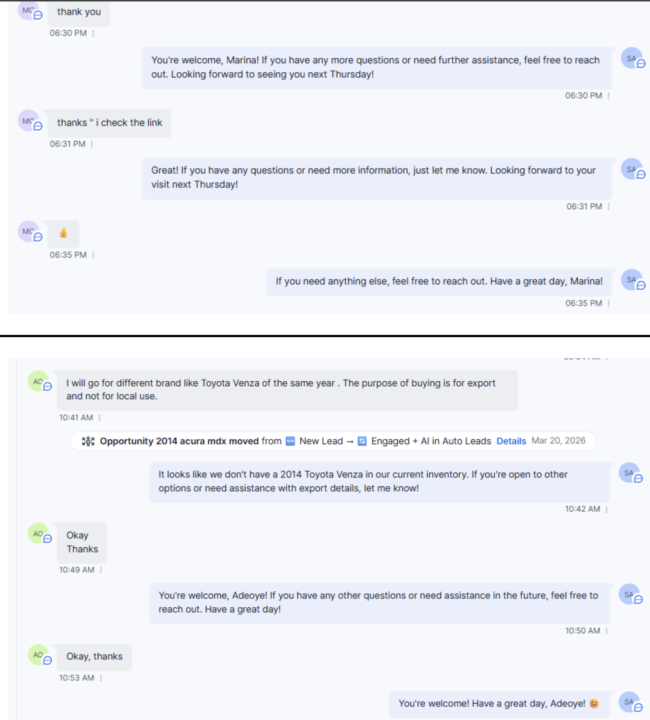
Many customers will end by saying thank you, then send like an emoji, then liking the message and the AI will respond to all of those messages and sound SUPER repetitive. Any way to avoid this? See attached!
1-10 of 50

@karl-brussolo-4024
Agency owner for 4 years now, we focus on scaling SaaS companies through our Customer Acquisition Infrastructure Build & Release Model.
Active 3d ago
Joined Mar 20, 2025
Toronto, Canada
Powered by