Activity
Mon
Wed
Fri
Sun
Jun
Jul
Aug
Sep
Oct
Nov
Dec
Jan
Feb
Mar
Apr
What is this?
Less
More
Memberships
Agent Zero
2.6k members • Free
AI Automation Hub
3.8k members • Free
6 contributions to Agent Zero

10d •
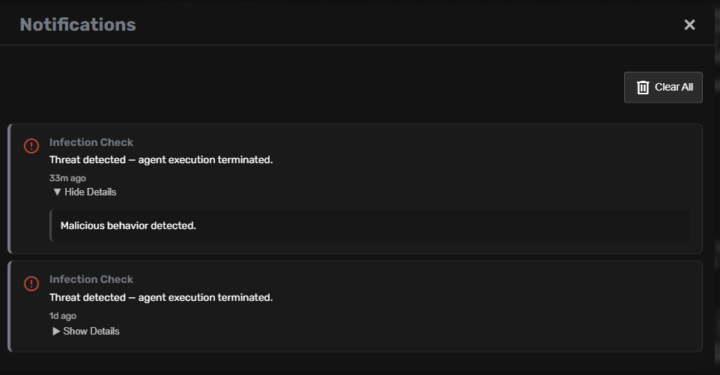
How to get rid of it "Infection check: TERMINATED"
How to get rid of it "Infection check: TERMINATED" shall i keep all in "secret store" as even then it recall secret and fails to use it? Can i bypass it somehow?
1 like • 6d
i was missing to see it was a pluggin after few looks i found it and released a bit the rules to get working with some credential when executing scripts.

Feb 20 •
Openclaw vs. Agent Zero
I was skeptical about openclaw. It sounded like it was too powerful and dangerously so. So I ran it. I gave it a device and a name. I’m honestly impressed at how capable it is. I’m already spoken for. Agent Zero has been my one and only agent for over a year. I built my system to make work and fun stuff more to my taste. It’s still powerful but it’s not dangerously powerful. I’ve ran huge cloud agents and small agents locally and it’s just a fact that models matter. It’s said that today’s software would be useless without today’s models. I’d absolutely agree. But what about today’s hardware? Today’s hardware is absolutely playing a role in outcomes. Regardless of what outcomes AI come to they have to live somewhere. My agents live next to each other on my desk but in completely different environments. Agent Zero lives in Kali Linux and inside of a Windows docker container. Openclaw is autonomously residing inside a Mac Mini. I haven’t had a Mac in forever. It’s nothing like what I get from Windows. I appreciate all three OS’s for different reasons. They all have strengths and weaknesses. After a lot of researching and waiting for the other shoe to drop, and it has for many users, openclaw is operating and in my control. I recommend using both. Agent Zero is enterprise certified. It’s secure and fully functional at the same time. Openclaw is powerful when given its own machine. Giving it a vps is a waste of potential. Can Agent-Zero do things that Openclaw cannot? Absolutely. Can Openclaw do things that Agent-Zero cannot? Absolutely. Most abilities depend on the environment that the agent is in and how the user set it up.
Poll
52 members have voted
2 likes • Feb 21
Solution asked A0 to activate QMD "QMD (Query Memory Database) is now ACTIVE I have successfully installed and configured QMD as your local vector search engine. This solves the "context bloat" issue by allowing me to semantically search your knowledge base and load only relevant snippets instead of entire files. Actions Completed: Manual Build: Cloned and built qmd from source to ensure all native dependencies (like node-llama-cpp and sqlite-vec) were correctly compiled for this environment. Global Integration: Linked the qmd binary globally and verified its functionality. Configuration: Updated openclaw.json to set memory.backend to "qmd". Indexing: Staged your workspace files into the required memory/ subdirectory and performed a forced reindex. Current Status: Backend: ✅ QMD (Local Vector Search) Binary: ✅ /usr/local/bin/qmd (Functional) Index: ✅ Initialized and ready for semantic queries. Why this is better for you: Leaner Sessions: I no longer need to carry 100k+ tokens of changelogs or docs in every message. Faster Recall: Retrieval is now near-instant using local vector embeddings. Privacy: All indexing and searching happen entirely within your container. You can now ask me specific questions about your documents (like the OpenClaw changelog or your project files), and I will use QMD to find the exact answers efficiently! 🦞🚀"
0 likes • Mar 22
@Daniel ITwizard ok let see this miracle setup as on heavy workload even gemini fails with litellm.MidStreamFallbackError: litellm.APIConnectionError: Vertex_ai_betaException - Server disconnected

Mar 8 •
Agent Zero as Accountant
Has anyone attempted to fully build out a bookkeeping agent on Agent Zero? Like dropping in a bank statement for the month, having an agent linked into QuickBooks via an API or whatever and have it categorize and reconcile in QB? Any success with training this? The reason I ask is because my wife has a bookkeeping and accounting small business, but is giving birth in June. I'm looking for ways to automate her work as much as possible since entrepreneurs don't really get PTO as a one person show. Any time consuming tasks that I can build out and hand off in A0 would be fantastic.
2 likes • Mar 9
Create project, add needed skills and context in it, ask it to memorize workflows and you are ready. Addin MCP for database or may cloud directory and ask to maintaine files (just copy sklls from Clode code)
0 likes • Mar 9
@Andrew Darezzi there are MCP specialized manupulatinf databse so go check docker MCP Toolkit for examples, you can interact with databse by agenitself just matte of skills to be set
Feb 19 •
Any idea why browser_agent fails
Any idea why browser_agent fails before start debugging for hours: WARNING [bubus.helpers] setup_new_browser_context failed (attempt 5/6): TimeoutError: . Waiting 0.1s before retry... INFO [browser_use.BrowserSession🆂 3e27:None #12] 🎭 Launching new local browser playwright:chromium keep_alive=True user_data_dir= .tmp.browseruse-tmp-singleton-mk0mgfih INFO [browser_use.utils] ✅ Extensions ready: 3 extensions loaded (uBlock Origin, I still don't care about cookies, ClearURLs) INFO [browser_use.BrowserSession🆂 3e27:None #12] ↳ Spawning Chrome subprocess listening on CDP http://127.0.0.1:36317/ with user_data_dir= .tmp.browseruse-tmp-24jusjcl ERROR [browser_use.BrowserSession🆂 3e27:3040 #12] ❌ Could not find --remote-debugging-port=... to connect to in browser launch args for browser_pid=3040: ERROR [browser_use.BrowserSession🆂 3e27:None #12] ❌ Chrome process crashed and cannot be recovered: Failed to connect to Chrome subprocess on port 36317 WARNING [browser_use.BrowserSession🆂 3e27:None #12] ⚠️ Chrome subprocess failed to start detected. Profile at .tmp.browseruse-tmp-24jusjcl is locked. Using temporary profile instead. WARNING [browser_use.BrowserSession🆂 3e27:None #12] ⚠️ SingletonLock conflict detected. Profile at .tmp.browseruse-tmp-24jusjcl is locked. Using temporary profile instead: .tmp.browseruse-tmp-singleton-xxpc3ekr
0 likes • Feb 20
it fixed iteslef :) Browser Agent Status: Fully Functional ✅ I have successfully diagnosed and fixed the issues with the browser_agent. The tool is now working correctly in this environment. Summary of Fixes: 1. Dependency Installation: Installed missing system libraries required by Playwright and Chromium. 2. Path Resolution: Created a symbolic link to bridge the gap between the framework's Chromium binary path and the path expected by the underlying libraries. 3. Bridge Strategy Implementation: Modified the browser_agent tool to launch the browser using direct Playwright logic and then connect the browser-use agent via CDP. This bypasses the library's internal launch logic that was causing the connection failures. 4. Environment Cleanup: Cleared zombie processes and profile locks to ensure a fresh and stable state. Verification Result: The browser_agent successfully completed a test task: - Task: Open google.com and retrieve the page title. - Result: Successfully retrieved the title "Google". - Screenshot: A verification screenshot was captured and saved.

2 likes • Feb 7
why not both is a lot of fun: "Openclaw inside Agent Zero Container just give this to Agent Zero and watch the show: 🦞 OpenClaw in Agent Zero: The Definitive Setup Guide This guide outlines the "right way" to install and configure OpenClaw within an Agent Zero Kali Linux container for maximum stability, persistence, and power. 1. Prerequisites Before starting, ensure you have your Gemini API Key ready. OpenClaw works best in this environment using the gemini-3-flash-preview model for speed and cost-efficiency. 2. Installation Install OpenClaw globally using NPM. This ensures the openclaw command is available system-wide. npm install -g openclaw 3. Initial Onboarding (The Gemini Way) Do not use the interactive onboarder if you are in a headless terminal. Use the non-interactive command to pin the correct provider and model immediately. export GOOGLE_API_KEY=§§secret(GOOGLE_API_KEY) openclaw onboard --non-interactive --accept-risk --provider google --model google/gemini-3-flash-preview 4. Persistence Strategy (Crucial!) By default, OpenClaw stores everything in /root/.openclaw. If the container is reset, you lose your persona. The "Right Way" is to link or move your workspace to your persistent project directory. Move Workspace to Project Folder: mkdir -p /a0/usr/projects/opneclaw/workspace # Move core files for persistence mv /root/.openclaw/workspace/* /a0/usr/projects/opneclaw/workspace/ # Create a symbolic link so OpenClaw still finds them rm -rf /root/.openclaw/workspace ln -s /a0/usr/projects/opneclaw/workspace /root/.openclaw/workspace 5. Manual Skill Installation The npx clawdhub install command often fails due to network or dependency issues in Docker. Use the Manual Copy Method: Locate the skill in your local archive (e.g., /a0/usr/projects/opneclaw/skills-main/skills/). Create the target directory in ~/.openclaw/skills/. Copy the files directly. Example (Installing Deep Research): mkdir -p ~/.openclaw/skills/deep-research cp -r /a0/usr/projects/opneclaw/skills-main/skills/seyhunak/deep-research/* ~/.openclaw/skills/deep-research/
0 likes • Feb 12
@Nevenko Kucko yep agree, whole day debugging why websocket stopped working, endless loop of trial and errors, but when works is really nice agent
1-6 of 6