Activity
Mon
Wed
Fri
Sun
May
Jun
Jul
Aug
Sep
Oct
Nov
Dec
Jan
Feb
Mar
Apr
What is this?
Less
More
Owned by Andrew
🥇#1 Ranked DaVinci Resolve community on Skool 🔥 Built for beginners → intermediate creators using DaVinci Resolve.
Memberships
Mid-Life Creator Community
180 members • Free
The Edit Room
3 members • $19/month
The YouTube Blueprint
1.9k members • Free
Skool Growth Free Training Hub
7.2k members • Free
Skoolers
195.3k members • Free
The 5- Hour YouTuber Community
1k members • Free
The Content Revenue Lab
814 members • Free
Next Level Growth Hub
318 members • Free
YouTube Mastermind Free
1.2k members • Free
145 contributions to Resolve School

13h •
How to increase the rate speed of the video?
Hey guys, today I just bought DaVinci Resolve 20. I've been watching a lot of YouTube videos trying to turn a long video into a few short clips, and it was so frustrating that I almost felt like giving up. ----- Sorry for the side note! My question is: how do you speed up a video to export at twice the speed?

0 likes • 6h
Are trying to get the video to play at twice the speed? If so you can right click on the clip, and self change clip speed. Then just adjust the percentage to get it to be twice as fast.
6d •
Resolve 21 Is Here (Beta) 👀
Just dropping this in here for you guys, Resolve 21 is officially out in beta, and there’s actually a lot in this update. I grabbed two solid videos that break everything down so you can skim through the features and see what actually matters without wasting time digging through release notes. A few things that stood out to me right away: - AI IntelliSearch → being able to search clips by what’s in them (objects, faces, dialogue) is a big workflow shift - AI Cine Focus → finally a blur tool that actually looks natural and handles edges well - Speech Generator → built-in text-to-speech with custom voice options, more useful than I expected for small fixes - Magic Mask caching → not having to re-track masks every time is a legit quality of life win - New Photo Page → full photo workflow inside Resolve, feels like they’re pushing toward replacing Lightroom There’s also a bunch of smaller quality-of-life stuff that honestly adds up more than the headline features. Quick heads up, though, this is beta. Expect bugs, and don’t throw it on a critical project without backing things up first. Go check out the videos and see what stands out to you. Curious what you guys actually think is useful vs just new and shiny 👇
1 like • 4d
@Silviu Tudor so 21 is a beta at the moment, which means there will be a good amount of bugs. I’d assume the creators of the presets are going to have to update them to match 21.
0 likes • 4d
@Silviu Tudor ahh, yeah that'll do it.
5d •
🎥 Launching Video Maker School (Cohort + Community)
Let’s say you’ve got a decent setup. You know your way around editing. You’ve watched the tutorials. But your videos still don’t look like others in your niche. Not bad, just not as clean, not as intentional, not quite at that level yet. And the frustrating part is you don’t really know what’s causing it. That’s exactly what I’m building Video Maker School around. WHAT THIS IS I’m putting together a 6-week cohort for educational creators who are serious about building authority or a business, but feel like their video quality isn’t there yet. No more random tips. No more tutorial rabbit holes. This is about: 👉 understanding what’s actually causing that gap 👉 fixing it step by step 👉 building a process you can rely on every time you record WHAT WE’LL DO Each week, we focus on what actually moves the needle: - lighting - framing and setup - color and image control - audio and on-camera presence - the small details that elevate everything Plus: - live sessions - real feedback on your footage - clear direction on what to fix THE GOAL By the end of the 6 weeks: 👉 you know what’s wrong with your videos 👉 you can fix it without guessing 👉 your content actually looks like the level you’re trying to build WANT IN? I’m keeping the first group small. If this sounds like you, join the waitlist here 👈
0 likes • 5d
@Abanoub Amin thanks!

6d •
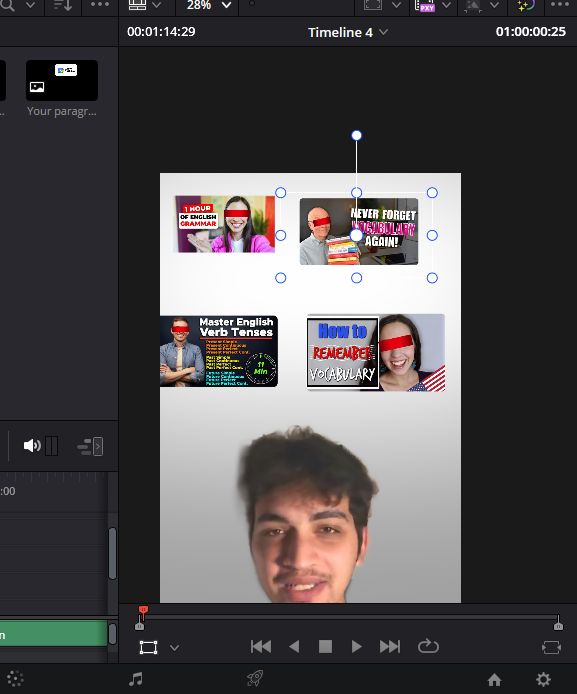
Uniform grid of images?
Hey everyone! I need to display a "wall" of YouTube thumbnails. The Problem: All my source images have different original sizes and aspect ratios. When I bring them in, the scales are all over the place. I want them all to be the exact same width/height and aligned perfectly in a grid (X and Y). I've been using guides and manually typing numbers into the Inspector, but it’s taking long. Is there any way to auto-scale these to match and snap them into a grid layout? Maybe a specific Fusion effects I’m missing?
1 like • 6d
Yeah this is one of those things Resolve just doesn’t handle cleanly right now. First step is to normalize all the images so they’re the same aspect ratio, whether that’s 16:9, square, or whatever you want your grid to be. You can do that in Photoshop or Canva, or just drop each image into its own timeline in Resolve and scale and crop it so they all match. Once everything is the same shape, it gets a lot more predictable. From there, there’s no real auto-grid system, so you’re basically building it out manually by lining up your first row, duplicating it, and then offsetting your X and Y positions evenly with snapping on. It’s a bit tedious, but that’s really the cleanest way to do it right now.

7d •
Colour Grading For Stills????
I didn''t see this coming..... https://www.blackmagicdesign.com/products/davinciresolve/photo

1 like • 6d
Yeah, I wasn’t either. But it it’ll be interesting to see how they develop it.
1-10 of 145

@andrewgfarmer
I help educational creators upgrade their video quality so their content matches the level of authority and business they’re trying to build.
Active 1h ago
Joined Jul 9, 2025