Activity
Mon
Wed
Fri
Sun
Dec
Jan
Feb
Mar
Apr
May
Jun
Jul
Aug
Sep
Oct
What is this?
Less
More
CG Python Academy
1.4k
Free
15 contributions to CG Python Academy

Jan 31 •
Finally a Late December Mini-Challenge Project Good Enough to Share
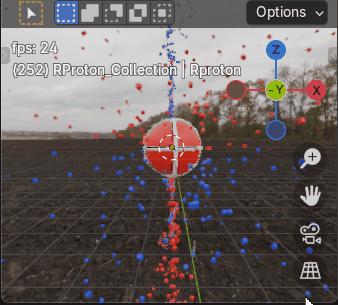
Here’s my late December Mini-Challenge Project. Originally Charge field 'Tornado and Debris’, now a Blender python Charge field physics, Proton with Charge Recycling model that contains top and bottom charge and anti-charge intake vortices, that I developed with ChatGPT help, good enough to share. All matter constantly recycles charge and anti-charge. It may not look like it at the moment, the animation shows a red, right spinning proton in Earth’s northern hemisphere’s vertical emission field, with a downward spiraling vortex of blue, left spinning anti-charge cubes (CW toward -z) entering the proton’s top spin axis pole while a vortex of red, right spinning cubes (charge) spirals upward (CW toward +z) into the proton’s bottom pole. After some delay, both charge and anti-charge is re-emitted by the spinning proton back into space, radially outward from the proton’s opposite hemisphere’s 40deg latitude, closer to the proton’s higher angular momentum equator. At this scale, with respect to the proton, I believe most charge would be too small to see, although electrons are essentially overgrown charge. Take it from this old has been engineer, Miles Mathis' Charge field physics makes much more sense than Quantum Theory, The proton spins with a driver function, add_continuous_rotation(thank you Victor). There are four particle systems, two with handlers and two without. HDRI functions are included, again thank you Victor (not to mention a gif), you’d need to provide a properly located hdri image to use them. The ps’ settings could use some changes. Please enjoy.

1 like • Jan 31
Very nice! Science and art playing together!
0 likes • Feb 2
@Victor Stepanov I noticed also that in World properties, under Surface, you can reduce the Alpha Strength to zero, effectively hiding the HDRI image. But you’d have to supplement with lights to see anything.

Jan 28 •
Bumping Coffee Hangout to next week
Hey team, Moving the Coffee Hangout to next week. I have been sick all week... Stay healthy and safe 💖

1 like • Jan 28
Hope you get well soon!
Dec '25 •
Struggles in duplicating an object with a Follow Path constraint
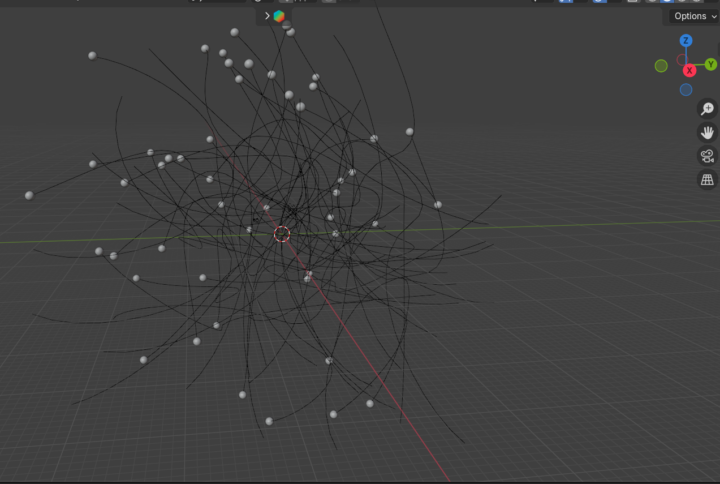
In my short film about fungi, I need lots of spores randomly floating around the scene. So I made one original spore with a Follow Path constraint targeting a Bezier curve. This would allow it to be animated using the Offset Factor in the constraint panel. I thought I’d then make copies by writing a script to duplicate the original spore. Not so easy! It took forever to get it right. One each try, the spore copy was displaced somewhere on the screen and not lined up at the start of the curve copy as it should be. This is what I had to do (also documented in the script file): Steps: 1. Select the spore and flight path for duplication 2. Duplicate the spore and flight path objects 3. Disable the Follow Path constraint 4. Centre copied spores at world origin (0, 0, 0) 5. Move the duplicates to a new location 6. Enable the Follow Path constraint on the copied spore I’ve attached the blend file and the python script. The spores are now ready for animation. Next step - maybe I’ll try to animate using a script. I’m using Blender 4.5.
0 likes • Jan 1
@Robert McBride Corrected!
Dec '25 •
Coding geometry
I'm just wondering what advantages there might be in working with object geometry in code rather than manually. In books, I've seen hundreds of lines of code needed to build a model from scratch when it seems it could be done faster the old fashioned way - by hand. So why use code?
0 likes • Dec '25
@Kai Konnarth Ah, interesting! Those all sound like very good reasons. I've been in the situation you cite in reason 2 many times, and building the model in code in the first place seems a much better way out of the hole I've dug. And yes, reason 4 also resonates. Thanks for the tips!
Dec '25 •
December mini-project - make a fungus
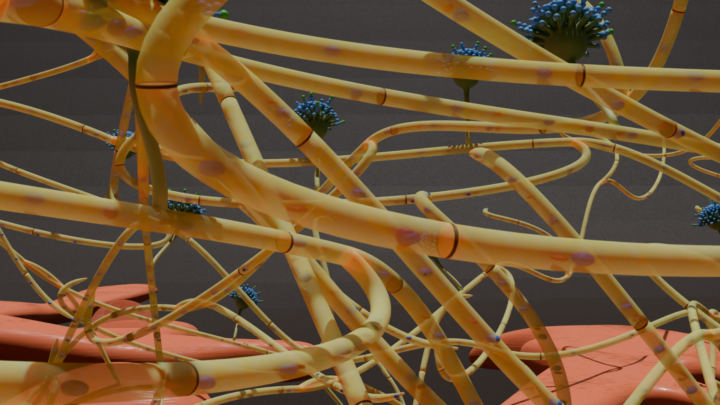
I’m working on a film about microorganisms such as fungi and bacteria. The underground portion of a fungus is composed of hyphae which are single strands of connected cells. A large grouping of hyphae is called a mycelium. The first image is of a mycelial mat that I did in Blender with no coding. But just for the fun of it, I tried to reproduce this entirely in code. Full disclosure – I had some help from VS Code Copilot AI. The Blend file is attached along with a screenshot of the results. Cool things left to do with a script: taper the ends of each hyphal strand and create septae (cross walls) to divide the hyphae into distinct cells. Just run the script to generate the sidebar operator and make some fungus!
1 like • Dec '25
@Robert McBride Hmm, can't explain that. I used 4.5 LTS but have just downloaded it from CG Python and it opened in 4.2.7 LTS. A bit slow, but it worked. Hope you get it going! I've attached the Python file if you don't get anywhere with the blend file.
1 like • Dec '25
@Robert McBride Great! Maybe I'll re-post with more comments to help interpretation. It was a learning experience for me too and I did rely on Copilot and to some extent chatGTP to answer lots of questions and even write a bit of code where I got stuck.
1-10 of 15

@david-ehret-7295
Retired plant scientist, now making video games and animated films with science themes
Active 1d ago
Joined Apr 6, 2025
Vancouver
Powered by