Activity
Mon
Wed
Fri
Sun
May
Jun
Jul
Aug
Sep
Oct
Nov
Dec
Jan
Feb
Mar
Apr
What is this?
Less
More
Owned by Catherine
Doing brilliant work that isn't getting noticed? For public sector professionals who want influence without fitting a mould. 👉 That changes here.
Memberships
YouTube Mastermind Free
1.2k members • Free
Lou Fellingham The Worship Hub
56 members • Free
The Growth Innovator Community
660 members • Free
The Authority Engine
40 members • Free
Pro Raw Launch Lab
24 members • $97/month
The Content Revenue Lab
815 members • Free
Heal. Lead. Multiply.
111 members • Free
Heal. Lead. Multiply. COACHING
19 members • $400/year
The Raw Course Launch Lab
558 members • Free
5 contributions to Resolve School

25d •
Zooming in on a video before editing??
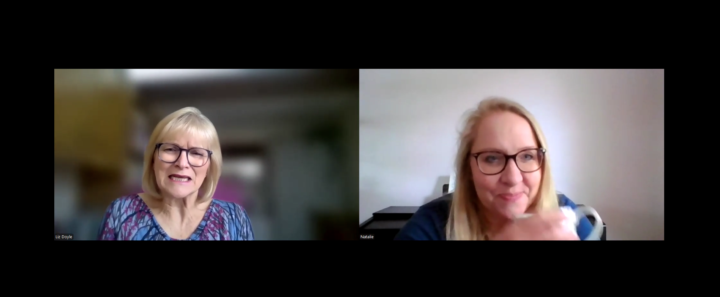
Hi. I'm really new to all this so forgive me if this is a basic question. I am co-ordinating a Christian women's conference in a few weeks. It wil be in person, about 150 attendees. Instead of speakers, we are having interviews and one of the ladies cannot make it on the day so she has been interviewed online and that recording has been sent to me to edit. I didn't realise they would both be on screen and so I need to cut the video down by about half (its currently 11 mins and I need it to be 6. Then I also want to put only the interviewee (the author on the right) on screen but keep the audio for the whole video. Can that be done? Is it a real faff? should I be thinking about it differently? Thanks!
1 like • 25d
@Andrew Farmer wow, thank you so much. I'll give that a try tomorrow. I noticed that when I dragged the video to the timeline, it separated the audio on a diff line but then they didn't line up at all. So not sure if I accidently caused that so I'll try it again so I don't have to try and line them up Appreciate you!
1 like • 17d
@Andrew Farmer thanks. I didn't. I failed and then was ill for a few days and am hoping to give it another go over the next few days. 🙃

Jan 28 •
How Resolve School Is Structured (and what’s changing on Feb 1) 🚀
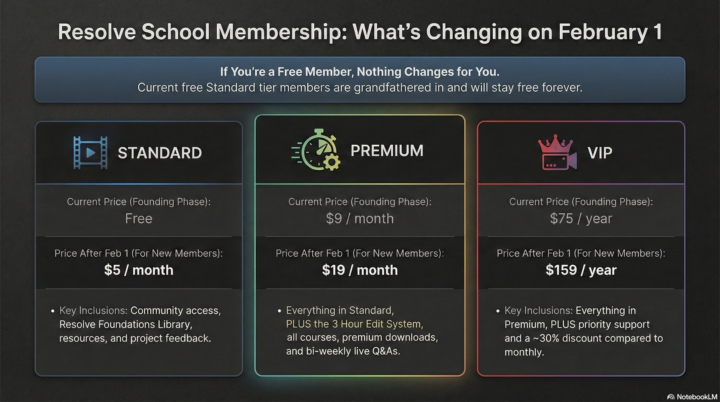
I want to take a moment to clearly explain how Resolve School is structured right now, and what will change when the 3 Hour Edit System officially launches on February 1. This post isn’t about pushing anyone to upgrade. It’s about clarity, so you can decide what makes sense for you without pressure. FIRST, THE MOST IMPORTANT THING TO SAY UP FRONT: If you joined Resolve School for free and are currently on the standard tier, nothing changes for you. You are grandfathered in and will stay free forever. There’s no requirement to upgrade, now or later. Everything below applies to new members joining after February 1, or to existing members who choose to upgrade. How Resolve School is set up right now (founding phase) At the moment, there are three tiers. Standard (free for founding members). This is the community foundation. It includes: • Full access to the Resolve School community • The Resolve Foundations Library • Tools and resources • Sharing projects for feedback • Commenting, discussion, and collaboration with other members This tier exists to make Resolve feel less intimidating and help beginners build confidence. Premium (founding price: $9/month). Premium is where structure and systems live. It includes everything in Standard, plus: • Full access to the 3 Hour Edit System • All current and future classroom courses • Downloadable presets, templates, and LUTs (premium-only) • Bi-weekly live Q&A sessions (every other week) This tier is for people who want a repeatable way to actually finish long-form edits. VIP (founding price: $75/year). VIP includes everything in Premium, plus: • A 30% discount compared to monthly pricing • Priority support for DMs and comments This is simply a more supported version of Premium for people who want faster feedback. WHAT CHANGES ON FEBRUARY 1? On February 1, Resolve School will move to fully paid tiers for new members only.
1 like • Jan 30
@Andrew Farmer ok one last question, I promise! If I upgrade to Premium by tomorrow at $9 and then want to move back to Standard in 6 months (or a year or whatever), will it be free or will I need to pay the $5? thanks!
1 like • Jan 30
@Andrew Farmer yeah, I thought so...darn. It's just that I am starting to feed one of my worst habits...which is collect lots of info and then be too overwhelmed to act on it all. I'm trying to choose which communiities to invest in and tell myself to reassess every few months rather than overload myself.
Jan 17 •
👉 Starting from zero in Resolve, this is for you
Quick heads up, I just added 6 brand new videos to the Getting Started in Resolve folder inside the Foundations Library 🎉 These are for true, complete beginners, like if you have never opened Resolve before, or you opened it once and immediately closed it because everything looked overwhelming, this is for you. The new videos walk through the absolute basics, step by step, no assumptions made: - Installing Resolve and opening your first project - Understanding the interface and what you are actually looking at - What each page is for and when to use it - Setting your project frame rate correctly - Importing media into the Media Pool - Creating bins and organizing footage If you have ever felt like you were “behind” or didn’t know where to start, this is your on-ramp. Nothing fancy, nothing advanced, just the foundations you need to feel comfortable opening Resolve and moving around without stress. If that sounds like you, head to the Classroom and begin with Getting Started in Resolve. And if you know someone in the community who is brand new, feel free to tag them below 👇

3 likes • Jan 17
Amazing thank you. I actually went out today and tried making some videos, while I walked. So much better but I had no script and so just blabbering, lol. How do you use a video plan (bullets) when you're walking with your phone camera? (I ask this because my memory issue is not solvable!)
1 like • Jan 17
@Andrew Farmer ah ok. Maybe I was trying too hard to be natural!
Jan 12 •
Welcome to everyone new who joined over the past few days 👋
Sam Evans, Cristian Aguilera, Robert Alan, Oyi Sun, Abhi Roy, Ganesh Dawande, Shei Ng, Jenny Slaytor, Laura S, Wendy Hodson, Catherine Marriott, Keith Bayles, Arnold Vaughan, Ismail Hunaid, Charles A. Pridgen Pridgen, Yusuf Sahloub, Chap Chapman A few of you came in after the workshop, so I just wanted to say I’m really glad you’re here. Resolve School exists for a pretty specific reason. It’s not about learning every feature in DaVinci Resolve, and it’s not about editing like a professional filmmaker. It’s about helping busy creators and solopreneurs actually finish long form videos without feeling overwhelmed every time they open Resolve. If you’re new and things feel slow or confusing already, that’s normal. Resolve has a lot going on, and the beginning always feels clunky. Progress here looks like opening the app again, making small improvements, and slowly building confidence, not getting everything right.

2 likes • Jan 12
@Andrew Farmer me! I'm holding me back! 😂 My first video was my About video for Skool and it's was so horrified by it, it took me two weeks to do it again. I still don't like it (just coz it's not how I sound IRL) and I think that's just put me off. I WANT to do my first videos not in my 'studio' set up. Going for a walk or in my car (or campervan) or just outside anywhere (hence asking you at the session about editing "walking videos".
1 like • Jan 13
@Andrew Farmer ah thank you. that's really kind of you to say. ...and yes I could sit around forever! In fact, I have a developing skill in that area, lol! I need to get up that escalator!
Jan 8 •
🔴 Live DaVinci Resolve Beginner Workshop
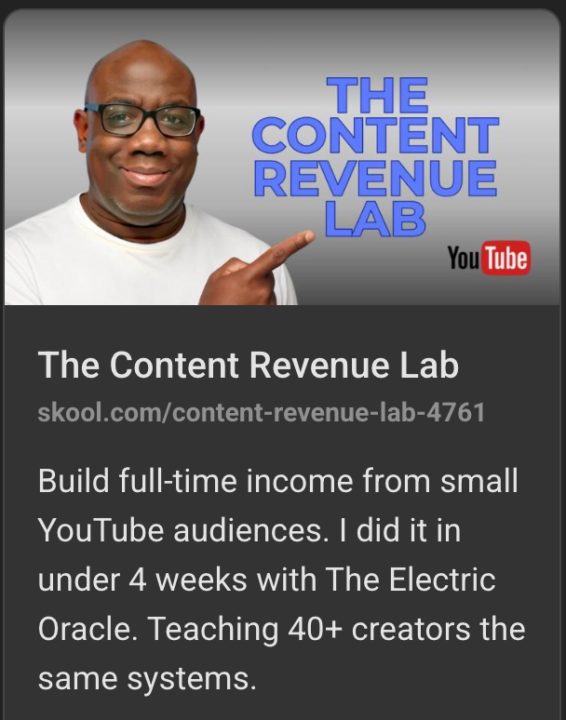
Quick heads up if editing still feels slow or heavier than it should, even on simple projects. Tomorrow, Friday, January 9th at 10 am EST, I’ll be on a live beginner workshop inside @Des Dreckett's Content Revenue Lab community. This isn’t about advanced features or fancy techniques. It’s about learning how to think through an edit so Resolve feels simpler and faster to work in. What I’ll be covering: 🧠 The mental shifts that make editing feel lighter 📐 An overview of a 3-pass approach to editing, so you’re not doing everything at once ✂️ Why certain cuts and decisions speed things up over time 📝 Practical examples like ripple delete silences and editing with transcript ⌨️ A few small shortcuts and trimming habits that add up quickly If you’re newer to Resolve or you’ve been using it but still feel unsure about your process, this session will help connect the dots and make editing feel more intentional. The workshop is hosted live inside Content Revenue Lab, so you’ll need to join that FREE community to attend. Hope to see some of you there 👋
1 like • Jan 9
It was great!
1-5 of 5
@catherine-marriott-4200
Leadership coach. Admin to senior leader in the public sector. It took me 21 years. I help overlooked professionals do it in a fraction of that time.
Online now
Joined Jan 9, 2026
Dorset, UK