Activity
Mon
Wed
Fri
Sun
May
Jun
Jul
Aug
Sep
Oct
Nov
Dec
Jan
Feb
Mar
Apr
What is this?
Less
More
Memberships
Elysium Traders Academy
739 members • Free
LeadIndicator.ai
562 members • Free
Assistable.ai
3.4k members • Free
DAAS With AudienceLab
3k members • Free
Sell & Scale (Free)
7.2k members • Free
Nexis AI w/Jason
501 members • Free
Automation Station
3.3k members • Free
BG
(13) A.I. Powered Accelerator
728 members • Free
ACA
2.8k members • Free
10 contributions to Assistable.ai

Jan 23 •
How to fix poor call quality through the mobile app
Looking for solutions to this problem. Context: I have a client who has agreed to pilot one subaccount to see if I can fix her call quality issue. She runs an agency and is getting calls left and right from customers who are experiencing dead audio/call failures and they are calling and complaining to her about how to fix it. My client works with service based businesses who are in the field and using the app to make service calls to their own customers while they are out in the field - both inbound and outbound calls are having problems right now. I'm thinking of setting up a simple tag that the techs can apply to the contact that will initiate an AI call to the customer in the field, and then having that call immediately transfer/bridge to the tech. But I haven't tried this yet and I'm looking for some ideas on ways I can ultimately fix her problem. Any and all help would be greatly appreciated - I would love to earn the rest of her business by showing what I can do with this (she has 40+ clients I could roll this out for). I've been scheming with GPT and Claude all day on ways to fix this -but wanted to get some insight from the community before committing to a path for execution.
0
0

Dec '25 •
🚀 Assistable Community — Free Snapshot Drop
Quick context: Last week I ran a free workshop inside the LeadIndicator group. During that session, I walked through the exact Assistable workflows and automations we use internally — the real ones that run our business, support, fulfillment, and scaling. There was a lot of interest in getting those workflows, and since the workshop was positioned as pure value with nothing to sell, I decided to give the entire snapshot away for free to that group. Rather than keep that value isolated, I want to make it available here as well. ✅ What I’m giving you - The full Assistable snapshot - The exact workflows we use internally - No stripped-down templates - No pitch, upsell, or funnel This is not something we normally give out publicly. The only thing I’m asking in return If you’ve found value in Assistable, I’m asking for one small favor: 👉 Go to Google, search for Assistable's TrustPilot page. Leave an honest review on our Truspilot page. That’s it. Reviews matter a lot — especially as we continue to grow and as we deal with the occasional bad-faith review that comes with scale. Your feedback genuinely helps. 📬 How to get the snapshot - leave a review on our TrustPilot page - Comment that you've left the review and I'll DM you.

1 like • Dec '25
Review DONE. Thanks Bernie!
Nov '25 •
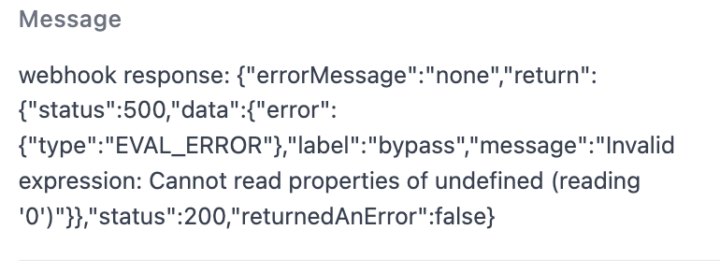
I stumped the dev team. Any ideas here?
I had a lead fill out a form to get a call to test the AI voice but found this error message in the execution logs. Assistable knows about it, but hasn't been able to figure it out yet. I tested it on myself and I'm getting calls with no problems on my own cell phone. Any help is greatly appreciated. FYI - The lead was a law office and he used his general 800 number to try to get the call. This is my suspicion at the moment. I tried asking GPT but it didn't help me identify the issue.
0 likes • Nov '25
DNC has a different error code. I dealt with that last week. And the fact that this was a 800 office number makes me question if the cell phone companies are the culprit.

Oct '25 •
Snapshot Done - Awaiting Check By Team
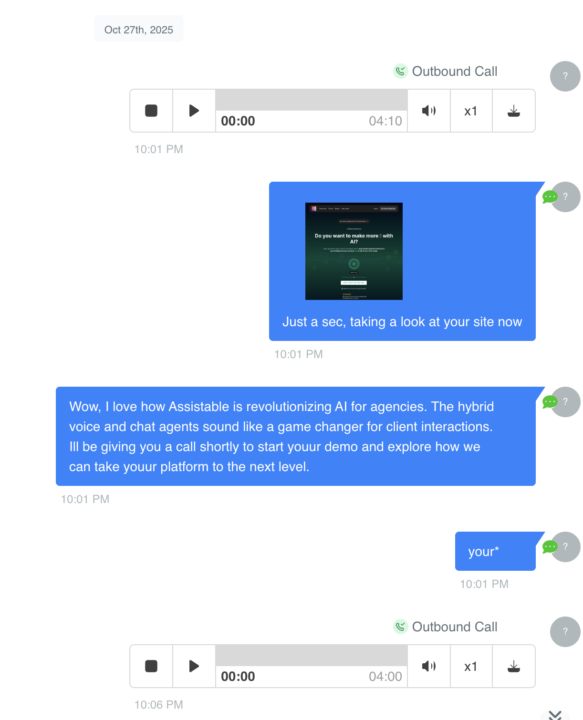
Alrighty, I finished up the self-selling snapshot. Screenshots attached of a sneak peak. Im going to have the guys (and team) check my work tomorrow before we release it and add more failsafes (like accidental hangups etc) and get 'er launched. I'm gonna go spend some time with little man and will film and send out snapshot after someone else testing / breaking :) This includes 1 assistant with 3 states: evaluator, demo, and closer. Meant to actually extract information from a user, turn it into a usable demo (and send the demo) and then finish them with a closer agent afterwards. This also includes access to 3 unofficial apis: misspelling API, screenshot API, and webscrape API. These send a screenshot of the user's website and a quick blip to kick off the demo stage. I've also included some custom javascript to correct URLs from form fills (some people love to mess up their own website url..) A doc with prompts and instructions included. If yall want, I can throw in our demo landing page as well? dunno if you want that or not. tons of fun, looking forward to it
0 likes • Oct '25
Looking forward to this! Thanks Jorden

1 like • Oct '25
@Japhine Monday I’m interested also! Thank you.
1-10 of 10

@bruce-young-3765
Performance based AI automations for sales teams in financial services. www.leadrevival.ai
Active 20d ago
Joined Sep 12, 2025
San Diego
Powered by