Activity
Mon
Wed
Fri
Sun
Feb
Mar
Apr
May
Jun
Jul
Aug
Sep
Oct
Nov
Dec
Jan
What is this?
Less
More
Memberships
AI Automation Society
237.5k members • Free
AI Automation First Client
1k members • Free
AI Automation Agency Hub
285.7k members • Free
7 contributions to AI Automation First Client

1d •
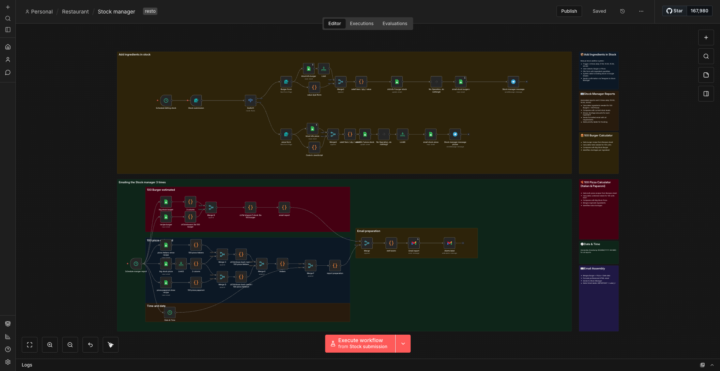
🚀 How We Automated Stock Management and Saved 12+ Hours Weekly
After analyzing our manual inventory system, we identified critical inefficiencies: stock updates took 45+ minutes daily and shortage alerts were reactive, not proactive. The Problem: 📦 Manual stock entry 4x daily 📊 No real-time shortage visibility 📧 Late supplier notifications 🔄 Disconnected recipe-to-stock calculations ❌ Frequent stockouts from poor forecasting Reality: Managing inventory for 200+ daily orders meant 3+ hours on spreadsheets plus costly last-minute supplier orders. The Solution: Built an intelligent n8n workflow automating inventory from entry to alerts: 1. Smart Stock Addition Scheduled forms (4x daily) Auto-updates to Google Sheets Instant Telegram confirmations 2. Predictive Shortage Analysis Recipe-based calculations (100 units) Real-time stock comparison Fuzzy matching for ingredients 3. Automated Reporting 3 daily reports (10:00, 15:00, 20:00) Formatted HTML emails Priority Gmail labels 4. Multi-Product Support Burger + Pizza tracking Separate recipe databases Merged shortage reports 💰 Impact: Time: 3+ hrs/day → 20 min = 12+ hrs saved weekly Cost: Labor: $576/month saved Emergency orders: $400+/month prevented Annual ROI: ~$11,700+ 🎯 Key Lessons: Predictive > reactive - Calculate needs before shortages hit Recipe integration - Connect formulas to inventory Scheduled automation - Regular checks prevent crises Smart matching - Fuzzy logic handles typos Tech: n8n, Google Sheets, Telegram, Gmail, JavaScript The Bottom Line: Simple automation transformed chaotic inventory into a predictive system that saves 600+ hours annually and cuts costs by ~$12,000/year. What processes are you automating in your business? I'd love to hear about different approaches and tech stacks people are using. Drop your experiences in the comments! 💬 hashtag#Automation hashtag#SmallBusiness hashtag#Productivity hashtag#Entrepreneurship hashtag#NoCode hashtag#n8n hashtag#BusinessGrowth hashtag#TechStack hashtag#StartupTips hashtag#DigitalTransformation

0 likes • 24h
Where do you find these clients man?

1d •
Medical Clinic Saves 15 Hours Monthly With Intake Automation 🔥
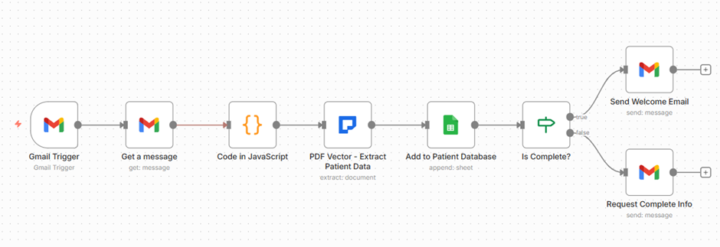
Clinic administrator frustrated with new patient intake data entry. Asked if automation could help. Built patient intake processor using PDF Vector. Changed their onboarding. THE CLIENT PROBLEM: Family practice. 35 new patients monthly. Each submits intake form with demographics, insurance, emergency contacts, medications, allergies, medical history. Manual process: Download form. Read through. Type everything into system. Check completeness. Email welcome or request missing info. 15 minutes per patient. 8.75 hours monthly on intake data entry. WHAT I BUILT: Workflow monitoring email for intake forms. PDF Vector extracts patient name, DOB, address, phone, email, insurance provider, policy number, emergency contact with name/phone/relationship, medications, allergies, medical history. Adds to Google Sheets database automatically. Validates required fields. Sends welcome email if complete or requests missing information. Email → PDF Vector Extract → Database → Validate → Email Patient. Seven nodes powered by PDF Vector extraction. WHY PDF VECTOR: Handles any intake form format. Handwritten forms, typed PDFs, scanned images. PDF Vector extracts consistently. Extracts structured healthcare data: Patient demographics, insurance details, contact information, medical arrays (medications, allergies). Schema-based extraction ensures all fields captured. Critical for healthcare compliance. THE FIRST FORM: Tested with actual form. 30 seconds: Patient name extracted. DOB, address, phone, email captured. Insurance extracted. Emergency contact with relationship captured. 3 medications, 2 allergies extracted. Added to database. Welcome email sent. Administrator: "It read the entire form and added everything to our system? Exactly what we need." PROCESSING MONTHLY: 35 new patients monthly submit forms via email. By month end: All 35 patients extracted, added to database, welcomed or contacted for completion. Review time: 10 minutes monthly spot-checking. Before: 8.75 hours monthly manual data entry.
1 like • 1d
@K.b Koboto me too bro
4d •
Near Zero Cost Invoice Processing Workflow
So, invoice processing as a first project is pretty simple. Everyone recommends tools like PDFVector or similar services that require credits in your account — and to be fair, they’re really good at what they do. But I set myself a very simple constraint: make the entire workflow as costless as possible. I used Google Drive as the entry point. Whenever an invoice is uploaded to a specific folder, the automation starts automatically. The file type is checked first — if it’s an image, I run it through OCR (Tesseract) to extract the raw text. If it’s a PDF, I used LlamaParse to parse it first and then extract the text. Once I have clean text, I pass it to an Information Extractor node powered by the Google Gemini Chat Model, using a very strict extraction schema. Instead of asking the model to “understand the invoice”, I only ask it to return specific fields like invoice number, date, seller, totals, tax, and currency. If something isn’t present, it returns null. The extracted data is then logged into Google Sheets. I also added a basic duplicate check so the same invoice doesn’t get logged twice. Finally, once everything is saved, the workflow sends a Slack message with only the most important information — invoice number, seller, and totals — so accounting can see it instantly without opening the invoice. No paid APIs, no credits, completely free. That said, there are some limitations: - LlamaParse has a free limit of 1,000 pages parsed per day - Gemini has a requests-per-day limit. I’m using Gemini 2.5 Flash, which is fast but comes with a lower free request quota compared to other models Still rough around the edges, but it works — and that was the goal. Curious how others here would approach this differently.
2
0

12d •
Stopped watching tutorials and built a real AI automation
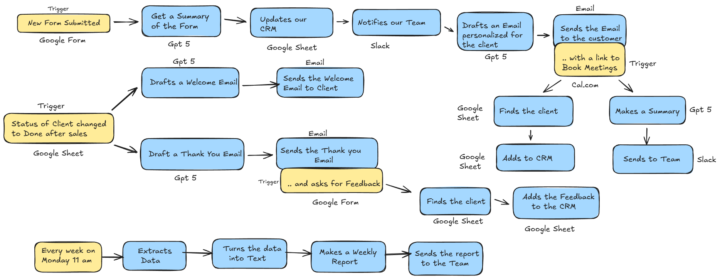
Built my first real AI automation instead of another tutorial. Goal was simple: stop businesses from losing leads due to slow replies. End-to-end flow:form → AI summary → CRM → instant email → booking → status sync → feedback → weekly report I know I’ll build way better systems in the future, but this one gave me confidence that “yeah, I can actually do this.” Posting to learn — what would you improve or simplify?
1 like • 11d
Amazing
11d •
Client processing 500 contracts daily - Three paralegals working overtime 🔥
THE MANUAL CHAOS 500 contracts across 15 formats 45 minutes per contract for key terms Missed review deadlines constantly Overtime costs: $3,200 weekly THE n8n TEMPLATE (14 nodes) Had this from another law firm. Adapted in 90 minutes. Multi-format receiver handles all contract types Contract classifier identifies 15 formats Key term detector finds payment, termination, renewal clauses Date extractor feeds calendar Liability finder flags indemnity clauses Confidence scorer queues uncertain items for human review DEPLOYMENT SPEED Template modification: 90 minutes Testing with their contracts: 45 minutes Production deployment: 30 minutes Training their team: 60 minutes Total setup: 3.25 hours Revenue: $4,200 setup plus $1,800/month CURRENT PERFORMANCE Daily volume: 500 contracts Processing: 2.8 minutes average per contract Accuracy: 97.6% on key terms Human review needed: 12% of contracts Time saved: 6.5 hours daily AFTER 4 MONTHS Eliminated overtime: $12,800/month saved Reduced review errors: 94% Client response time improved: 89% TEMPLATE REUSE Same base template now deployed: 6 law firms 3 real estate companies 2 insurance companies Each adaptation: 60-120 minutes Each generates: $900-1,800/month recurring Templates: n8n | Make | Zapier How many problems could your core templates solve with minor modifications?
1 like • 11d
@Duy Bui Hey Duy, where can I find sample files for testing and learning purposes (such as sample invoices for invoice extraction etc.)
1-7 of 7

Active 9h ago
Joined Jan 6, 2026
Dhaka, Bangladesh