
Write something

🔥
1d •
What's your tool stack look like?
Do you change your tools regularly or stick to what you have? New or known? How many tools do you have?
Poll
2 members have voted
1
0


23d •
Take the advance payment
Freelancers & agency owners, Take the advance payment. Seriously. I know this sounds obvious, but I ignored this rule once and I'm paying the price for it right now. A few weeks ago, I completed an entire workflow for a contractor based in California. The scope was discussed. The work was delivered. Everything was completed from my side. Then came the scope creep. Suddenly there were new requirements that were never part of the original agreement. Since those requests were outside the approved scope, the project got stuck in back-and-forth discussions. The result? The client hasn't paid the contractor yet. The contractor hasn't paid me yet. And everyone's stuck in endless conversations. The reason I didn't take an advance? "Let's build trust first." Big mistake. Trust is great. Contracts are better. Advance payments are even better. A lesson I'll never ignore again: Get the scope in writing. Take an advance. Deliver the work. Get paid. Leave on good terms. PS: Get that advance fix that windshield 😂

Sep '25 •
Document Automation = Your Fastest Path to $2,000
Want to know the dirty secret about landing clients? Start with their paperwork. Every. Single. Time. Why documents? Because every business drowns in them: - Invoices - Contracts - Applications - Forms - Reports And guess what? They're all just data trapped in PDFs. MY FIRST 10 CLIENTS: 1. Dentist - Patient forms - $1,500 2. Lawyer - Contract extraction - $2,000 3. Accountant - Invoice processing - $1,800 4. Gym - Membership apps - $1,500 5. Restaurant - Vendor invoices - $1,200 6. Contractor - Permit docs - $2,000 7. School - Enrollment forms - $1,700 8. Clinic - Insurance forms - $1,900 9. Realtor - Lease agreements - $1,600 10. Retailer - Purchase orders - $1,400 Total: $16,600 from moving data from PDFs to spreadsheets. THE SIMPLE TECH STACK THAT PRINTS MONEY: - Automation tool: Pick one (Zapier/Make/n8n) - PDF processor: PDF Vector (my go-to, free tier handles 100 docs) - Storage: Google Drive (free) - Delivery: Their existing system That's it. $50/month in tools. $2,000/month per client. THE WINNING FORMULA: 1. Find business drowning in paperwork 2. Count hours wasted on data entry 3. Build simple PDF → Spreadsheet workflow 4. Demo with their actual document 5. Close with ROI math REAL EXAMPLE FROM LAST WEEK: Insurance broker, 50 applications/day Manual entry: 5 hours My automation: 0 hours Their savings: $3,000/month My fee: $1,800 + $200/month Build time: 3 hours Your competition is charging $10k for "AI solutions." You're solving real problems for $2k. Who do you think wins? DROP A COMMENT: What type of business do you know that drowns in paperwork? First 5 comments get my exact PDF automation template. Time to stop overthinking and start building.
Dec '25 •
Medical Clinic Saves 15 Hours Monthly With Intake Automation 🔥
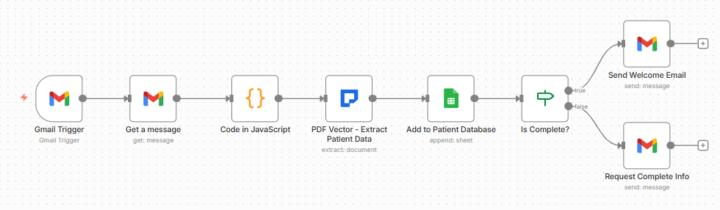
Clinic administrator frustrated with new patient intake data entry. Asked if automation could help. Built patient intake processor using PDF Vector. Changed their onboarding. THE CLIENT PROBLEM: Family practice. 35 new patients monthly. Each submits intake form with demographics, insurance, emergency contacts, medications, allergies, medical history. Manual process: Download form. Read through. Type everything into system. Check completeness. Email welcome or request missing info. 15 minutes per patient. 8.75 hours monthly on intake data entry. WHAT I BUILT: Workflow monitoring email for intake forms. PDF Vector extracts patient name, DOB, address, phone, email, insurance provider, policy number, emergency contact with name/phone/relationship, medications, allergies, medical history. Adds to Google Sheets database automatically. Validates required fields. Sends welcome email if complete or requests missing information. Email → PDF Vector Extract → Database → Validate → Email Patient. Seven nodes powered by PDF Vector extraction. WHY PDF VECTOR: Handles any intake form format. Handwritten forms, typed PDFs, scanned images. PDF Vector extracts consistently. Extracts structured healthcare data: Patient demographics, insurance details, contact information, medical arrays (medications, allergies). Schema-based extraction ensures all fields captured. Critical for healthcare compliance. THE FIRST FORM: Tested with actual form. 30 seconds: Patient name extracted. DOB, address, phone, email captured. Insurance extracted. Emergency contact with relationship captured. 3 medications, 2 allergies extracted. Added to database. Welcome email sent. Administrator: "It read the entire form and added everything to our system? Exactly what we need." PROCESSING MONTHLY: 35 new patients monthly submit forms via email. By month end: All 35 patients extracted, added to database, welcomed or contacted for completion. Review time: 10 minutes monthly spot-checking. Before: 8.75 hours monthly manual data entry.
Sep '25 •
Where to Find Clients Who'll Pay Today (Not in 6 Months)
Forget cold outreach. Find businesses in active pain. THE DESPERATION SIGNALS: **Job Boards** (Indeed, LinkedIn, Craigslist): Search: "data entry" + your city They're literally paying someone to copy-paste Your message: "Saw your data entry posting. What if you never had to hire for this again?" **Facebook Groups**: "[City] Small Business Owners" "[Industry] Professionals Network" Look for: "Does anyone know..." "I'm drowning in..." "Help needed with..." **Google Maps**: Search: Accountants, Dentists, Law firms, Clinics Check reviews for: "Slow paperwork" "Long wait times" "Disorganized" These are automation goldmines **LinkedIn Sales Navigator** (free trial): Filter: Small business, Posted in last 30 days Keywords: "overwhelmed" "manual process" "hiring admin" They're screaming for help **Your existing network**: That dentist you go to Your accountant Your gym owner The local restaurant owner They ALL have document problems MY BEST CLIENT SOURCES: 1. Job boards: 2 clients ($2,400) 2. Local Facebook: 6 clients ($3,200) 3. Direct referrals: 5 clients ($10,500) 4. LinkedIn: 4 clients ($3,200) 5. Google Maps: 3 clients ($2,100) THE DESPERATION TEST: Ask: "How many hours per day on paperwork?" If they say 2+ hours = DESPERATE If they're hiring for it = EXTREMELY DESPERATE If they're complaining publicly = SHUT UP AND TAKE MY MONEY REAL EXAMPLE: Found this Indeed post last month: "Admin Assistant - Data Entry Focus - $18/hour" Messaged business owner: "Saw you're hiring for data entry. What if I could eliminate that position entirely?" Response in 2 hours. Demo on Thursday. Closed Friday. $1,900 setup + $200/month. They saved $3,120/month. YOUR ACTION PLAN: 1. Pick ONE source above 2. Find 10 desperate businesses 3. Send the 9-word message 4. Report back here First to book a call gets my demo script. Who's hunting today?
1-30 of 370
powered by
skool.com/ai-first-client-formula-8589
From zero to first $1k/month with AI automation in 30 days. Get the exact formula + templates that landed 100+ their first client.
Suggested communities
Powered by