Activity
Mon
Wed
Fri
Sun
Nov
Dec
Jan
Feb
Mar
Apr
May
Jun
Jul
Aug
Sep
What is this?
Less
More
125 contributions to Creator Boost Tribe
May 16 •
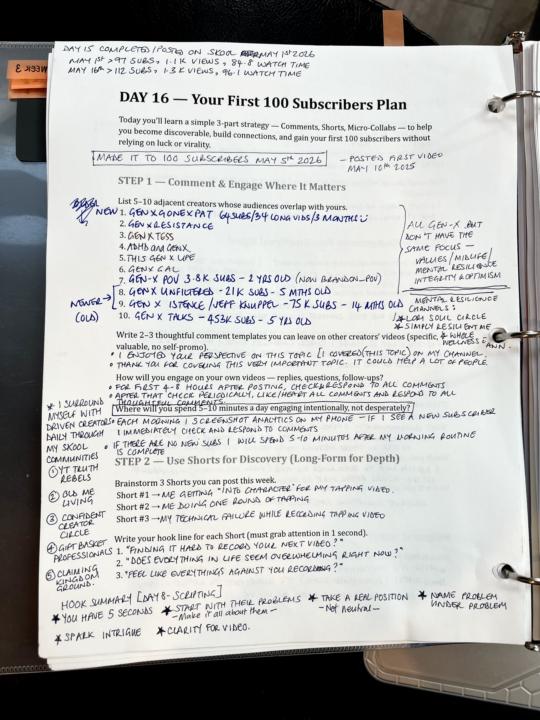
CB Challenge - Day 16 Done (First 100 Subs)
This one took me 15 days to complete, but I’m happy to report that in those 15 days I surpassed 100 subscribers😊 I’ve learned so much in the last year (I posted my first video on May 10th 2025) after posting 30 videos - mostly long form. I still have so much to learn, but thanks to this community and my amazing supporters I’m still excited for the YT adventures😀 @Dr. Saundra Stancil @Jaye Brunner @Adam Tinkoff @Ricardo Solomons @Dajana K. @Cat PInegar @Virgil Rucker @Lillie Handy Dominguez

2 likes • May 17
100 on your way to 100K!

🔥
May 15 •
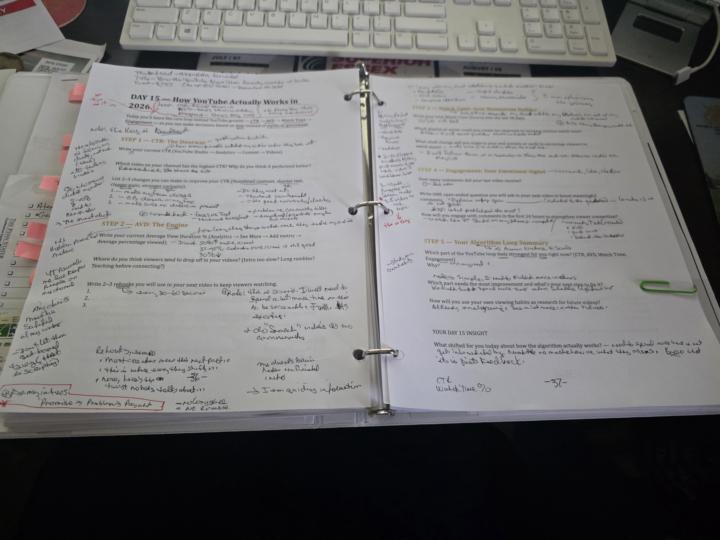
Day 15 - Creator Breakthrough Series (How YouTube Actually Works in 2026)
As you know, it has been an intense period for me, but I did not quit and I do not quit... I Continue!!! It was almost a month (22 days actually), but I never quit. I talked about it and worked on it daily even though you did not see me post about it. Silence is golden and with that golden nugget, this Day 15 is completed & proof attached.😁 It is important to take care of your priorities and address obstacles that interfere😅. Then there are advancement opportunities that shifts the growth cycle📈. This is what happened in the last few weeks: - served 7 clients (including 2 emergency clients) - started my Skool Community for this pivot & learning everything😁 - updated my profile here twice - took a business trip and this CBS challenge with me😀 - met with in-person & virtual colleagues & collaborators - joined a couple of Skool groups that will benefit this entire career shift of my retirement business (Thanks, @Mike Bayer , @Des Dreckett, @Alexa Saarenoja's new group--all are Game Changers!💥📈🔥) - secured a CRM for this business🔥 - had urgent home roofing repairs done - prepped two trade shows, & done - recorded and edited videos - computer maxed out of memory!!!😨 - prep for in-town guest for business interview of me - and even more I won't mention I'm just documenting for my own reference, but you can enjoy the above (or get exhausted reading it, lol😆). For me, can't stop, won't stop💪🏾. In my past, I hate numbers and do all kinds of creative things with them. But this day, like many of the other days in this challenge, was encouraging. I am going to like the numbers!😍 The ultimate lesson was Alexa's final statement: -CTR brings my clients in -AVD keeps my clients watching -Engagement shows my clients I care That's it! I'm all ready for Day 16--this one is going to be exciting too!😀 Side Info: -Current Niche: Teaching Gift Basket Biz Startups
5 likes • May 16
Your tenacity is an inspiration to us all. Thank you.

🔥
May 4 •
Doggone Day 9
Day 9 done — and my first video is LIVE 🙌 Stayed up way too late but zero regrets. Took Alexa's Hook → Story → Value framework and actually used it tonight — scripted, filmed and published my first real value video. For anyone sitting on an idea waiting for perfect conditions — it doesn't come. You just go. Peace from Australia 🦘
4 likes • May 5
While I don’t recall what I thought about my first video. I can tell you that I quickly realized that I was doing this mostly for myself despite what I told myself. lol.

May 2 •
If I were to build a Creators App what would you like included
HI Alexa & Brains Trust, It's been a wee while, however, from time to time I check out what's happening in the community. I have a wee idea (well it's a bit complicated to build) for a Creators app that people in the community may find useful to assist with the process involved in creating a video for one's channel. My ideas are to include a range of steps from idea to final upload of the video, including one having the choice of what ai they would like to use i.e. Claude, Chat GPT etc. and one can use different ai at various stages. Kind of like a plan for the video including title, thumbnail, description, story board etc. Including upload to your Y/T Channel of the final video. And also downloading the video project to one's computer etc. I'm thinking of a web version which people have 30 days to download the completed project to their computers and a desktop version where people can download what they have completed on the web and finish the remainder of the process on their desktops or do the whole project on their desktop. (Trying to give as much choice to people as possible) My ? are: 1. Would people find this app useful. 2. What would people like to see included in such an app. I'm currently in the planning stages only. So now is the time for people to say what they would like included in such an app, if they think it's useful. Whilst I'm aiming primarily for solo creators as such, if people want teams involved, I could potentially incorporate this. (Will have to think through how it incorporate.) Any ideas and suggestions are welcome and are greatly appreciated. Many thanks Talk to you soon, Desley
2 likes • May 2
@Desley Casey Asking before building is a smart move. I'd probably not use it, though I understand the appeal. I already use VidIQ for a lot of this, and even a solid tool like that doesn't often get it right. AI fatigue is real right now, and creators are trusting tools like this less and less. Also tools that try to do everything often do nothing particularly well. If there's one stage you could own completely and do better than anything else out there, that might be a stronger starting point than providing an end-to-end solution. Either way, good luck with it. It's a real problem worth solving!

🍀
Apr 30 •
Kick-off Call is today for Truth Rebels
If you haven’t heard or haven’t joined yet and want to. We go live today. We are already almost 100 members strong! 🎉 https://www.skool.com/alexasaarenoja/about Here’s what it’s all about: Most YouTube growth advice is designed to grow your channel — not your business. Post more. Go viral. End up with 10,000 subscribers and zero clients. YouTube Truth Rebels is for purpose-driven entrepreneurs ready to build a six-figure business — or beyond — with YouTube at the center of it. Not by chasing the algorithm. Not by burning out. But by showing up aligned, speaking your truth, and building something real. What You Get: ➡️Weekly live calls with Alexa ➡️Content feedback ➡️Trainings/Courses (+ more coming) ➡️Community of Entrepreneurs 💥Sign up for annual = Free 30 min. coaching call w/Alexa (My 1:1 clients invest five figures to work with me. Here you get my brain for $67/month.) Who You're Learning From: 🔥 $300K+ in 2 years by being herself on YouTube 🔥 55k subscribers in 18 months YT 🔥 9k Skool community built from scratch 🚫 Not for you if you want viral shortcuts, follower counts that don't pay your bills, or a highlight reel with no business behind it.

2 likes • Apr 30
I'm listening to the call now and sorry I missed it. Great kickoff!
1-10 of 125
Active 21d ago
Joined Mar 2, 2026
Idyllwild, CA
Powered by