Activity
Mon
Wed
Fri
Sun
Jun
Jul
Aug
Sep
Oct
Nov
Dec
Jan
Feb
Mar
Apr
What is this?
Less
More
Owned by Ari
—Creatio EX Nihilo— ⟁Enter the portal⟁ Systems + feedback + receipts. From REC to REEL. FAST. Lets BREAK timelines. TOGETHER.
Memberships
83 contributions to Clief Notes

10d •
I went to bed with two briefs. I woke up to two shipped products.
Last night I briefed two things. A plugin for a professional video editor. A Mac app for a dashboard I'd been sketching for weeks. Both real. Both specced. Neither had a single line of code written. I wrote the briefs. I kicked off the dispatch layer. I went to sleep. This morning there were two working products. The math on it: - 5 Opus sessions acting as executor advisors - 5 Sonnet sessions doing the mechanical build work - 0 extra spend on top of my Anthropic subscription - 0 new chat windows opened by me The orchestrator session I use as my advisor seat handed each spec to its own background worker. Each worker got its own branch, its own clean context, its own budget line. The Opus workers held the judgment. The Sonnet workers did the keystrokes. They handed off to each other. I slept. The lever people keep missing Most people think "power" in AI means a bigger model or a longer context window. The real lever is distribution. One tight brief can be executed by ten workers in parallel. Ten workers, each with a clean low-token budget, outperform one conversation carrying a bloated context every time. It is not close. The brief is the compression. The brief is the intelligence. Why it costs nothing extra The workers ran on Claude. Claude is covered by my subscription plan. Opus and Sonnet are both on the same plan. No metered API spend. No per-call billing. No "agentic loop surcharge". Ten workers in parallel cost exactly the same amount as sitting in one chat window and typing all day. Same bill. Ten times the output. The system around the AI is what did the work. The principle Stop prompting. Start briefing. A brief is a contract. It has acceptance criteria, files in scope, the one condition that makes the worker stop and surface to you, and the exact thing you want to be sitting on top of in the morning. Every worker starts cold. Every worker reads that same doc. The doc is the system. Prompts fight your context window. Briefs replace it.
0 likes • 6h
@Roberto Aguirre 100% as a Creative Director myself, there's a big difference between a client saying, "Make me a video" and "Make me a video about Product X that's 15 seconds long for TikTok to cater to this audience" and so on and so forth.
1 like • 2h
@Gabriel Azoulay <3
7h •
The model is rented. Your workspace is yours.
Coupling your workflow to one model is a single point of failure. Pricing shifts. Features get deprecated. A better model lands somewhere else. If your data, your protocols, and your methods all live inside one vendor's runtime, every shift becomes a multi-week refactor. The fix isn't picking the "right" model. It's building so the question doesn't matter. ——————————————————————————————————————————————— Three layers, three different jobs pull your stack apart and look at what's actually coupled. Data and protocols. Markdown files, JSON, plain folders. This layer should already be model-agnostic. If you're storing notes, briefs, plans, and memory inside a vendor's chat history, you don't have a workspace, you have a session. Tooling. Python scripts, CLIs, MCP(Model Context Protocol) servers. Also agnostic by default. The trap is hardcoded paths and runtime assumptions baked into shell commands. Lift those into env vars. Now any worker can run them. Agent invocation. This is the only layer that's genuinely model-coupled. Skills, hooks, slash commands, dispatch syntax don't pretend it isn't. Accept the coupling here, then make it swappable. What you actually want consistent: Not the model. The behaviour around it. 1. Voice rules. Same copy standard regardless of who's drafting. 2. Response format. Same skim-friendly structure across every backend. 3. Methodologies. Brainstorm, brief, handoff, audit. Same shapes. 4. Memory access. One protocol, one source of truth, every model reads it identically. 5. Output contract. Same final message shape so the same audit gate can verify it. That's the consistency that matters. The reasoning style of Opus vs GPT-5.5 vs Gemini stays distinct on purpose. That's why you have three. The shared layer Pull the always-on stuff into a .shared/preferences/ folder. Voice rules, response format, anything load-bearing on every interaction. One source. Generate CLAUDE.md, AGENTS.md, GEMINI.md from it.
1 like • 7h
ICL I do feel like i'm cheating on claude rn getting it to build out my workspace for GPT 5.5 lool
2 likes • 5h
@Nathan Smith I put all of my subscriptions on virtual cards, so my Claude subscription stopped the other week cause the virtual card expired and I froze and was in the same position. Sorted it but that led me to realize I need to not just be dependent on one model 😆

11h •
Something’s not clicking for me here.
I think I’m mixing up some concepts here. What exactly is the difference between: - a well-designed folder/file structure - an AI agent - a full app I understand them individually at a basic level, but I don’t clearly see where one stops and the other starts and when you’d choose one over the other. In one of @Jake Van Clief videos, he said that he's using the folder structure as his app. I would appreciate If anyone can break this down in a simple way or with a real example. Thank you.
1 like • 7h
The three things do different jobs. Once you separate the jobs, the line between them gets clear. 1. Folder/file structure = the office It's the workspace where work gets done. Walls, desks, filing cabinets, the company handbook on the shelf. - Top folder: founders. Sets identity and high-level rules. - One down: management. Routes work to the right team. - One down: team leader. Owns a specific project. - One down: the actual task or stage. At every level you've got a CLAUDE.md or CONTEXT.md acting as the policy doc for that floor of the building. The agent reads only what's relevant to where it's standing. 2. AI agent = the worker The agent is whoever's clocked in. Could be Opus, Sonnet, a Haiku sub-agent, or you. It walks into a folder, reads the policy on the wall, picks up the inputs on the desk, does the job, drops the output in the output/ tray. Then you(the human 😆) reviews, or the next stage's worker picks it up. The agent isn't the office. It's the body moving through it. 3. Full app = either the desk or the product This is where most people get confused. "Full app" is two different things depending on context: - The desk: your interface into the office. Claude Code, Cursor, a custom UI. It's how you and the agent talk. - The product: the thing the office makes. A plugin, a video, a website, a report. A "full app" in the traditional sense is software you ship to other people. An ICM workspace is software you use to ship other things. Why Jake says "folder structure as app" Because in ICM, the orchestration logic isn't in code. It's in the folder layout. - Numbered folders = execution order. - CONTEXT.md files = the prompts. - output/ directories = the handoffs. - A review stages = the conditional branching. The "app" is the workspace itself, because the workspace is what produces the deliverable. In my case VVV For my plugin work the path is: Pushing_Squares/Plugins/[Plugin name]/[stage]
1d •
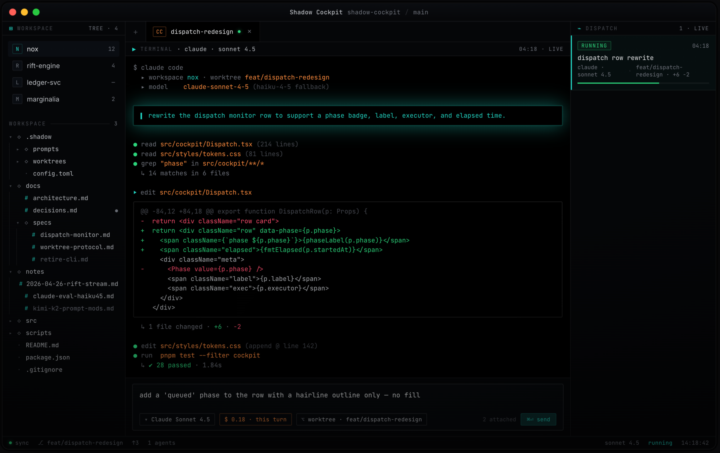
The orchestrator seat: I stopped letting Claude code and got it to delegate.
Most people use AI coding agents the same way. Open one chat, type, watch it work, copy the output. The model is doing both the thinking and the typing. That's the bottleneck. The interesting move is splitting those two roles. One model holds the judgment. Other models do the typing. The judgment seat never touches a file. The typing seat never makes a decision. I call this the orchestrator pattern. If you've been here a while You'll have seen me developing a system for dispatching workers from within a single Claude Code session. Briefs going out, workers running in the background, results coming back to one main seat without me ever switching windows. I've been running it for months. I just open-sourced the harness. What it does Pushing Dispatch is a multi-model dispatch framework for AI coding agents. You sit in one Claude Code session as the orchestrator. From there, you write briefs and dispatch workers. Workers run in the background on whichever model fits the task. Opus for hard reasoning. Sonnet for steady execution. Haiku for mechanical sweeps. Kimi for long-context. DeepSeek for cheap parallelism. One harness. Many models. One judgment seat. How I use it Three patterns: Brief and dispatch. I write a brief in the orchestrator session, hand it to a worker, and don't read code while the worker runs. I review the output when it's done. Parallel fan-out. When ten files need the same kind of edit, I dispatch ten workers and review all diffs in one pass. Long-context to Kimi. When something needs the model to hold a hundred-thousand-token codebase in working memory, the brief routes to Kimi automatically. The point is never to type the code myself, and never to do the same kind of thinking twice. Quick start Paste this into a fresh Claude Code session: ———————————————————————————————————— Read SETUP_WITH_CLAUDE.md from https://github.com/PUSHINGSQUARES/Pushing-Dispatch_ and walk me through setup end to end.
1 like • 8h
@Michael Steve No rest till I have my own Jarvis hahah
0 likes • 8h
@Allan Durhuus <3

1d •
🏆 WEEKLY WINNER 🏆 Ari Evergreen
@Ari Evergreen just locked in lifetime Premium. Free. Forever. That's what the top spot on the 7-day leaderboard gets you in here. Show up, post hard, help people out, and the community rewards you for it. The 7-day clock just reset. Next Monday we crown the next winner. Could be you!! Here's how it works: - Post bad ass stuff - Help people in the comments - Share what you're building, what's working, what's breaking - Engage with other members' posts The leaderboard tracks all of it. Whoever sits at #1 on Monday wins. The prize, depending on where you're at: - Free member? You get lifetime Premium, free - Already Premium? We convert your account so you stop paying - Already VIP? We convert your VIP so you stop paying Either way, you stop paying. For life! @Ari Evergreen, congrats. You earned it. Everyone else, the next 7 days are wide open. Go.
1 like • 21h
@Andrew Carter ❤️🔥❤️🔥❤️🔥
0 likes • 15h
@Kevin Carrasco <3
1-10 of 83

Active 2h ago
Joined Mar 15, 2026
ENFP
Powered by