
Write something

Dec '25 •
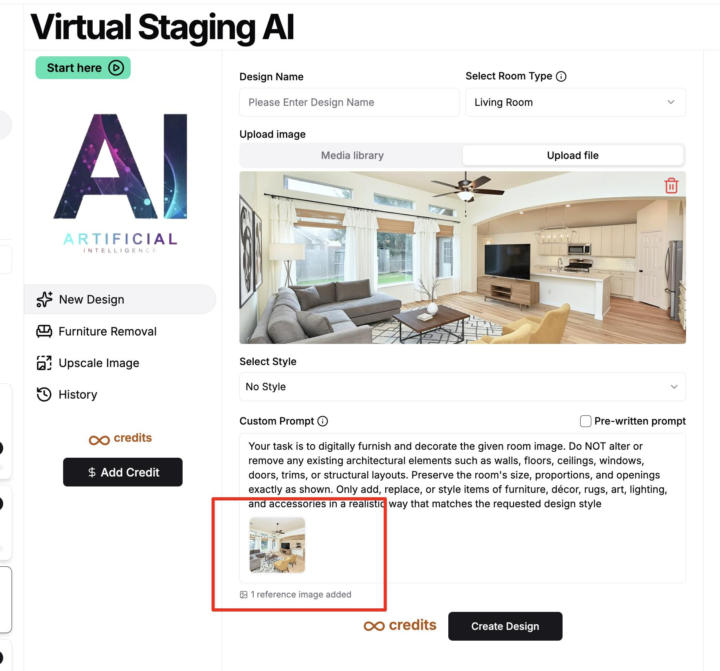
New Update: Add a reference image in Pictastic Virtual Staging!
You can now add a reference image in Pictastic Virtual Staging. This means if you have specific furniture you would like, add them as reference and BAM they are in the photo. REALLY cool stuff going on here! Just copy and paste your reference image to add it into your prompt.
4
0
Sep '25 •
Huge Update! - Add Furniture To 360 Images!
Hi guys! I’m excited to announce a brand-new feature inside Pictastic → 360° Virtual Staging with AI This changes everything for property photos and tours: -> Upload a 360° photo of any room -> Stage it instantly with AI furniture & décor -> Upscale to HD for flawless, high-resolution results -> Publish directly into your CloudPano tours The key? You’ve got to see the walkthrough video. In this step-by-step video, I show you exactly how to avoid the common mistakes, get perfect stitch lines, and create immersive, staged 360° rooms that wow your clients. Watch the full video now and try it yourself here: 360 Virtual Staging on Pictastic.ai Empty rooms don’t sell. Immersive, staged 360° rooms do. Don’t just hear about it — watch the process, follow along, and start staging today. Watch the video here: https://new.pictastic.ai/360-virtual-staging To your success, Zach Calhoon Co-Founder, CloudPano & Pictastic.ai PS: Its very important to watch the video here: https://new.pictastic.ai/360-virtual-staging
Sep '25 •
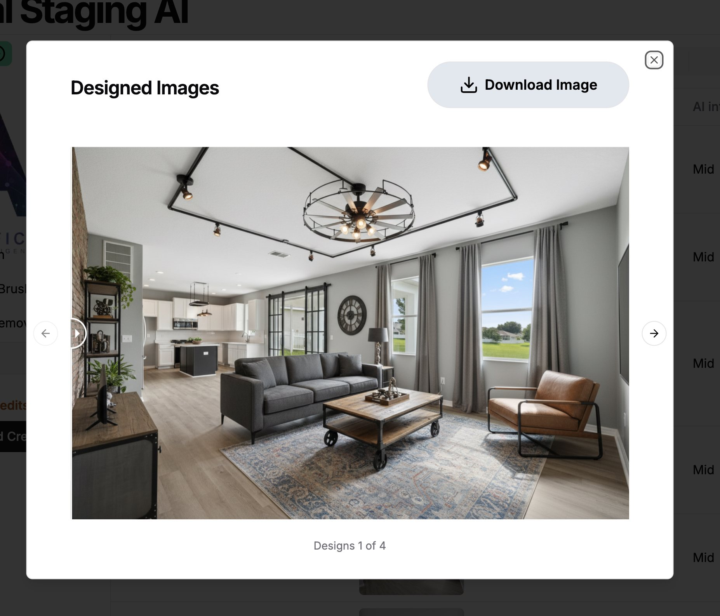
UPDATE: More Powerful AI Virtual Staging on Pictastic
UPDATE: We have a new MUCH more powerful model released for AI Virtual Staging on Pictastic. If you are interested in testing it we can add few free credits to your account just comment below and we will add them to your account. or test it here: https://app.pictastic.ai/gallery/virtual-staging-ai
Sep '25 •
New Unlimited Plan for AI Virtual Staging Now Available!
🚀 Big News for Creators for the community! Unlimited AI Virtual Staging is here 🎉 Turn every empty room into a show-stopping listing photo—no limits, no credits to count, just pure creative freedom. I’ll be dropping a video walkthrough soon, but you can be one of the very first to try it today 👇 👉 Activate Unlimited Virtual Staging Now Only $49 a month for the next 50 users. --- There are three important things about this launch that you need to know right now: 1) We gutted and upgraded our AI engine completely. This means better outputs, better quality, and overall more satisfaction from users. 2) We increased the speed of outputs exponentially. You should expect staging to take place within 6-10 seconds. That's it, you're done. 3) You can now use our unlimited plan and try as many times as you wish. This way we can guarantee satisfaction because if you don't like an output, you just change your prompt or just click Create Design again and you get a better output quickly. Big shout out to the team for making this happen. It's such a huge deal and it's going to help everyone out big time! Here's the announcement again. Of course, if you like this deal, I recommend grabbing the annual plan to save two months free. Upgrade here: https://app.pictastic.ai/virtual-staging-ai-plans?billing=yearly&plan=0 I'll see you inside. -Zach --- Email Announcement--- We just launched something HUGE! 🎉 Introducing our brand-new Unlimited Plan for AI Virtual Staging. Now, you can create unlimited designs and transformations for just $49/month — a total game-changer for real estate professionals. With our Unlimited Plan, you get: ✅ Endless AI-powered staging options ✅ Unlimited photo transformations ✅ Stunning results in seconds No limits. No restrictions. Just creativity at full speed — all for less than the cost of a nice dinner out. 🍽️

Mar '25 •
New Features for Pictastic.ai – Furniture Removal from Any Real Estate Listing Image
Hi! We’ve just rolled out two powerful new features at Pictastic.ai and we’re excited to share them with you! If you’ve ever wondered how to remove furniture from a photo (and make it look like it was never there), we’ve got you covered. Our Furniture Removal tool lets you highlight and erase unwanted items in seconds. Pair that with our new AI Staging Brush, and you’ll be creating clean, stunning virtual stagings like a pro. 🪑 Furniture Removal Tool – Just brush over what you want gone and generate a clean, empty room. 🖌️ AI Staging Brush – Customize your staging by choosing exactly where to place your AI-generated furniture. 💵 And the best part? You can do all this for under $1 per image. 👉 Watch the full demo video here: https://youtu.be/t9Y8n2EAeA0 Ready to try it yourself? Log in to your account or sign up at Pictastic.ai and start transforming your photos today.
1-24 of 24
skool.com/360-profit
Welcome to the 360º Profit! Here you'll find the roadmap, tools, and resources to generate sales with 360º media, and digital marketing.
Leaderboard (30-day)
1

+12
2

+12
3

+7
4

+7
5

+6
Powered by