

16h •
PAI 2.0 is coming
I quote the advertisement for the new version of PAI: "PAI 2.0 is our biggest release yet, introducing a more powerful creative agent, a new Canvas based workflow, and significantly improved image and video generation models. It is designed to make cinematic creation more flexible, controllable, and collaborative than ever before." As of this morning, I gave it a try with this script—more to come...
1
0

20d •
Important Poll for AI Animation Masterclass
Big question for you. I need your honest vote. I’m at a crossroads with what to build next, and I want YOU to be the one who decides. Here are your two options: - Option A: Videos first, software second: I keep building out the weekly video lessons on schedule. You can see exactly what’s coming by clicking the curriculum link below. New modules drop consistently, you follow the step-by-step process, and we build the pipeline together lesson by lesson. - Option B: Software first, videos second: Instead of learning how to do each technique, you get a tool that does the technique for you, powered by AI. Here is what the software would include: - Brainstorm story ideas fast - Develop character psychology to build interesting characters quickly - Write and fix scripts line by line with AI assistance - Design characters with an integrated image generator - Build full storyboards shot by shot - Fix any shot to adjust camera angle or character position - Manually fix any panel with a built-in Photoshop-like editor - Put clips together with an online video editor - Advanced cinematography controls when generating your images, including: ∙ Close up ∙ Medium close up ∙ Full shot ∙ Over the shoulder ∙ Low angle / high angle ∙ Frontal, side, and 3-quarter view And this one is my favorite. - An AI coach assistant, available 24/7, powered by Claude. This is not a generic chatbot. It will have access to everything the video lessons are supposed to teach you. So instead of waiting for the next module, you ask a question, and you get the exact answer you need, right now, for your specific situation. Now here is something important regardless of which option wins. Whenever we start building the software, everyone in this community gets unlimited FREE credits for image generation and the AI chat assistant while we are in development. That is a gift from me to you for being here early. Video generation is more expensive to run, so that part will require a small pay-as-you-go investment when the time comes.
Poll
36 members have voted
27d •
Exciting NEWS for AI ANIMATION MASTERCLASS - Image Generator Coming Soon!
Right now I'm working on the early prototype of the image generator. Right now it's still very buggy but at least it started creating images using NanoBanana Pro and NanoBana 2. I'm trying to add a couple of features that I have not seen in the other engines. The one that I'm most interested in is in being able to edit the images with Photopea right there in the interface (which is basically Photoshop but online, and without the AI), and also be able to select areas and ask for adjustments using any AI model like Nano Banana Pro, SeedDream, or any image generator of your preference. And for those of you in the AI Animation Masterclass, can test the super early prototype right now, if you are interested, send me a DM. After this is polished, and improved, will have unlimited image creations for 6 months, just to make it up for the delays in the training. -- Again pivoting from just creating another online course and instead create an online software that guides you to animate any AI Shortfilm step by step, I believe becomes much more powerful. We are also learning a lot in the freelance project we're doing for the video game FreeFire (disclaimer - this is not our trailer, this is from the game just for context), and all the process we do, for visualization, storyboarding, color grading, etc, is something we want to include in this online software. Right now it's still not ready for early testers but I plan to have something solid next week.

May 1 •
AI ANIMATION MASTERCLASS - Official Update
2 UPDATES: 1. Official Delivery Dates for Modules 5 to 8 2. Confirmation for the AI Animation Coach (my AI Clone + 2 talented directors) to guide you step by step on your filmmaking progress. I recorded a short video for you to explain the upcoming updates. When I launched AI Animation Masterclass I committed to 8 modules delivered weekly. I'm at 4 of 8. Two reasons: 1. I had an original plan for the Curriculum of this program that changed dramatically. 2. I had a computer braking up, and could not edit videos or edit images fast enough. It would take too much time to load anything. The original curriculum was this: - WEEK 1: Becoming an AI Director & Producer - WEEK 2: Shot-by-Shot Production Pipeline - WEEK 3: Character Design & Style Consistency System - WEEK 4: Character Actions & Limitations - WEEK 5: Background Design & Consistency - WEEK 6: Audio Consistency (Voice Acting, Music and SFX) - WEEK 7: Camera Magic (Motion, Timing and Limitations) - WEEK 8: Putting it All Together, Publish, Grow, and Repeat And after teaching classes live and seeing what students were actually struggling with, that changed too: - MODULE 1: Becoming a Good AI Director & Producer - MODULE 2: Shot-by-Shot Production Pipeline - MODULE 3: Consistency Shot-by-Shot - MODULE 4: Take Back Control When AI Won't Listen - MODULE 5: Unlock Maximum Control - MODULE 6: Advanced Image Editing - MODULE 7: Advanced Video Editing - MODULE 8: Advanced Audio Editing - BONUS: Advanced Cinematography That's resolved now. I have a new machine that can actually handle the workload, and I'm back at the desk. Here's the real timeline: - Module 5: May 25 - Module 6: Jun 1 - Module 7: Jun 8 - Module 8: Jun 15 And as a thank you for your patience: Every active AAM student gets lifetime access to all future course updates at no additional cost. Also, we are working on a project to develop a software that guides you step by step on all this AI Production Pipeline, with an AI Clone of me + 2 directors who have together 30 years of experience in filmmaking working with big clients like Amazon, Warner Music, and Universal.
Apr 17 •
IMPORTANT ANNOUNCEMENT for Live Classes!
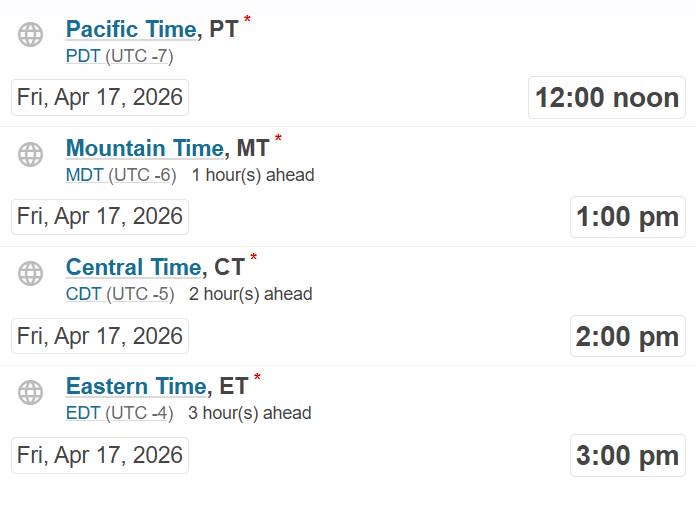
@Thomas Jennings @Lone Fox @Cathy Ferguson @Ernesto Guerrero @Michael Crist @Arlene Dilworth @Asma Omair @Simona Adelina @Darryl Jones Starting this Friday April 17, Classes will be moved 30 mins later. Instead of the usual 12:30 PM MT, it will start at 1:00 PM. Like this comment if you are aware of this change or comment below.
1-30 of 40
Leaderboard (30-day)
1
+80
2
+57
3

+41
4
+32
5

+30
Powered by