

🔥
29d •
Community Pins
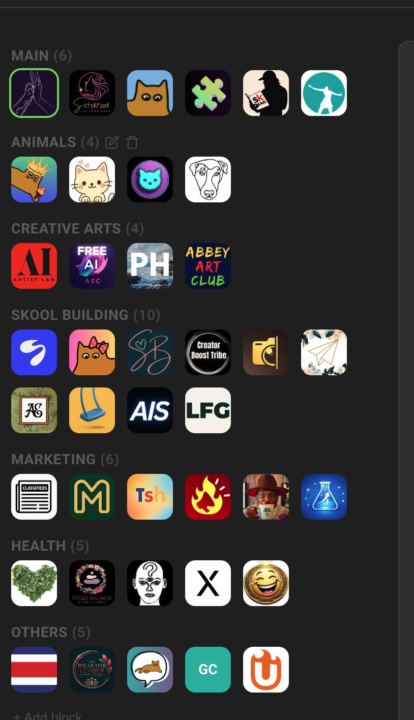
Replace Skool's left community switcher with a strip that holds every community you belong to, grouped into named blocks Skool's left sidebar only surfaces a handful of communities at a time — the rest sit behind a switcher dropdown you have to open every time. If you're active in a dozen or more, the ones you visit daily end up buried in a list you keep scrolling through. Community Pins replaces that switcher with a redesigned strip down the left edge that shows every community you belong to at once — your logos flow in rows across the space beside the page instead of one cramped column. Hover any community to see its name in a tooltip, and the one you're currently in is marked. Group your communities into named blocks. Add a block, head it "AI", "Clients", or whatever fits — each heading carries a live count of how many sit inside. A permanent "Pinned" block catches every community on its own: join a new one and it lands there, leave one and it drops out. Manage it all inline in the strip — "+ Block" adds one, the pencil renames a heading, and the trash icon removes a block (after a quick confirm) and drops its communities back into "Pinned". The "Pinned" block itself can be renamed but never deleted. Drag to organize. Reorder communities inside a block, pull one across to another block, or grab a block's heading to move whole blocks up and down. A custom mouse-driven drag tracks your cursor one-to-one, with no HTML5 ghost image or forbidden-drop flicker to get in the way. The strip scrolls quietly once the list grows long — a slim green scrollbar appears on hover and stays hidden otherwise, so the sidebar stays calm at rest. The whole arrangement is cloud-synced: lay your blocks out on one device and they show up the same on the next. Community Pins can be toggled in the Extension Settings under Appearance. --- Skools linken Community-Switcher durch einen Streifen ersetzen, der jede Community enthält, in der du bist, in benannten Blöcken organisiert Skools linke Sidebar zeigt immer nur eine Handvoll Communities auf einmal — der Rest steckt hinter einem Switcher-Dropdown, das du jedes Mal aufklappen musst. Wenn du in einem Dutzend oder mehr aktiv bist, sind die täglich besuchten in einer Liste vergraben, durch die du immer wieder scrollst.
🔥
Mar 30 •
Course Overview (Admin Feature 👑)
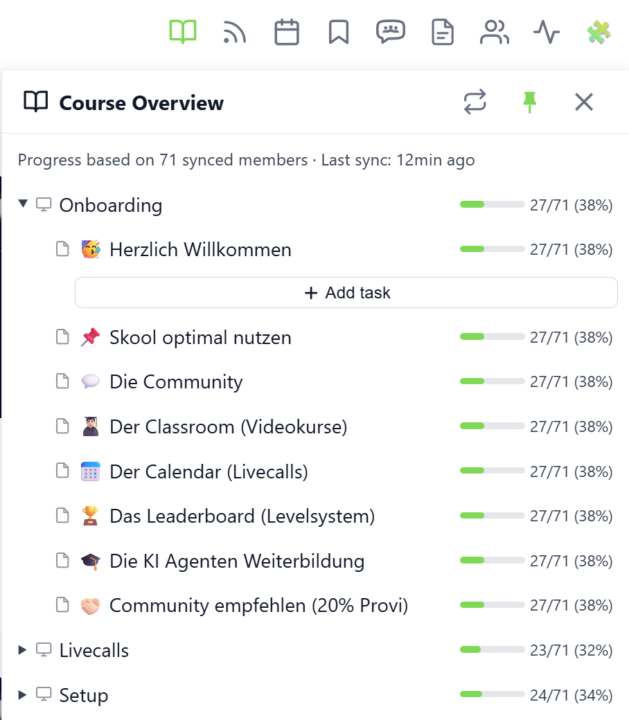
𝗖𝗼𝘂𝗿𝘀𝗲 𝗢𝘃𝗲𝗿𝘃𝗶𝗲𝘄 — 𝗬𝗼𝘂𝗿 𝗘𝗻𝘁𝗶𝗿𝗲 𝗖𝗹𝗮𝘀𝘀𝗿𝗼𝗼𝗺 𝗦𝘁𝗿𝘂𝗰𝘁𝘂𝗿𝗲 𝗮𝘁 𝗮 𝗚𝗹𝗮𝗻𝗰𝗲 Managing a Skool classroom with multiple modules, folders, and pages means a lot of clicking and scrolling to understand the full picture. Course Overview adds a dedicated sidebar panel that shows your complete course structure as an expandable tree — every module, every folder, every page — without leaving the page you're on. Click the book icon in your toolbar to open the panel. Each module shows as a collapsible row with a folder icon for subfolders and page icons for individual lessons. Click any module to expand it and reveal its nested content, loaded directly from Skool's data. The tree remembers which modules you've expanded, so your view stays consistent as you navigate. The real power comes from the completion stats. If you've synced your members' course progress, each module displays a green progress bar showing what percentage of your members have started it. Hover over the bar to see member names, or click it to open a popup with the full list — complete with avatars, tags, and pipeline status. A note at the bottom shows how many synced members the percentages are based on. Hit the refresh button to reload the course structure or update completion stats. The panel respects the 24-hour sync cooldown and shows when the next sync is available. You can pin the panel to keep it open while you browse, resize it by dragging the left edge, or close it when you're done. Course Overview is available for admins and owners only, and works on any page within your community. The feature can be toggled in the Toolkit Settings under the Admin section. --- 𝗞𝘂𝗿𝘀ü𝗯𝗲𝗿𝘀𝗶𝗰𝗵𝘁 — 𝗗𝗲𝗶𝗻𝗲 𝗴𝗲𝘀𝗮𝗺𝘁𝗲 𝗖𝗹𝗮𝘀𝘀𝗿𝗼𝗼𝗺-𝗦𝘁𝗿𝘂𝗸𝘁𝘂𝗿 𝗮𝘂𝗳 𝗲𝗶𝗻𝗲𝗻 𝗕𝗹𝗶𝗰𝗸 Eine Skool-Classroom mit mehreren Modulen, Ordnern und Seiten zu verwalten bedeutet viel Klicken und Scrollen, um das Gesamtbild zu verstehen. Die Kursübersicht fügt ein eigenes Sidebar-Panel hinzu, das deine komplette Kursstruktur als aufklappbaren Baum zeigt — jedes Modul, jeden Ordner, jede Seite — ohne die aktuelle Seite zu verlassen.
🔥
11d •
Chat Panel + Chat Search
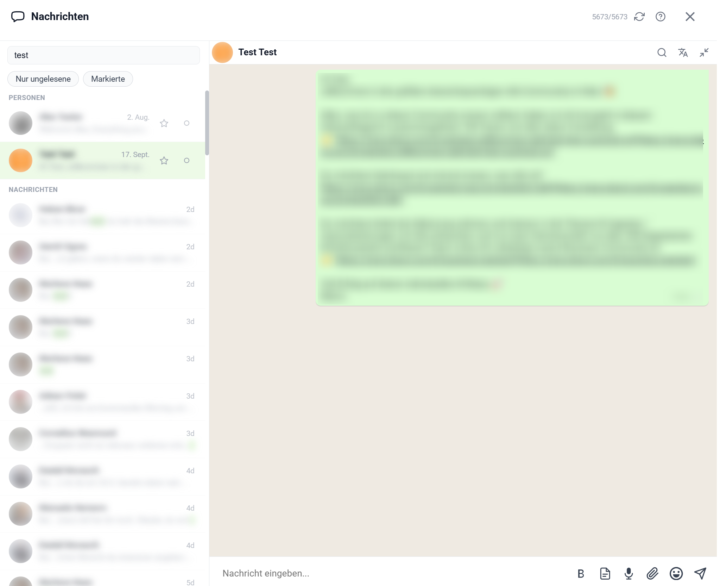
𝗦𝗸𝗼𝗼𝗹 𝗖𝗵𝗮𝘁 — 𝗬𝗼𝘂𝗿 𝗪𝗵𝗼𝗹𝗲 𝗗𝗠 𝗜𝗻𝗯𝗼𝘅, 𝗥𝗲𝘄𝗼𝗿𝗸𝗲𝗱 𝗜𝗻𝘁𝗼 𝗢𝗻𝗲 𝗙𝗮𝘀𝘁 𝗣𝗮𝗻𝗲𝗹 Skool's own chat lives in a long sidebar list: to read a conversation you click away to a separate page, there's no way to filter or pin the threads that matter, and the search box only matches member names. Skool Chat rebuilds the whole direct-message experience as a single toolkit panel — your conversations on one side, the open chat right next to them, and everything you'd otherwise hunt for one click away. Open it from its own icon in the toolbar, where a live badge counts your unread DMs. The panel shows a compact list of every conversation — avatar, name, time of the last message, and a one-line preview, with unread threads clearly marked. Click any row and the conversation opens inline, right inside the panel, instead of throwing you out to skool.com. A back arrow returns you to the list, and you can pin the panel open so it stays put while you keep browsing Skool. Reading and writing happen in the same place. Type a message and send it with Enter — Shift+Enter for a line break — and it appears instantly while it's on its way; new incoming messages show up on their own without a refresh. The composer carries everything you need: an emoji picker that remembers your recents, a bold button for real bold text, your saved text templates, and a translate button. Attach a file with the paperclip — images, PDFs, Word, Excel, ZIP and more — or just drag it straight onto the conversation and drop it. Voice and video messages record right from the input bar. Two filters sit above the list. "Unread only" strips it down to threads you haven't read yet — invaluable in a busy inbox — and "Bookmarked only" shows just the conversations you've starred. The two combine, so you can see, say, only the unread messages among your important contacts. A star on every row bookmarks that conversation, and your bookmarks are cloud-synced — the threads you starred on your laptop are starred on your desktop too. You can mark any chat read or unread by hand, and that state stays consistent across every open tab and device.
🔥
11d •
Community Rank History (Premium Feature 👑)
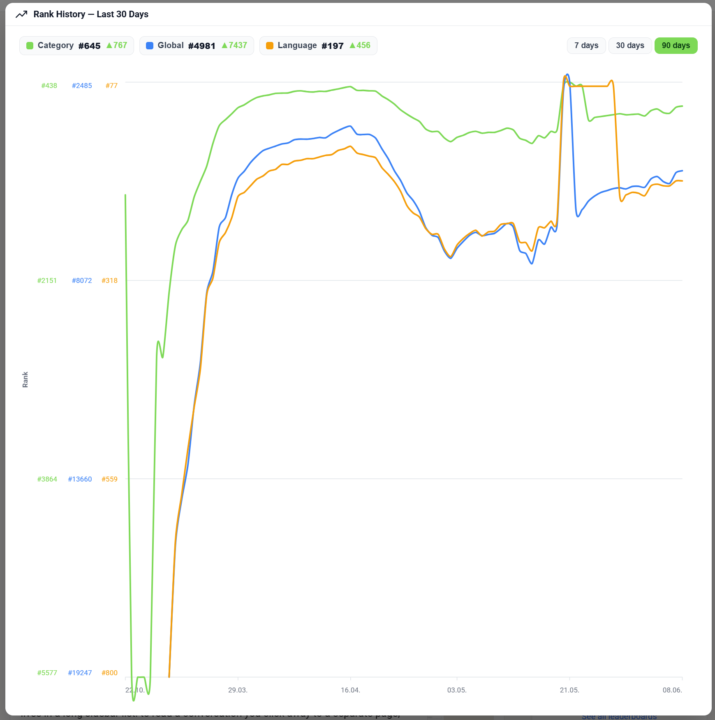
𝗖𝗼𝗺𝗺𝘂𝗻𝗶𝘁𝘆 𝗥𝗮𝗻𝗸 𝗛𝗶𝘀𝘁𝗼𝗿𝘆 — 𝗦𝗲𝗲 𝗪𝗵𝗲𝗿𝗲 𝗮 𝗖𝗼𝗺𝗺𝘂𝗻𝗶𝘁𝘆 𝗛𝗮𝘀 𝗕𝗲𝗲𝗻 𝗧𝗿𝗲𝗻𝗱𝗶𝗻𝗴 Skool shows a community's current rank, but never where it came from — is it a rising star or a fading leader? Community Rank History turns that single number into a story. Click the rank on any community page and a chart opens its ranking trend over the last 30 days, so you see at a glance whether a community is climbing or sliding before you join, partner or buy. The chart draws three lines at once — global rank, category rank and language rank — each in its own color and toggled on or off from the legend, so you can isolate the one you care about or compare all three. Switch the window between 7, 30 and 90 days to zoom from a quick pulse-check out to a full quarter, and hover any day to read the exact ranks on that date. It's the kind of view you'd otherwise have to rebuild by hand from screenshots taken weeks apart. The history is a Premium feature. Free users still see the chart — blurred, with an upgrade prompt — so the value is visible before the paywall; Premium unlocks the sharp, full history. The data is served on demand from the Skool Extensions backend, which keeps a rolling daily snapshot of every tracked community's ranks, so the line you see is real recorded history rather than an estimate. --- 𝗖𝗼𝗺𝗺𝘂𝗻𝗶𝘁𝘆-𝗥𝗮𝗻𝗴-𝗩𝗲𝗿𝗹𝗮𝘂𝗳 — 𝗦𝗶𝗲𝗵, 𝘄𝗼𝗵𝗶𝗻 𝗲𝗶𝗻𝗲 𝗖𝗼𝗺𝗺𝘂𝗻𝗶𝘁𝘆 𝘁𝗲𝗻𝗱𝗶𝗲𝗿𝘁 Skool zeigt den aktuellen Rang einer Community, aber nie, woher er kommt — ist sie ein aufgehender Stern oder ein verblassender Marktführer? Der Community-Rang-Verlauf macht aus dieser einen Zahl eine Geschichte. Klick auf den Rang auf jeder Community-Seite, und ein Diagramm öffnet den Ranking-Verlauf der letzten 30 Tage, sodass du auf einen Blick siehst, ob eine Community steigt oder fällt — bevor du beitrittst, kooperierst oder kaufst. Das Diagramm zeichnet drei Linien auf einmal — globaler Rang, Kategorie-Rang und Sprach-Rang — jede in eigener Farbe und über die Legende ein- und ausblendbar, sodass du die eine isolieren kannst, die dich interessiert, oder alle drei vergleichst. Schalte das Zeitfenster zwischen 7, 30 und 90 Tagen um, um vom schnellen Puls-Check bis auf ein ganzes Quartal zu zoomen, und fahre über einen Tag, um die genauen Ränge an diesem Datum abzulesen. Es ist die Art Ansicht, die du dir sonst von Hand aus wochenweit auseinanderliegenden Screenshots zusammenbauen müsstest.
🔥
Mar 13 •
Bold Text Button
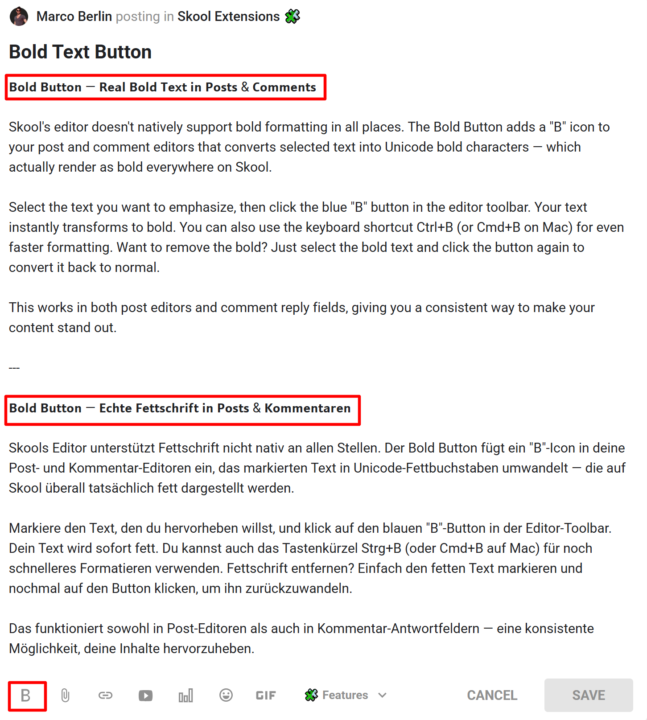
𝗕𝗼𝗹𝗱 𝗕𝘂𝘁𝘁𝗼𝗻 — 𝗥𝗲𝗮𝗹 𝗕𝗼𝗹𝗱 𝗧𝗲𝘅𝘁 𝗶𝗻 𝗣𝗼𝘀𝘁𝘀 & 𝗖𝗼𝗺𝗺𝗲𝗻𝘁𝘀 Skool's editor doesn't natively support bold formatting in all places. The Bold Button adds a "B" icon to your post and comment editors that converts selected text into Unicode bold characters — which actually render as bold everywhere on Skool. Select the text you want to emphasize, then click the blue "B" button in the editor toolbar. Your text instantly transforms to bold. You can also use the keyboard shortcut Ctrl+B (or Cmd+B on Mac) for even faster formatting. Want to remove the bold? Just select the bold text and click the button again to convert it back to normal. This works in both post editors and comment reply fields, giving you a consistent way to make your content stand out. --- 𝗕𝗼𝗹𝗱 𝗕𝘂𝘁𝘁𝗼𝗻 — 𝗘𝗰𝗵𝘁𝗲 𝗙𝗲𝘁𝘁𝘀𝗰𝗵𝗿𝗶𝗳𝘁 𝗶𝗻 𝗣𝗼𝘀𝘁𝘀 & 𝗞𝗼𝗺𝗺𝗲𝗻𝘁𝗮𝗿𝗲𝗻 Skools Editor unterstützt Fettschrift nicht nativ an allen Stellen. Der Bold Button fügt ein "B"-Icon in deine Post- und Kommentar-Editoren ein, das markierten Text in Unicode-Fettbuchstaben umwandelt — die auf Skool überall tatsächlich fett dargestellt werden. Markiere den Text, den du hervorheben willst, und klick auf den blauen "B"-Button in der Editor-Toolbar. Dein Text wird sofort fett. Du kannst auch das Tastenkürzel Strg+B (oder Cmd+B auf Mac) für noch schnelleres Formatieren verwenden. Fettschrift entfernen? Einfach den fetten Text markieren und nochmal auf den Button klicken, um ihn zurückzuwandeln. Das funktioniert sowohl in Post-Editoren als auch in Kommentar-Antwortfeldern — eine konsistente Möglichkeit, deine Inhalte hervorzuheben.
1-30 of 51

skool.com/skool-extensions
Global Calendar - Community Stream - Group Chat - Voice Messages - Bold Text - Bookmarks - Skool CRM - Skool Automations
Leaderboard (30-day)
1

🔥
+117
2

🔥
+61
3

🔥
+54
4

🔥
+43
5

🔥
+42
Powered by