Activity
Mon
Wed
Fri
Sun
Oct
Nov
Dec
Jan
Feb
Mar
Apr
May
Jun
Jul
Aug
Sep
What is this?
Less
More
Owned by Silke
Polynesisches und Insel-Lebensgefühl an jedem Tag 🌴 | Insider-Reisetipps für Hawai'i 🌺 und die Welt 🌎 | Austausch mit Herz & Aloha 🩷| Auf Deutsch
Meilenweit Voraus Basic ⭐️
4.6k members • Free
Sylt - Gemeinsam Meer erleben
607 members • Free
Reise Community
52 members • Free
Claude Masterclass
658 members • $25/month
Weltenbummler-Treff
511 members • Free
Spiritualität & Meditation
65 members • Free
DEMENZ IST ANDERS Community
229 members • Free
NLP Community
396 members • Free
Buchhaltung. Einfach. Machen.
283 members • Free
15 contributions to Skool Extensions 🧩

🔥
Jun 20 •
Schedule Posts (VIP Feature 💎)
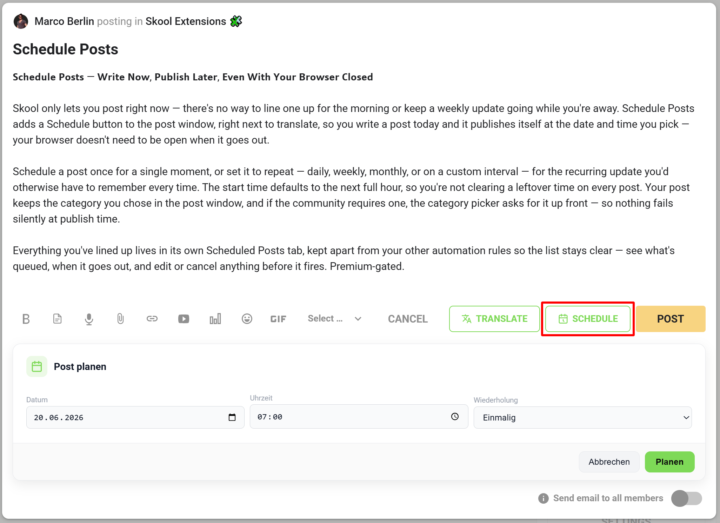
𝗦𝗰𝗵𝗲𝗱𝘂𝗹𝗲 𝗣𝗼𝘀𝘁𝘀 — 𝗪𝗿𝗶𝘁𝗲 𝗡𝗼𝘄, 𝗣𝘂𝗯𝗹𝗶𝘀𝗵 𝗟𝗮𝘁𝗲𝗿, 𝗘𝘃𝗲𝗻 𝗪𝗶𝘁𝗵 𝗬𝗼𝘂𝗿 𝗕𝗿𝗼𝘄𝘀𝗲𝗿 𝗖𝗹𝗼𝘀𝗲𝗱 Skool only lets you post right now — there's no way to line one up for the morning or keep a weekly update going while you're away. Schedule Posts adds a Schedule button to the post window, right next to translate, so you write a post today and it publishes itself at the date and time you pick — your browser doesn't need to be open when it goes out. Schedule a post once for a single moment, or set it to repeat — daily, weekly, monthly, or on a custom interval — for the recurring update you'd otherwise have to remember every time. The start time defaults to the next full hour, so you're not clearing a leftover time on every post. Your post keeps the category you chose in the post window, and if the community requires one, the category picker asks for it up front — so nothing fails silently at publish time. Everything you've lined up lives in its own Scheduled Posts tab, kept apart from your other automation rules so the list stays clear — see what's queued, when it goes out, and edit or cancel anything before it fires. --- 𝗣𝗼𝘀𝘁𝘀 𝗽𝗹𝗮𝗻𝗲𝗻 — 𝗝𝗲𝘁𝘇𝘁 𝘀𝗰𝗵𝗿𝗲𝗶𝗯𝗲𝗻, 𝘀𝗽𝗮̈𝘁𝗲𝗿 𝘃𝗲𝗿𝗼̈𝗳𝗳𝗲𝗻𝘁𝗹𝗶𝗰𝗵𝗲𝗻, 𝗮𝘂𝗰𝗵 𝗯𝗲𝗶 𝗴𝗲𝘀𝗰𝗵𝗹𝗼𝘀𝘀𝗲𝗻𝗲𝗺 𝗕𝗿𝗼𝘄𝘀𝗲𝗿 Skool lässt dich nur sofort posten — es gibt keine Möglichkeit, einen Beitrag für den Morgen vorzubereiten oder ein wöchentliches Update laufen zu lassen, während du weg bist. „Posts planen" fügt dem Postfenster einen Planen-Button hinzu, gleich neben „Übersetzen": Du schreibst einen Post heute, und er veröffentlicht sich von selbst zum Datum und zur Uhrzeit, die du wählst — dein Browser muss dafür nicht offen sein. Plane einen Post einmalig für einen einzelnen Zeitpunkt oder stell ihn auf wiederkehrend — täglich, wöchentlich, monatlich oder im eigenen Intervall — für das regelmäßige Update, an das du sonst jedes Mal denken müsstest. Die Startzeit steht standardmäßig auf der nächsten vollen Stunde, sodass du keine übrig gebliebene Uhrzeit bei jedem Post wegklicken musst. Dein Post behält die Kategorie, die du im Postfenster gewählt hast, und braucht die Community eine, fragt die Kategorie-Auswahl gleich danach — so scheitert nichts still beim Veröffentlichen.

🔥
5 likes • Jun 22
Ok, dieses Feature könnte ein Anlass sein auf Premium zu gehen. Ich lass es nochmal sacken....aber....💜!

Jun 8 •
Geburtstagskalender
Gibt es so etwas wie einen Geburtstagskalender, in den sich die Mitglieder eintragen können. Nur Tag und Monat und morgens erscheint, wer Geburtstag hat?

🔥
1 like • Jun 14
@Melli Heinz
🔥
0 likes • Jun 18
@Ilia Kapustin 😇
🔥
May 22 •
🐞 Issues or bugs
The range of functions has now become large and there can always be an error or unusual behavior in the extension. Use this post and report things that you notice. My goal is always to solve problems as quickly as possible. --- Der Funktionsumfang ist mittlerweile groß geworden und es kann immer mal zu einem Fehler oder einem ungewöhnlichen Verhalten in der Extension kommen. Nutzt diesen Post und meldet Sachen, die euch auffallen. Mein Ziel ist es immer schnellst möglich Probleme zu lösen.
🔥
2 likes • Jun 12
@Robin Swanson Hm. That is really strange....have you tried it in another browser? I believe the Extension is available for Firefox and Chrome.
🔥
2 likes • Jun 13
@Robin Swanson Firefox is my standard browser - so I was also very happy when @Marco Berlin issued the Firefox Version. How is it with the bold-text? Better today?
🔥
Jun 9 •
Hawai'i 🌺 - a hui hou!
Bald ist es soweit und mein Mann, unsere Tochter und ich reisen für mehrere Wochen nach Hawai'i 🌺. Schon seit über einem Jahr schmieden wir Pläne. Unsere Tochter lernt die Inseln zum ersten Mal kennen - was es umso spannender für uns alle macht. Und ich weiß gar nicht, was als erstes kam: Die Idee zu Hawai'i 🌺 eine Community zu gründen oder die Reisepläne? Es hängt einfach beides miteinander zusammen. Denn Hawai'i 🌺 ist meine absolute Leidenschaft. Wenn Du uns auf unserer Reise virtuell begleiten möchtest und zudem Interesse an der Kultur von Hawai'i 🌺, der Sprache, der Geschichte und der Menschen hast, dann komm sehr gerne in unsere 'ohana: Hawaii 🌺 & 🌎 Reisen - Community Es ist übrigens völlig egal, ob Du konkrete Reisepläne hast: Es reicht, völlig aus, wenn Du Dir täglich im Alltag ein Stück Hawai'i Gefühl zu Dir nach Hause holen möchtest. Auch wenn Du Dich für die anderen polynesischen Länder und Inseln im Pazifik interessierst und einen Austausch unter Gleichgesinnten suchst, bist Du bei uns gold-richtig! A hui hou - wir sehen uns in der Community. Eure Silke 💚🌈🌺🐢🌴🐋🍍🥥🌊🥥🍍🐋🌴🐢🌺🌈💚
🔥
1 like • Jun 11
@Monika Hobelsberger Respekt! Du kannst das Puzzle übrigens wiederholen.....habe jetzt ein neues About Bild : ) Edit: Es ist noch das alte Bild drin...da müssen wir wohl noch ein paar Tage warten.
🔥
1 like • Jun 11
@Monika Hobelsberger Wir starten Ende Juni mit dem Beginn der hessischen Schulferien! Ein oder mehrere Videos dazu kommen bald in der Community.

🔥
Jun 2 •
🧩 Pain Puzzle - Finde deinen Weg 🧩
🧩 Willkommen bei Pain Puzzle – Health meets Management 🧩 https://www.skool.com/pain-puzzle-finde-deinen-weg-8831/about Pain Puzzle ist eine Community für Menschen, die erkannt haben, dass chronische Schmerzen und komplexe Gesundheitsprozesse oft viel mehr sind als reine Struktur- oder Einzelprobleme. Viele Betroffene bewegen sich jahrelang zwischen unterschiedlichen Fachrichtungen, Diagnosen, Therapien und Meinungen und versuchen gleichzeitig weiterhin ihren Alltag, Beruf, ihre Familie und ihre Energie irgendwie zu organisieren. Genau dort setzt Pain Puzzle an. Die Community verbindet moderne Schmerz- und Neurowissenschaften mit Projektmanagement, Selbstführung, Psychologie, Resilienz und menschlicher Erfahrung. Denn komplexe Gesundheitsprozesse ähneln oft komplexen Projekten: Viele Beteiligte. Viele Informationen. Viele Unsicherheiten. Und häufig fehlt jemand, der hilft, daraus ein verständliches Gesamtbild zu machen. Worum es bei uns geht: 🧩 moderne Schmerz- und Neurowissenschaften verständlich erklärt 🧩 Orientierung bei komplexen Gesundheitsprozessen 🧩 Austausch ohne Verurteilung oder Schubladendenken 🧩 Selbstmanagement, Resilienz und Umsetzung im Alltag 🧩 die Verbindung von Körper, Nervensystem, Psyche, Arbeit und Leben🧩 Health meets Management Ich selbst komme aus Projekt-, Portfolio- und Change-Management, habe viele Jahre in der Medizintechnik gearbeitet und lebe gleichzeitig seit Jahrzehnten mit chronischen Schmerzen und chronischen Erkrankungen. Dadurch kenne ich sowohl die professionelle Systemseite als auch die Perspektive von Betroffenen sehr gut. In der Community geht es deshalb nicht um einfache Schnelllösungen oder „denk einfach positiv“-Parolen. Es geht um Verständnis. Zusammenhänge. Orientierung. Mitgefühl. Und darum, gemeinsam Stück für Stück das eigene Pain Puzzle besser zu verstehen. Ich freue mich sehr auf den Austausch mit euch 🚀
🔥
1 like • Jun 9
@Monika Hobelsberger Wirklich ein tolles About-Bild, was Du hast - und so eine wertvolle Community für viele Betroffene... 🧩 Solved the teaser of Pain Puzzle in 02:55. Oh je, das hat ein wenig gedauert....
1-10 of 15

🔥
@silkebrand
🌴Reiseverrückt.
🩷Aloha im Herzen.
🍍Weltoffen.
🌈 Komm in unsere Hawaii 🌺 & 🌎 Reisen Community hier ⏬!
Active 3h ago
Joined Apr 2, 2026
Schöneck (Hessen), Germany
Powered by