
Write something

5d •
Server RAM
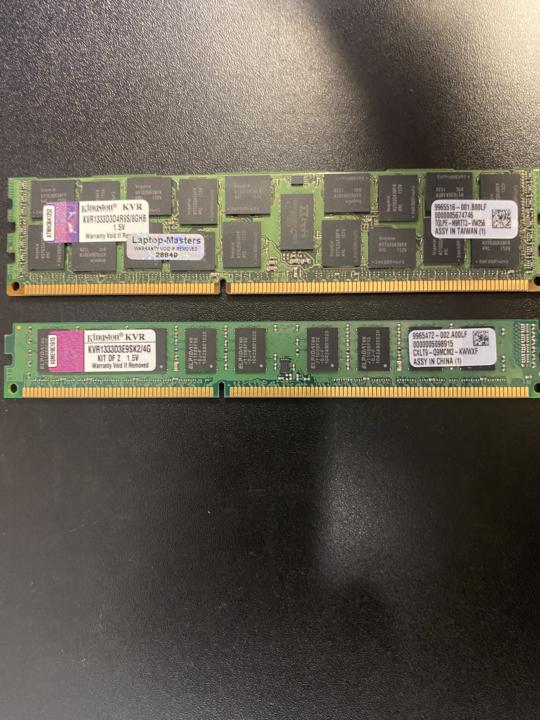
I have an Intel S3420 server board that I am trying to add ram to and it will not post. Both are registered 1333 ddr3 ECC unless I am wrong. Any help is greatly appreciated, it on my Proxmox machine. Two different sticks in the pic below. Smaller is 4Gb and larger is 8Gb

9d •
Upgraded my Proxmox nics
I’ve upgraded the old Intel X520 NICs in my Lenovo P520 workstations to Intel XXV710 network adapters, which natively support 25 Gbps per port (in addition to 10 Gbps and 1 Gbps). The XXV710 is designed for much more efficiently and successfully allows the processor to enter deep C-states. Even though the card is faster, your Lenovo P520 will likely consume less power in idle mode. While I’m not upgrading to 25GbE just yet, this prepares my setup for future developments. The Intel XXV710 features superior hardware offloading and excellent SR-IOV support. The Proxmox advantage: you can split the physical 25G port into dozens of "Virtual Functions" (VFs) and pass them directly through to your VMs. This provides your VMs with near 100% hardware speed at extremely low CPU overhead. Furthermore, if you utilize SDN (Software-Defined Networking) within Proxmox and set up virtual network tunnels between nodes, these packets are processed by the XXV710's hardware rather than being handled by your P520's processor. In short: you get increased speed, lower latency, a lower idle power bill, and better integration with modern Proxmox features.
2
0

Nov '25 •
Refurbished NAS HDD'S
Thoughts on going with refurbished hard drives for a nas/media server to keep the cost down ? I see shucking was a popular strategy but does not seem to make sense with the current prices. Any reccommendations on the best places to buy refurbished drives ?
Apr 26 •
Upgraded my router to a Asus RT-BE88U (old one ASUS RT-AC68U)
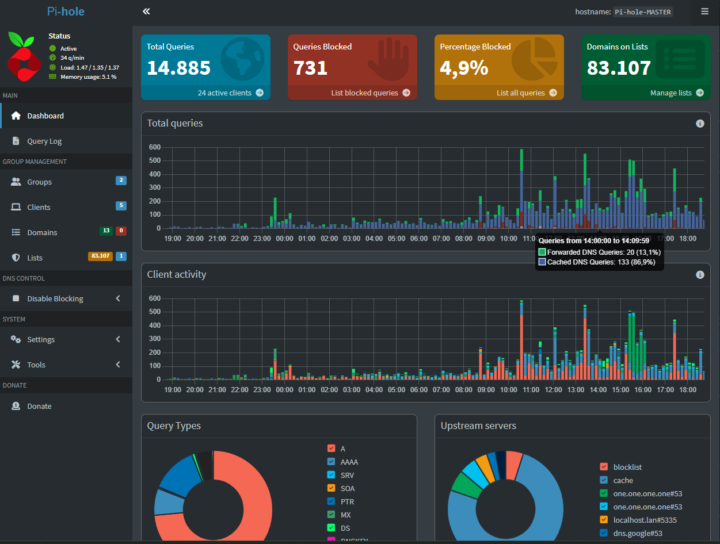
What an improvement 😁 Why the Asus RT-BE88U is my Ultimate Choice and upgrade for my Homelab and Fiber Future The Asus RT-BE88U (WiFi 7) is uniquely positioned to handle both the extreme speeds my upcoming fiber connection and the complex internal traffic of a homelab user. It serves as the perfect high-bandwidth foundation for my environment. 1. Merlin firmware 2. The 10Gbps SFP+ & Multi-Gigabit Backbone 3. 10 GB to my Qnap QSW-M804-4C The dedicated 10Gbps SFP+ port is a game-changer for any Proxmox or NAS user. By using a direct optical or DAC (Direct Attach Copper) connection to my server, I achieve: - Zero-Latency Internal Transfers: Move huge VM images, backups, and 4K media at full 10Gbps speeds. - Future-Proofing: It enables a complete high-speed path from my ISP’s fiber modem, through the router, directly into my server infrastructure. - Expanded Connectivity: Combined with an additional 10Gbps WAN/LAN port and four 2.5Gbps ports, I have plenty of high-speed lanes for all my wired nodes. 2. Advanced VLAN Segmentation & Security Professional VLAN (Virtual LAN) management allows me to organize my network like a homelab data center: - Network Isolation: Easily separate my IoT devices and smart TV from my main lab environment. This ensures that media devices stay in their own segment while still accessing my Pi-hole/Unbound setup. - Optimized Traffic: VLANs reduce "broadcast noise," ensuring that intensive lab tasks don't interfere with the stability of my daily internet usage or streaming services. 3. WiFi 7 and Multi-Link Operation (MLO) With my upcoming fiber connection, MLO ensures my wireless network finally matches your wired speed. By allowing devices to connect to multiple bands (2.4GHz, 5GHz, and 6GHz) simultaneously, MLO provides: - Wire-like Stability: If one band encounters interference, traffic seamlessly continues on another, eliminating buffering. - Extreme Throughput: Aggregated bandwidth allows WiFi 7 devices to reach multi-gigabit speeds wirelessly, perfect for high-speed fiber lines.
Apr 4 •
New toy new possibilities
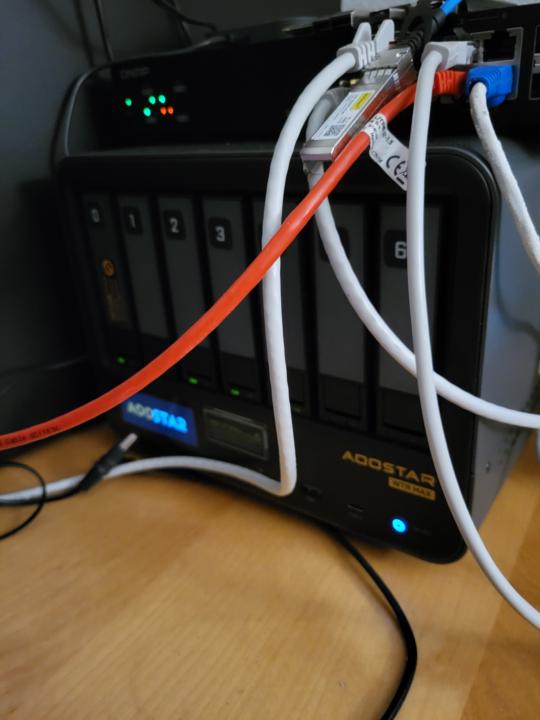
A few days ago, I welcomed my new toy: an Aoostar WTR Max 8845HS. I must say, the hardware layout of this PC/NAS is impressive. It’s an 11-bay box, including 5x NVMe slots, and four intel nics 2spf+10gb intel 710 and 2 x2.5 I226-V nics , no pci but ...oculink. I managed to get 80GB of ECC memory through the Aoostar site. Unfortunately, 96GB wasn't available, so 64GB runs in dual channel while the remaining 16GB does not. Still, I figured 80GB is better than 64GB. I already have a Lenovo P520 running Proxmox, but since I have more time on my hands now that I’m retired, I thought this would be a fun project. My plan: install Proxmox and run PBS (Proxmox Backup Server) and TrueNAS Scale as VMs, using PCI passthrough for the SATA controller and the remaining 4 NVMe drives for Proxmox or as a ZFS cache for TrueNAS. The possibilities with this box are endless; I’ll have to give it some more thought. Anyway, after securing my data from my Synology DS923+ and moving it to my TrueNAS Scale zpool, I wanted to take it a step further: why not link the two Proxmox servers in a cluster? However, a cluster with a 10-year-old Xeon and a relatively new AMD CPU seemed unwise for running VMs on the hosts (CPU). I’d have to set everything to x86-64-v2-AES for safety, and I can forget about live migration anyway.( cold migration yes I can do). "By forcing a modern AMD CPU to behave like an old Xeon (via v2-AES), you lose access to modern accelerators like AVX-512 or other performance enhancements that the new chip offers." So, I’m putting that idea on ice for now. Since my Aoostar "passes through" all drives to the TrueNAS Scale server, I decided it would be wiser to store the PBS backups on a local NVMe rather than on the TrueNAS zpool. The thought of something happening to TrueNAS or its pool gave me the jitters. I know you can import a zpool into a new TrueNAS server without an explicit export—perhaps losing only the last few seconds of data—but still. To avoid cluttering my desk with hardware, I decided to also run PBS on my existing Lenovo P520 Proxmox server. Not to backup from there, but to use the datastore to sync backups from the Aoostar’s NVMe drive to a directory on my zpool there. You might think I’m crazy, but my most critical data is also stored on an external hard drive and secured in the cloud. Am I paranoid?
1-30 of 49

skool.com/homelabexplorers
Build, break, and master home labs and the technologies behind them! Dive into self-hosting, Docker, Kubernetes, DevOps, virtualization, and beyond.
Leaderboard (30-day)
1
+68
2

+40
3

+12
4

+12
5

+8
Powered by