

23d •
Changing Editing Programs
My subscription runs out for CapCut Pro on 11.1. I am tapped out on money flowing out so I have decided to switch up editing programs! The down side, learning a new program. I have decided to go with DaVinci Resolve 21 the free version. I have heard from others on here it is a good option. I have heard it said many times, YouTube is no longer the go to place to learn things. Me being me, I did the YT search on learning DaVinci. Well, to all the DaVinci gurus, you didn't help! You assumed I knew some stuff! I was so confused and discouraged after watching a few videos. In my frustration I ran to my friendly assistant, ChatGPT to vent! Oh my goodness, I can't say enough about the step by step process Chat laid out for me to follow in publishing my first DaVinci video! What I thought would take me a month of learning, and practicing took just a few hours! It was a very simple video with some B-roll and music added, no fancy stuff like transitions and text overlay. But still for this 67 year old woman, I was excited to get it done without all the frustration! Bottom line, Chat can be used for LEARNING as well as a rock polisher for scripting! Just wanted to share the tip!

18d •
I audited a YouTube channel this week. 4 mistakes I see small creators make all the time
I do SEO and thumbnails for a creator, and this week I went through their whole YouTube Studio. Same mistakes I keep seeing everywhere, so sharing in case it helps someone here. Mistake #1: Junk traffic that kills your channel One video had 85% of views coming from random sites and apps (external traffic), avg watch time 0:24. YouTube sees people leaving in seconds and stops recommending you. Check Analytics > Traffic source > External. If you see sites you don't recognise, stop whatever is sending them. Mistake #2: Sending your videos to friends and family Feels like support, but if your channel is for a US/UK audience and your family watches from another country, YouTube learns the wrong audience. One video even got a search term from a school student. Share only with people who would watch it anyway. Mistake #3: No chapters + numbers that don't match Two videos had zero chapters, and one title said $19K while the description said £19K. Small thing, but viewers notice and trust drops. Add chapters to every long video and keep numbers consistent. Mistake #4: Targeting keywords nobody searches The channel kept using a phrase in titles that barely shows up in YouTube search suggestions. Type your idea in the YouTube search bar first: if it doesn't autocomplete, almost nobody is searching it. The good news: the videos with fixed titles and thumbnails got 6–8% CTR vs 3.6% before. What's the one metric in your Studio that confuses you most? Happy to help in the comments.

26d •
I made a YouTube link optimizer for Skool embedded videos.
I thought I'd share this since it's been so handy for me. I hope it's ok to post this Alexa :) Make sure your Skool embedded video views are counted. You can add characters to the end of your videos to make sure embedded views count for YouTube views. Or you can just use the tool I made. This tool also converts your channel link to include the subscribe popup so people are prompted to subscribe right away. It's free! No catch. YouTube Link Optimizer


🔥
May 14 •
The Reason Your Weekly Video Starts Cold Every Single Time
The vast majority of creators think YouTube judges a video on its own merits. Post it, wait, see what happens. That's not quite how it works. When your video goes live, YouTube immediately looks for a warm audience to serve it to. People it already knows have an interest in what you talk about. If you've been quiet all week, that list is thin. So the video gets shown to cold traffic first, click-through is low, and the algorithm concludes nobody wants it. That's not a bad video. That's a cold start. Here's the fix. Every time someone watches a Short from your channel or sees a Community post, YouTube adds them to what I think of as your warm list. It knows they care about your topic. So when Thursday's video drops, it's got a pool of active, interested viewers to recommend it to right away. The first hour looks completely different. One long-form video per week is enough. But the week around it matters. A couple of Shorts clipped from the video, scheduled across the days before and after. A Community post or two keeping the topic alive. Daily presence without daily production. The one thing that kills this is Shorts that pull in the wrong audience. Trending sounds, off-topic hooks - they train the algorithm to associate your channel with people who'll never sit and watch a 15-minute video. Keep everything contextually relevant, and the model works. What does your week look like between uploads right now? Curious what people are actually doing.


May 27 •
Editing videos, is that a struggle?...📼
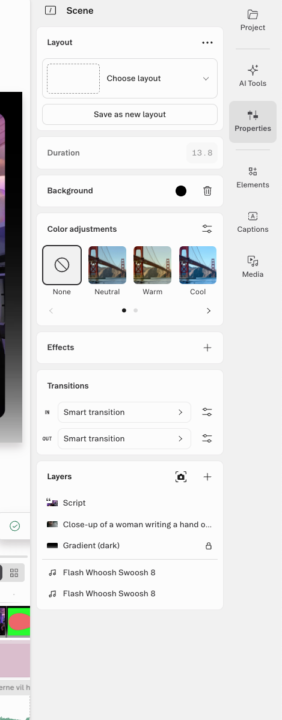
A lot of you are properly struggling editing your Youtube videos. Yes Final Cut Pro and other video editing platforms can be a big mouthful and take a long time. That why I also looked elsewhere. So,,, there is alternatives which is a huge time saver.... After doing Final Cut Pro for a couple of years, I have looked at DeScript (https://web.descript.com). Descript is a tekst based editor where you simply remove words and sentences from the transcribe and then it will be removed from your video. Yes its AI base and has a lot of other advantages such a B-roll which it automatically adds if you want it. Below are some screenshots if you are interested. It's taken from my newest video which will be available on my channel later today. It took me one day to get started with this platform, it so simple anyone can do this. No I don't get anything for saying that. It's me honest opinion. 😊 Please reach out to me. I will be happy to help you getting started. Have the best day 🌸 Henriette
1-30 of 481
skool.com/creatorboost
Next-Level YouTube Growth Starts Here. Where Passionate Creators Find Their Voice and Grow.
Leaderboard (30-day)
1

+120
2

+77
3

+43
4

🔥
+36
5
+35
Powered by