
Write something

4d •
Google Created This Lead Generation Tool Almost 10 Years Ago For Small Local Businesses—Yet Most Of Them Still Don't Know It Exists
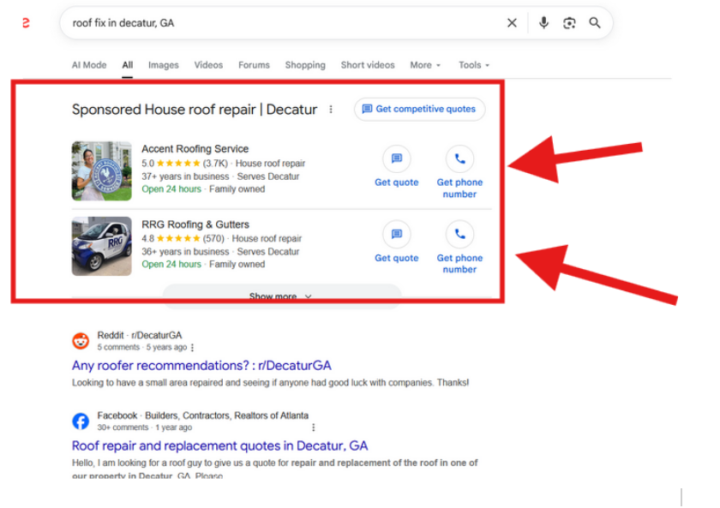
Many contracting businesses don't know about this, and they really—REALLY should. Google first introduced this feature back in 2017, nearly a decade ago, after spending roughly two years testing and refining it. The rollout was a success, and today it has become one of the most powerful lead-generation channels available to small and medium-sized local service businesses. This one is especially relevant for local service professionals. Traditional Google Ads can be incredibly powerful, but they're also competitive. You need to write good ad copy, set up your campaigns correctly, monitor performance, optimize keywords, and continuously refine the account. On top of that, you're usually paying per click—not per lead. That means if your landing page isn't converting, you can easily spend a significant amount of money on clicks without generating many actual leads. And unfortunately, that's a reality many businesses experience. But what if I told you there's a way for small and medium-sized local businesses to bypass a lot of that complexity? What if you could appear at the very top of Google, pay for leads instead of clicks, and let Google handle much of the heavy lifting for you? Have a look at the picture attached. This is an example search I performed in Decatur, GA. Take a look at the top two results. You'll notice something interesting right away. These businesses aren't appearing through traditional Google Ads. They're showing through Google's Local Services Ads (LSA) platform, which sits above the regular search ads and organic results. This is what's called LSA (Local Services Ads). It's connected to your Google Business Profile (formerly Google My Business), which you're probably already familiar with through Google Maps. LSAs are displayed in a way that allows searchers to either call the business directly or send a message with just a few clicks. One of the major advantages is that you don't need a dedicated landing page to generate leads.
4h •
Can You Spot The Google Ads Mistake In This Screenshot?
In this article, I'm going to show you a real example I recently came across that demonstrates just how easily a Google Ads contractor campaign can become misconfigured and, more importantly, how those mistakes can be fixed. Have a look at the screen shot attached . Google Ads has been around for more than 20 years and is arguably one of the most advanced and robust marketing systems ever created. But that's not all. It's also one of the most documented, taught, and explained marketing platforms in existence. Because of that, what continues to surprise me time and time again is that despite the massive amount of educational material available— advertisers still make mistakes that cost them time, money, and potential customers. You can clearly see that my search term was: "Fix my roof now in Wyoming." The intent is clear, and although the location is statewide, it's still very specific. So you can probably already spot the obvious problem this advertiser has... What it's offering is "Roofing Services in South Dakota." Now, it's true that South Dakota is right next to Wyoming. But if I'm a homeowner searching for someone to fix my roof NOW in Wyoming, I sure as hell want to see a company that serves Wyoming. And even if this roofing contractor is capable of sending a crew into Wyoming quickly, someone searching in Wyoming should still see an ad that's relevant to Wyoming. An honest mistake? Maybe. But the reality is that the ad isn't matching the searcher's location, which can lead to fewer clicks and, even worse, people clicking the ad only to discover it's actually a company based in South Dakota. This creates friction, lowers trust, and ultimately hurts campaign performance. So how should they solve that? The answer is to be diligent with your Google Ads geo-targeting settings. Google provides a reporting section that shows exactly where your ads appeared and where your clicks came from. A savvy advertiser should review this report at least once a week and check whether the campaign is generating traffic from locations that are outside the intended service area.
0
0


3d •
I tested the Safest AI before it vanished worldwide
As a CTO for RapidSafeSystems -- an AI construction safety management assistant, I run a sequence of evaluations with the latest AI, and Anthropic's Fable was something I jumped on immediately ! In the write-up below, I detail how I ran this evaluation against other State of The Art models! Curious to see if other builders have similar stories! https://medium.com/my-ai-colleague/the-safest-llm-just-vanished-worldwide-f97f136368f5?sk=6c1bb48a929b090420c266a1a23bf07c

18d •
What do you want to get out of the community? (And Welcome)
Hey Everybody A knew month so I thought I’d start a new welcome thread. Please comment and introduce yourself. Let me know what you are trying to achieve and if you have any questions about the resources. If you click on the “Classroom” tab you’ll get access to all the resources. My goal in June is to keep growing my consulting business and focus on re-building my construction project management course. The original is around 9 hours, but the new one I want to be around 30 hours and cover a few more important topics like software, AI and personal skills. Let me know if you have any questions!
2d •
Understanding a PMIS (Project Management Information System) - And why AI will make these more important
The average construction project runs across a dozen disconnected spreadsheets — and that's exactly where mistakes happen. A PMIS (Project Management Information System) fixes that. It's one place where every piece of project info lives and connects: RFIs, variations, drawings, costs, correspondence, approvals — all in one system instead of scattered across files nobody can reconcile. The key thing spreadsheets can never do: a spreadsheet records what you did, a PMIS controls how it's done. Raise a variation and your cost-to-complete updates automatically — because in construction everything is connected. And with AI coming, it's about to be non-negotiable. AI is only as good as the context you hand it. A PMIS is that context — your whole project history in structured, connected data.
1-30 of 297
skool.com/construction-contractors
For construction contractors and project managers.
Estimating, scheduling, contracts, AI and practical systems to grow a contracting business.
Leaderboard (30-day)
1

+50
2
+24
3

+24
4

+17
5

+16
Powered by