
Write something
Pinned

👑
⭐
7h •
Welcome to Clief Notes. Here's where to start.
1. Go check out 📚Navigating The Course to see how to get around and what's here. 2. Start with The Foundation. Concepts, folder architecture, prompting framework. Everything else builds on this. 3. Check in at the bottom of each lesson. Polls, discussion posts, other members working through the same stuff. Use them. 4. When you're ready to build real things join in on our Biweekly competitions and win some real cash. ⭐ Competitions Mega Thread 5. If you are wanting to dive into the masterminds, grab all the past templates, artifacts and resources. Upgrade and head into the The Vault for Premium and The Drawing Room (VIP) for VIP 6. Post your work. Ask questions. Help others when you can. What are you here to build?
Pinned

1d •
🏆 HOW COMPETITIONS WORK FROM NOW ON 🏆
Quick update on the competition schedule so everyone knows what to expect. 📅 NEW CADENCE: TWICE A MONTH We're dropping comps on the 15th and the 30th of every month. Two chances to compete, every month, on a set schedule you can plan around. ✍️ WHY THIS SCHEDULE Spacing them out this way means we can give tailored feedback on every single submission. Not just the winners. Everyone who enters gets notes on what worked, where it's weak, and what to do next. 🎁 WHAT WINNERS GET Along with the prize, every winner gets a 15-minute one-on-one with Jake. Use it to talk through your build, ask questions, or bring whatever else is on your mind. Two comps a month. Feedback on every entry. Direct time with Jake for the winners. Mark your calendar for the 15th and let's get to work!
Pinned
1d •
🎆 GOOD NEWS: THE SALE STAYS OPEN. HAPPY 4TH 🎆
We're holding the last sale through the holiday weekend so nobody misses it. 🎉 Premium: $27 → $14/mo 🎉 VIP: $97 → $67/mo This is the cheapest it will ever be. Once it closes, the price is gone for good. ⏰ New deadline: July 5th, 10:00 AM EST. This is the last extension. If you've been on the fence, sign up now. You lock this rate in and keep it every month going forward. 🖥️ ONE MORE REASON TO JOIN The week of July 5th we're dropping the software we've been building for this community. It goes out for beta testing first, and only Premium and VIP members get access. Sign up before the sale closes and you're in from day one.

37m •
Agents as Folders.
Recently a lot of excellent community discussion around how to ICM. Having experienced rapid growth in my past, one of the hardest things to do is keep language and definitions aligned. If I say the Agent did this, where does your brain go? Lines get crossed because you have so many levels of understanding and perspective. Some people are coming from non-technical backgrounds and have learned through corporate ai marketing. Others coming from corporate environments where language is defined for them by the management and designers building their infrastructure. Mini cultures with their own language. One of the brilliant aspects of ICM is it's commonality with almost anyone on a computer. It's just a folder, from that foundation we can all get on board. What's difficult is what happens next. I had this conversation with claude during a planning session. Claude asked me did I want agents or roles? I responded back by did he mean an agent like claude or codex, which is really an LLM, a purpose built agentic piece of software that the market tells me is an agent that does stuff? Or a folder acting as an agent with a specific role. I didn't know what the underlying meaning implied, how to answer? So I asked here was the response. 1. Engine — the LLM brand (Claude, Codex, Kimi, Minimax). Raw cognition, rented capacity, the electrons. Interchangeable. 2. Agent — the ICM folder. Persistent shaped context: identity + rules + reference + memory + boundaries. A standing operator that exists on disk and endures across sessions. This is your "folders hold attention" — an agent is where attention lives. 1. Role — a lens/hat: a function performed at one step of a process. It exists only in the doing. Where attention points right now.

6h •
ICM for Teams: Multiple Personal Repos + One Shared Repo Approach
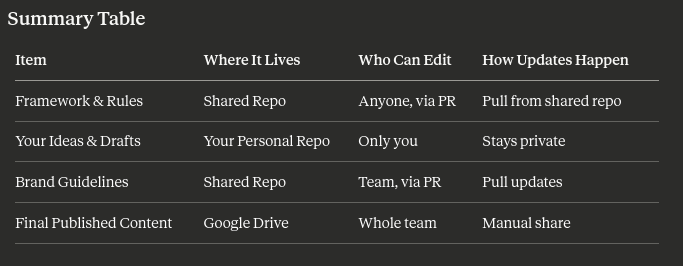
This is an update on my first post here https://www.skool.com/cliefnotes/icm-for-teams-my-understanding-to-onboarding-coworkers-to-a-shared-content-pipeline?p=03813a63. And thanks to solid inputs by @Curtis Hays, i decided to do an update. This is a more robust and scalable way to run a shared ICM content system with multiple people. It works especially well for teams. Why This Approach? - Everyone has their own private workspace, so there is no risk of stepping on each other's drafts. - There is still one source of truth for the shared framework, rules, and client info. - Merge conflicts are much less likely. - It is easy to pick up someone's work if they are absent. Overall Structure The use two types of repositories. 1. Shared Repo (one for the whole team) Contains: - Framework, rules, prompts, and stages - Client information and brand guidelines - Shared logs Does not contain personal ideas or drafts. 2. Personal Repo (one for each person) Contains: - Your own `stage folder e.g 01-ideas`, `02-drafts`, `03-formats`, and working content Fully private to you. Step by Step Setup Guide For You (The Person Who Built the Original System) Step 1: Create the Shared Framework Repo 1. Create a new private GitHub repository e.g `marketing-content-framework`. 2. Copy only the framework files into it: - `agent.md` / `CLAUDE.md` - `context.md` - Core stages and context contracts - Brand guidelines, rules, templates - Any shared client projects or logs folder 3. Add a `.gitignore`. Example: ```gitignore # Ignore personal content folders 01-ideas/ 02-drafts/ 03-formats/ *.local.md ``` 4. Push it to GitHub. Step 2: Create Your Personal Repo 1. Create another private repo e.g `yourname-content-workspace`. 2. Clone the shared framework into it, or copy the structure. 3. This becomes your main working folder.
1-30 of 2,193

skool.com/cliefnotes
What we give away free beats most paid courses. Build durable AI systems with a Marine vet and Edinburgh researcher. 40+ lessons, growing.
Leaderboard (30-day)
1

🔥
+1702
2

🔥
+1668
3

+1248
4

+970
5

+620
Powered by