
Write something

🔥
5d •
📬 AI Controls My Inbox: First Review After 72 Hours
So, was it perfect? Nope. Did I miss anything critical? Two emails. Fortunately, one person texted me, and the other email my wife asked if I saw it - so, there was no major negative impact. But that is exactly why I am doing this experiment. I do not want to know if AI can manage my inbox when everything goes perfectly. I want to know where the cracks show up when I am not looking every day. Here is what I learned after the first 72-hour cycle. 📝 Lesson one: the first cycle had a built-in advantage. Because I was already familiar with the current state of my inbox, I knew what I expected to see. I had a mental map of open conversations, active deals, pending follow-ups, and emails that might matter. That made the first review easier, but that advantage starts to disappear in the next cycle or two. Once I stop carrying the recent inbox context in my own head, the system has to stand on its own. That is when the real test begins. 📝 Lesson two: prompts matter. 📝 Lesson three: prompts matter even more. Yes, this experiment is quickly becoming a lesson in prompt design. Even though I did not open my inbox during the 72-hour window, I did adjust the prompts based on what I expected to come in and what was getting through that should not have been. - Some spam and promotions still surfaced. - Some categories needed tighter language. - Some escalation rules needed more clarity. That does not mean the system failed. It means the operating instructions needed refinement. And that is probably the biggest early takeaway. AI inbox management is not a set-it-and-forget-it system. At least not yet. It is more like training an operations assistant. You give it a role. You define the boundaries. You observe the misses. You tighten the rules. Then you run the next cycle. 📝 Final lesson: redundancy matters. At this stage, built-in redundancy has real benefits. For this experiment, I used three AI layers: - Claude Cowork - ChatGPT Scheduler - Gmail AI Inbox
🔥
10d •
📬 AI Controls My Inbox: 🧪 Experiment
For the past several months, I’ve been using ChatGPT and Claude to help manage my inboxes. They’ve been reading emails, sorting intent, identifying what matters, and surfacing what needs attention. But up until now, I’ve always check the work of AI—reviewing everything alongside them and verifying decisions daily. That will change for the next 30 days. 🧪 The Experiment Starting today, I’m running a 30-day controlled experiment: - ChatGPT and Claude will be the "first systems to review my inbox" - AI will handle all first-pass triage, prioritization, and escalation - I will only respond to emails that are flagged by AI - I will only open my email every 72 hours (3 days) - I will rely on AI summaries and alerts between reviews - ChatGPT scheduling and Claude coworking workflows will run in parallel This is not convenience automation. It’s a controlled delegation test under time delay. 📬 Important Context My email is not siloed. It is a shared channel for both personal and business communication. That includes: - Clients and prospects - Financial and operational items - Personal messages and family logistics - Newsletters, system alerts, and vendor communication This is a real mixed-context inbox, not a filtered business queue. That matters, because context switching is where prioritization either succeeds or fails. 🎯 The Goal I want to understand one thing clearly. What happens when AI becomes the first decision layer in a real-world inbox with delayed human access? Not just summarization. Not just filtering. But actual prioritization that must hold for 72-hour cycles. Specifically: - What AI consistently gets right - Where urgency is misclassified or delayed too long - How well personal vs business context is separated - What gets buried that should not be - How trust behaves when human correction is delayed 🚧 The Guardrails This is not full autonomy. There is still a safety system in place: - Human review every 72 hours - Explicit escalation rules for VIP, financial, and time-sensitive messages - Dual-system validation (ChatGPT + Claude) - No irreversible actions without review - I am still responding to emails, that is not being delegated
🔥
9d •
📬 AI Controls My Inbox: Feeling Nervous on Day 1
This morning, I woke up feeling a little nervous. It wasn't because AI was going to read my inbox—it has been doing that for months. What made me uneasy was knowing that I was no longer going to be the reading it at all for three days. My inbox isn't just business. It's clients, prospects, personal email, financial information, family logistics, subscriptions, and everything in between. I also have a few active deals in progress, so missing the wrong email could have real consequences. Since I had fully committed to letting AI review my inbox first, I wanted to make sure the instructions were as clear and complete as possible, and that ChatGPT and I were on the same page. One thing I like about ChatGPT Scheduled Tasks is that I can prompt directly inside the email notification chat, which means it already has context, that makes it very easy to refine the instructions without starting from scratch. So, without reading my email, I asked a simple question: 💬 The Prompt: I would like to look my email every three days. How should we enhance the prompt? Or is it good? 🤖 ChatGPT’s Response: Your current prompt is good for twice-daily alerts, but if you only plan to personally check email every three days, I would strengthen it. The main enhancement is to make the AI act less like a “notification filter” and more like an email operations assistant with escalation judgment. Here is a stronger version: Review my recent email and notify me only when a message likely needs my attention before my next manual inbox review. I personally review my inbox every 72 hours, so prioritize anything that cannot safely wait three days. Flag emails involving: - Clients or prospects - Time-sensitive requests - Deadlines, renewals, billing, payments, payroll, contracts, or account/security issues - Anything from VIP senders - Messages that require a reply, approval, decision, review, or action Ignore by default: - Promotions - Spam - Newsletters - Automated notifications - Receipts or FYI-only updates, unless they involve money, account access, deadlines, or risk

🔥
20d •
📊 Nutrition Tracker Part 3: DAY START and DAY LOCK, LLM Boundaries
When I started using ChatGPT as a nutrition and activity tracker, one of the first problems was not calories, macros, or activity estimates. It was boundaries. Where does one day begin? Where does one day end? That sounds obvious to a person. But ChatGPT is reading a stream of messages. It does not automatically know whether a food entry belongs to today, yesterday, an example, or a correction unless I make that clear. So I added two simple commands inside my Project Instructions: - DAY START - DAY LOCK These commands became the boundaries for the tracker. DAY START tells ChatGPT when a new tracking day begins. DAY LOCK tells ChatGPT when that tracking day is complete. That creates a clean container for the day’s food, activity, steps, workouts, and summaries. Without it, entries can blur together. A snack from last night. A workout from today. A correction from yesterday. A new meal logged after midnight. To a human, those may feel obvious. To an LLM, they need structure. DAY START begins a new tracking day. DAY LOCK finalizes the day. That matters because once a day is locked, I do not want the numbers drifting or changing later. No accidental edits. No mixing with the next day. No reinterpreting old entries. No rolling yesterday into today. The day is done. The AI Lesson: The real lesson is not about nutrition. It is about building reliable AI workflows. LLMs can answer questions, but workflows need boundaries. Together, they turn a loose conversation into a defined tracking period. That is the difference between chatting with AI and building a system. Add the entire section below to your Project Instruction: Daily Boundary Rules Use two commands to manage each tracking day: DAY START When I type DAY START, begin a new nutrition and activity tracking day. Everything logged after DAY START belongs to that day. Do not include food, activity, steps, workouts, or corrections from before DAY START unless I explicitly tell you to. DAY LOCK
🔥
23d •
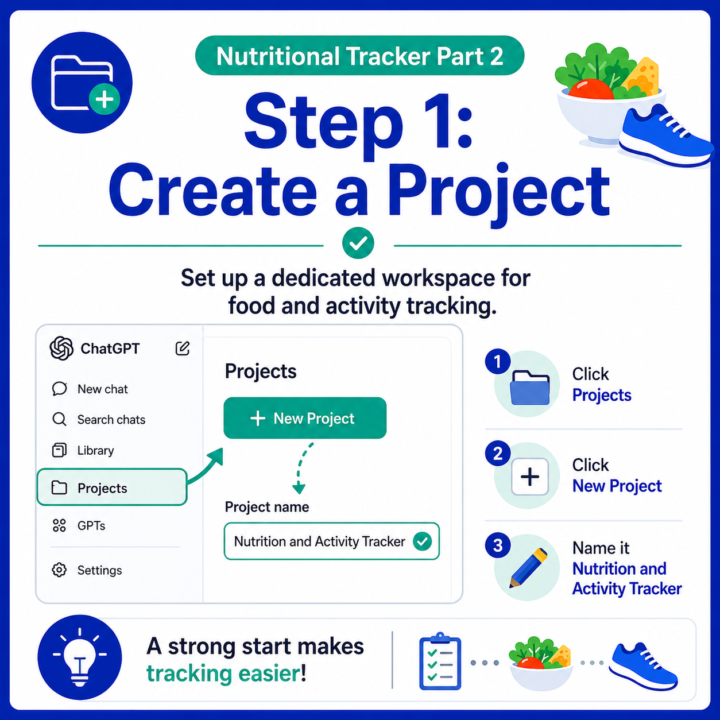
📊 Nutrition Tracker Part 2: Teaching ChatGPT Context Using Project Instructions
In Part 1, we started with a simple experiment. I gave ChatGPT a basic food and activity log and asked: How did I do today? The answer was generic. Why? Because ChatGPT did not know enough about me. It did not know my: - Goal - BMR - Daily calorie target - Protein target It did not know what “good” meant for me. That was the first real lesson: - A generic chat produces generic answers. - The next step was creating better context memory using Projects. Step 1: Create a Dedicated Project Instead of starting a random new chat every day, I created a dedicated ChatGPT Project for nutrition and activity tracking. Why does this matter? Because a regular chat is just a conversation. A Project is more like a focused workspace. It gives ChatGPT a place to keep the work organized around a specific purpose. For this project, the purpose was simple: 🍽️ Track food 🚶 Track activity 🔥 Estimate calorie burn 📊 Summarize the day 🎯 Help me understand whether I am moving toward my goal To create the Project: 1. Click Projects 2. Click New Project 3. Name it Nutrition and Activity Tracker Step 2: Add Basic Project Instructions Next, I gave ChatGPT a few simple Project Instructions. Nothing complicated. Just enough context to make the answers more useful. Something like: You are my nutrition and activity tracking assistant.My goal is to lose body fat while maintaining muscle.My estimated BMR is 1,800 calories per day. When I enter food, estimate calories and macros.When I enter activity, estimate calories burned.When I ask for a summary, show food calories, protein, carbs, fat, activity burn, net calories, and whether the day is trending toward a calorie deficit. Keep summaries concise. That small set of Project Instructions changed the quality of the output because ChatGPT now had context. To add Project Instructions: 1. Open the Project 2. Click the three dots 3. Select Project settings 4. Add your instructions The Same Food Log Became More Useful
1-30 of 30
skool.com/ai-bits-and-pieces
AI lessons you can read in under 3 minutes and apply in everyday work and life.
Leaderboard (30-day)
1

+102
2

+49
3

+36
4

+23
5

+22
Powered by