
Pinned

💎
⭐
1d •
I'm hosting a new event about making money with AI automation
Here's why you should attend: Over two days at AIS Live, every speaker is someone actively earning from AI services, and they show their actual work. The real projects they sell, how they get clients, the numbers behind it. It just opened to the public, and right now you can save $50. But only through Sunday: -> Go here for details: https://app.aiautomationsociety.ai/ais-live/register/
Pinned
💎
⭐
1d •
🚀New Video: 100 Years of Artificial Intelligence Explained
This one's a little different, but I had fun putting it together. I hope you guys find it interesting! 100 Years of Artificial Intelligence Explained, and it starts with a 26-year-old building something in his parents' bedroom and a code that took an entire war to crack. I walk through the whole timeline: the two winters that nearly killed the field, the approach everyone wrote off as a dead end, and the single move that made a world champion walk away. This is 100 Years of Artificial Intelligence Explained, and honestly we're just getting started.
Pinned

🔥
5d •
🏆 Weekly Wins Recap | May 23 – May 29
From $64K+ in closed deals to first paid projects, first workflows, and first technical builds - this week inside AIS+ showed what happens when builders stop consuming and start moving. Some wins were big money. Some were first steps. Both matter. 🚀 Standout Wins of the Week inside AIS+ 👉 @Jacob West closed two deals in one week — a $22.5K custom software build for a local gym and a $42K AI OS rollout for a mid-market energy business. 👉 @Luca Giovinazzo delivered his first full client project live — 11 n8n workflows, CRM, Telegram bot, inventory alerts, booking system, KPI tracking, user guide, and Loom walkthrough. 👉 @Fadwa Naboulssi landed her first client three weeks into the community — a candidate sourcing workflow on a $150-per-successful-hire commission. 👉 @George Maitland completed his first technical build using Claude Code + n8n MCP — a local content engine with Telegram as the command center. 👉 @James O Neill built a free portfolio site for a friend-of-a-friend’s side hustle… and she insisted on paying anyway. First real money landed. ⸻ 🎥 Super Win Spotlight | @Josh Holladay Josh joined AIS+ because he wanted more than scattered learning. He wanted momentum. Focused content. Better access. And a room full of people actually moving. Since joining, he has: - Closed real client work - Built stronger confidence around pricing and value - Used the portfolio course to get clear on where he was and what needed to happen next - Learned how to turn client conversations into real business opportunities - Found a place to celebrate wins with people who actually understand the journey


19h •
Made a cheat Sheet for AI Systems (EA, AI OS, OpenClaw, Hermes — The Full Breakdown)
I kept seeing the same questions pop up in here. What is the difference between an Executive Assistant and an AI Operating System? Is OpenClaw still worth using? Where does Hermes fit in? There is a lot of confusion around these four tools because they all live in the same ecosystem but serve completely different purposes. People either conflate them or do not know where to start. So I put together my version of a breakdown. What each one actually is, how they differ from each other, what they can and cannot do, and most importantly which one you should start with if you are just getting into this. I also cover when to bring Hermes in, why OpenClaw has largely been replaced, and how the Executive Assistant naturally grows into an Operating System over time if you build it right. It is a two-page PDF. Page one is a full side-by-side comparison table. Page two is the explanation and a clear recommended path. Drop any questions below. Curios to know what you feel after going through this guide.

2m •
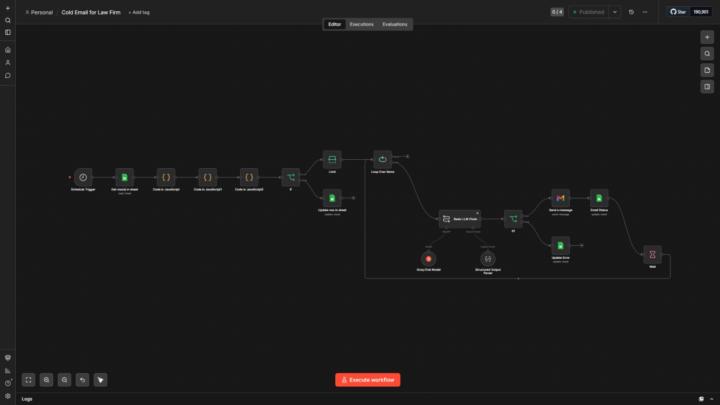
Built a full cold outreach system for law firms. 3 emails. Zero manual work after setup.
Here's the full breakdown of what it does: Runs daily on a schedule trigger. Pulls all leads from Google Sheets, filters out anyone already contacted, bad domains, wrong countries, SEO-polluted keyword entries. Passes each valid lead through a keyword cleaner that strips generic legal noise and extracts the actual practice area. Groq (Llama 3.3) writes a personalized cold email based on the specific practice area — personal injury, family law, immigration, criminal defense, whatever the lead actually does. The pain point is derived from their niche, not a fixed template. Email sent via Gmail. Thread ID saved back to the sheet. Second workflow runs at a different hour. Checks days since initial send. At day 4 — if no reply detected via Gmail Thread Get — it generates and sends follow-up 1 in the same thread. At day 9 — follow-up 2 (breakup email) with a direct Calendly link. Each step updates the sheet: Follow up 1 Sent, Follow up 2 Sent, error states handled separately. The reply detection works by checking messages.length > 1 on the thread — if someone replied, the system skips them. Tools: n8n · Groq · Gmail · Google Sheets
2
0
1-30 of 18,286

skool.com/ai-automation-society
Learn to get paid for AI solutions, regardless of your background.
Leaderboard (30-day)
1

🔥
+7552
2

🔥
+5028
3

🔥
+3548
4

+3008
5
+1429
Powered by